Electrical Installation
11
BB-2117 & BB-2119 Power/Signal Connection
Route the interconnect cable (P51) located in the left side of the BB-2117/BB-2119 up
through the hole in the top of the cabinet into the hole in the bottom of the BB-2116 and
connect to a mating interconnect cable (J51).
Wireless Signal Connection
All Sport Control
A wireless radio system requires an All Sport control console equipped with radio
transmitter as well as a radio receiver plugged into the 6-pin J21 jack on the primary
driver and mounted internally to the front panel of the display. For more information, refer
to the Gen VI Radio Installation Manual (DD2362277), provided with the receiver unit and
available online at www.daktronics.com/manuals.
RC-100/RC-200 Control
A hand-held RC-100/RC-200 wireless radio control system requires a base station receiver
plugged into the 6-pin J21 jack on the primary driver and mounted internally to the front
panel of the display. For more information, refer to the appropriate manual listed in
Display Controllers (p�2).
Note: If an All Sport radio receiver and an RC-100/
RC-200 base station are both installed in the
same display, the wireless device that takes
precedence is the one that the receiver
nds active rst; it will control the display until
the signal is no longer present.
Radio Settings
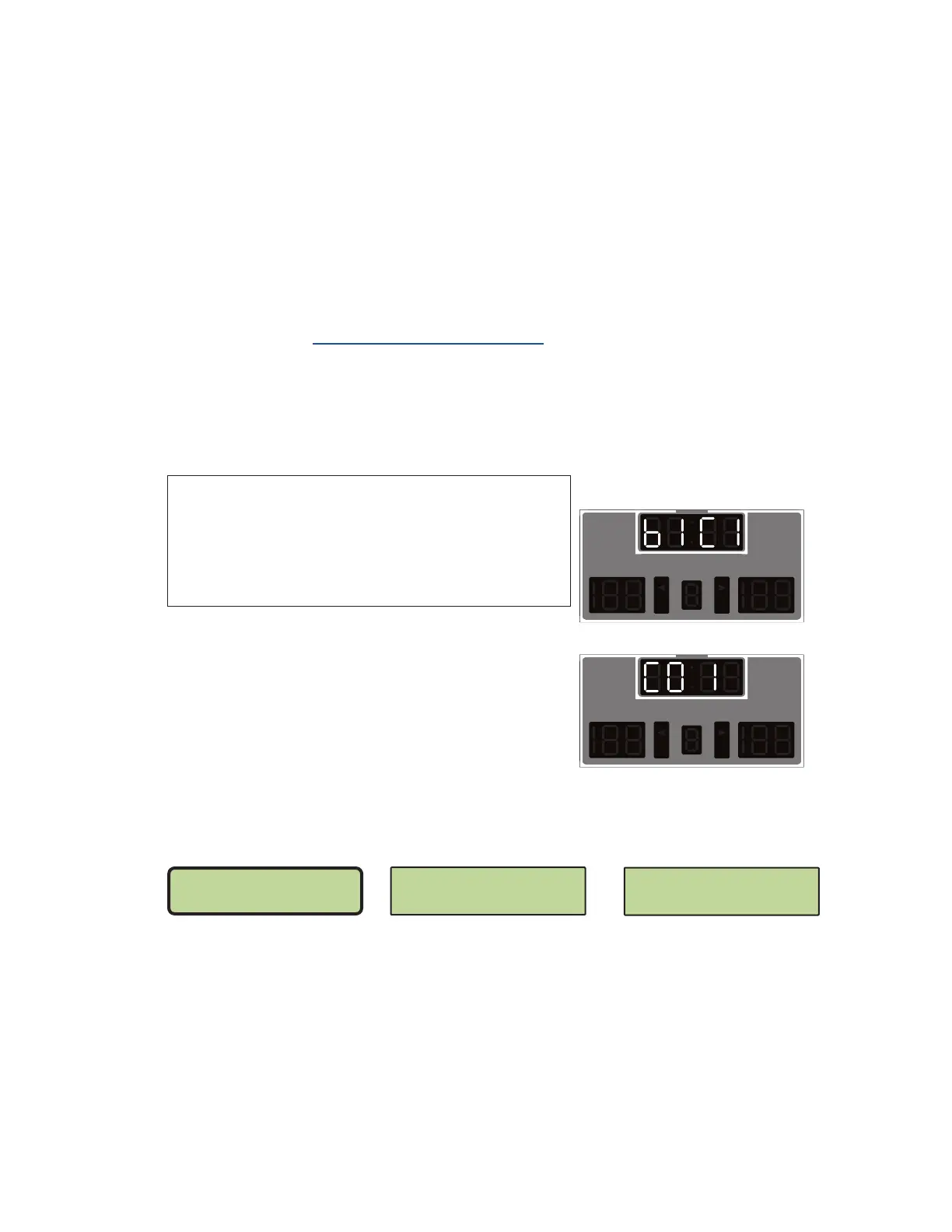
With an All Sport radio receiver or RC-200 base
station installed, watch for the radio Broadcast
settings (“b1”) and Channel settings (“C1”) in the
clock digits or Home and Guest scores during the
Power-On Self-Test (POST) (p�10). Displays with
an RC-100 base station will only show the channel
settings (“C01”). Refer to Figure 12.
These values must match the settings in the control
console. Refer to the controller screens below and
the manual listed in Display Controllers (p�2).
All Sport Radio Settings RC-100 Radio Settings RC-200 Radio Settings
If the radio receiver channel and broadcast settings match those set in the console but
the console does not control the display, there may be radio interference. This can occur
when a nearby display also uses radio control. In this case, change the settings of the
wireless radio receiver inside the display and in the console as described in the radio
control manuals.
daktronics
PERIOD
GUESTHOME
BB
daktronics
PERIOD
GUESTHOME
BB
All Sport / RC-200
RC-100
Figure 12: Radio Settings in Clock Digits
RADIO SETTINGS
BCAST 1 CHAN 01
RADIO CHANNEL
DEFAULT: 01
GROUP (1-8): 01
CHAN (1-8): 01


 To Next Page