MANUALE INSTALLATORE RELEASE 00.1 PAG. 13
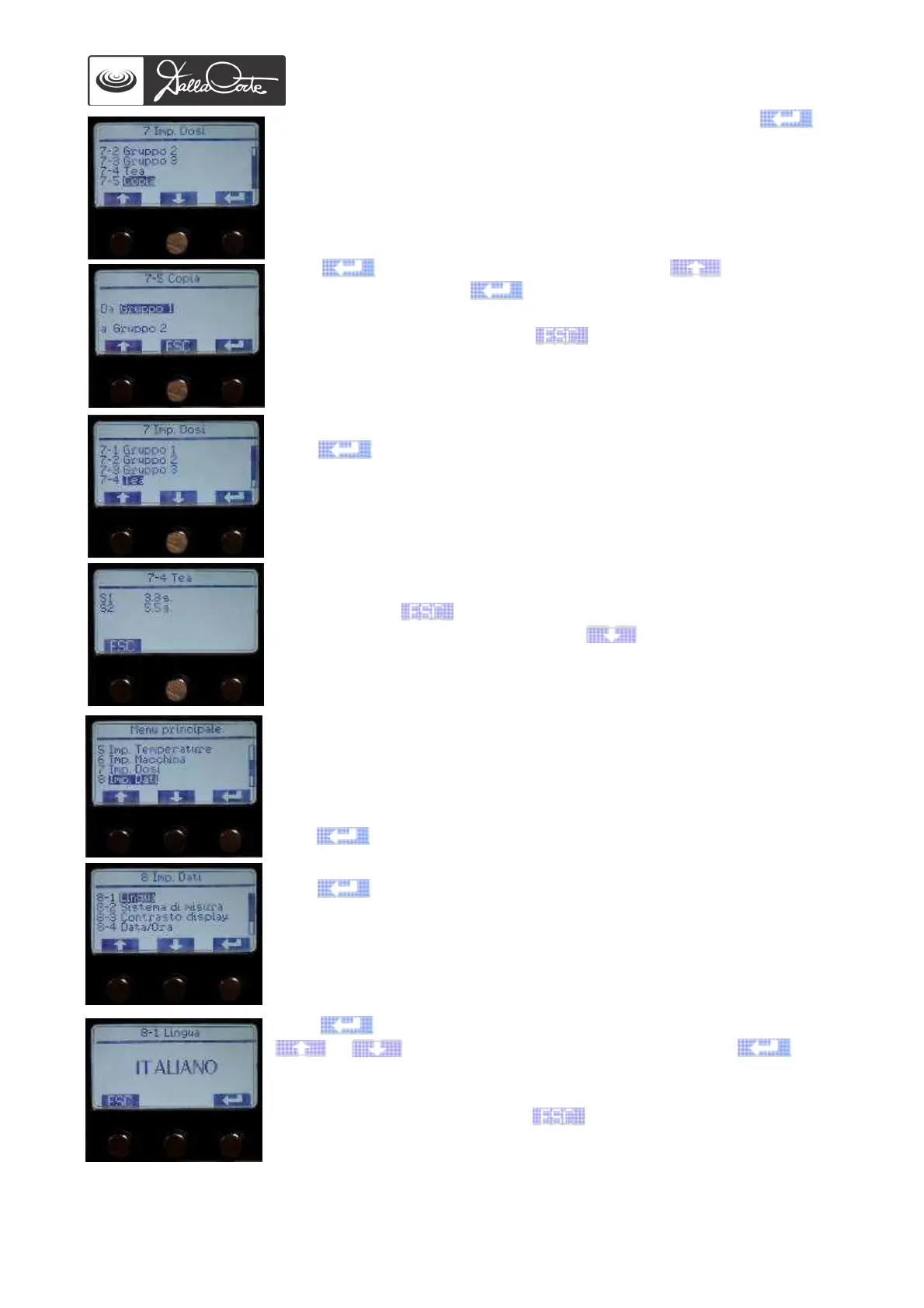
7-5 Copy group 1 doses to the other machine groups. Push to
access this menu.
Push to confirm the group of origin, then to choose the
group of destination and to confirm duplication.
Repeat the operation on the groups you wish to copy group 1 data to.
At the end of the operation, push to go back to previous screen.
7-4 Dose set up for hot water buttons
Push to access this menu.
Access this menu, push S1 on the hot water control panel and push it
again when the desired dose has been reached to stop and save the
setting.
Repeat the same steps on the second hot water button. At the end of the
operation, push to go back to previous screen.
Once all doses have been set up, push repeatedly to go back to
main menu.
8-DATA SET UP
This menu is used to set up language, measure, display contrast and
clock. These operations are usually carried out by the manufacturer, but
it can be necessary to adjust the settings depending on the country the
coffee machine is destined to.
Push to access this menu.
8-1 Language
Push to access this menu.
Push again to highlight the language to be changed, then use
or to choose the desired language, then push again
to confirm it.
At the end of the operation, push to go back to previous screen.














 To Next Page