EasyManua.ls Logo

Danby DPAC10071 - Fan Operation Mode; Fan Mode Operating Guide

Danby DPAC10071
22 pages
Print Icon
To Next Page IconTo Next Page
To Previous Page IconTo Previous Page
Loading...
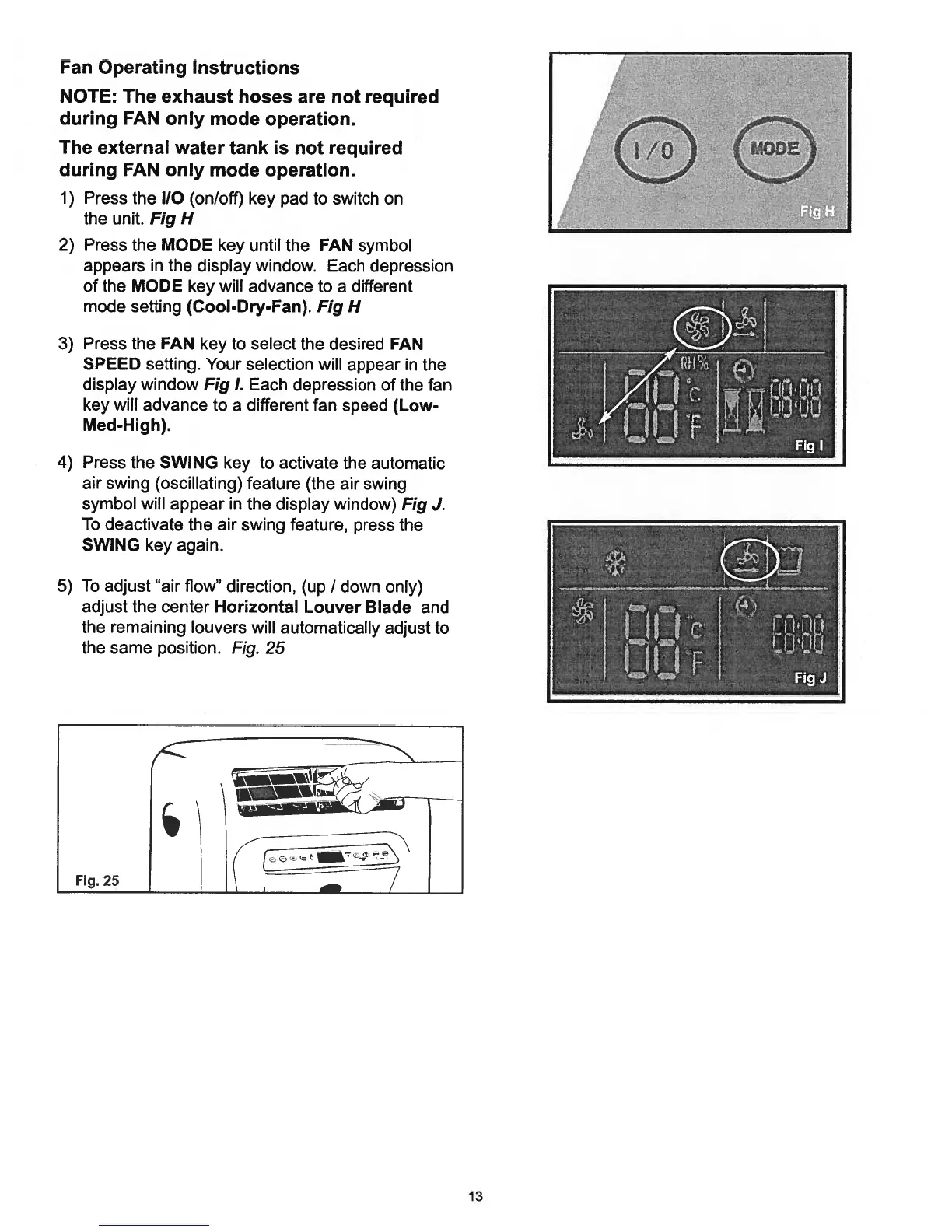
Fan
Operating
Instructions
NOTE:
The
exhaust
hoses
are
not
required
during
FAN
only
mode
operation.
The
external
water
tank
is
not
required
during
FAN
only
mode
operation.
1)
Press
the
110
(on/off)
key
pad
to
switch
on
the
unit.
Fig
H
2)
Press
the
MODE
key
until
the
FAN
symbol
appears
in
the
display
window.
Each
depression
of
the
MODE
key
will
advance
to
a
different
mode
setting
(Cool-Dry-Fan).
Fig
H
3)
Press
the
FAN
key
to
select
the
desired
FAN
SPEED
setting.
Your
selection
will
appear
in
the
display
window
Fig
I.
Each
depression
of
the
fan
key
will
advance
to
a
different
fan
speed
(Low
Med-High).
4)
Press
the
SWING
key
to
activate
the
automatic
air
swing
(oscillating)
feature
(the
air
swing
symbol
will
appear
in
the
display
window)
Fig
J.
To
deactivate
the
air
swing
feature,
press
the
SWING
key
again.
5)
To
adjust
“air
flow”
direction,
(up
/
down
only)
adjust the
center
Horizontal
Louver
Blade
and
the
remaining
louvers
will
automatically
adjust
to
the
same
position.
Fig.
25
1
c1
13

Related product manuals