EasyManua.ls Logo

Danby DPAC10071 - Remote Control Operation; Remote Control Buttons Explained

Danby DPAC10071
22 pages
Print Icon
To Next Page IconTo Next Page
To Previous Page IconTo Previous Page
Loading...
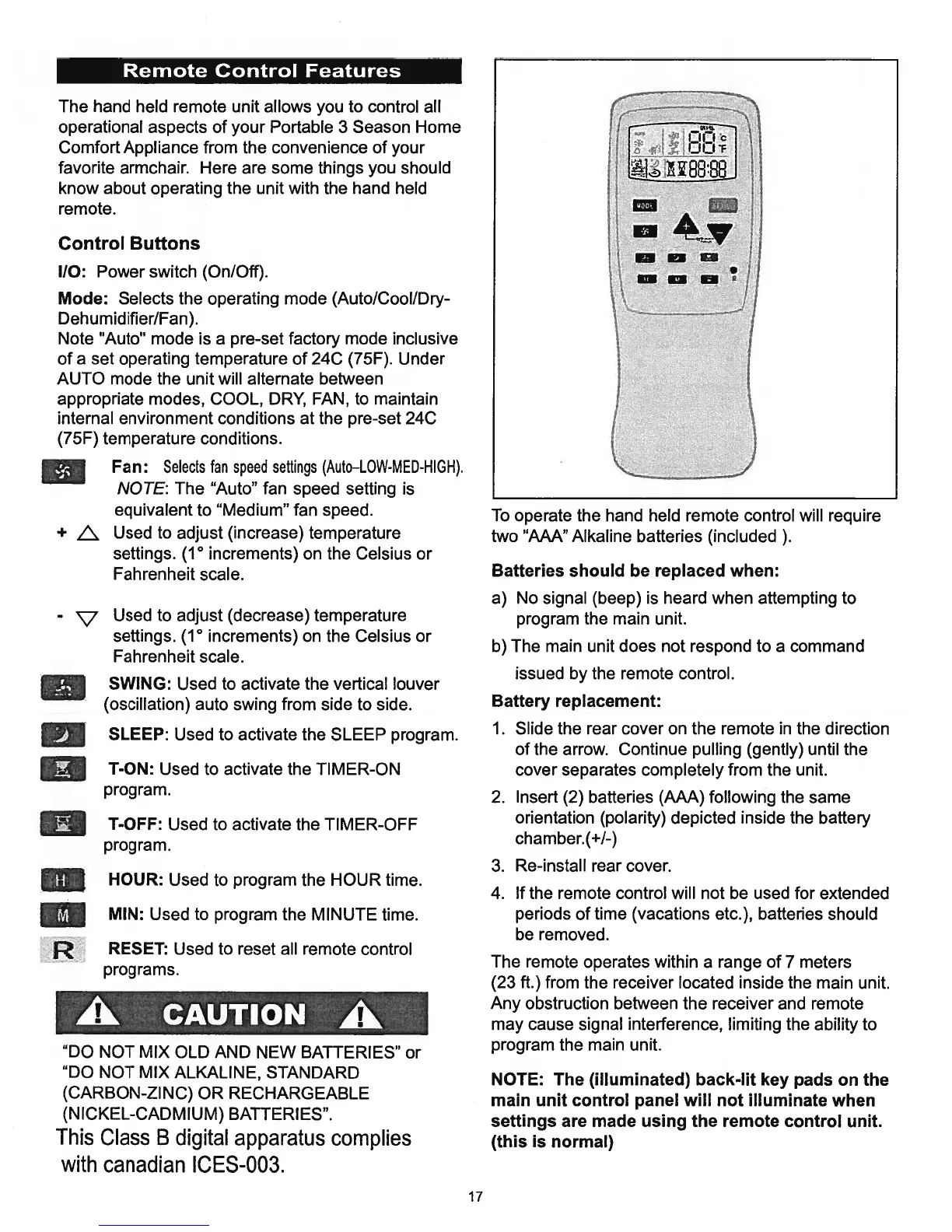
Remote
Control
Features
The
hand
held
remote
unit
allows
you
to
control
all
operational
aspects
of
your
Portable
3
Season
Home
Comfort
Appliance
from
the
convenience
of
your
favorite
armchair. Here
are
some
things
you
should
know
about
operating the
unit
with
the
hand
held
remote.
Control
Buttons
110:
Power
switch
(On/Off).
Mode:
Selects
the
operating mode
(Auto/Cool/Dry-
Dehumidifier/Fan).
Note
“Auto”
mode
is
a
pre-set
factory
mode
inclusive
of
a
set
operating
temperature
of
24C
(75F).
Under
AUTO
mode
the
unit
will
alternate
between
appropriate modes,
COOL,
DRY,
FAN,
to
maintain
internal
environment
conditions
at
the
pre-set
24C
(75F)
temperature
conditions.
Fan:
Selects
fan
speed
settings
(Auto—LOW-MED-HIGH).
NOTE:
The
“Auto”
fan
speed
setting
is
equivalent
to
“Medium”
fan
speed.
+
L.
Used
to
adjust
(increase)
temperature
settings.
(1°
increments)
on
the Celsius
or
Fahrenheit
scale.
-
V
Used
to
adjust
(decrease)
temperature
settings.
(1°
increments)
on
the
Celsius
or
Fahrenheit
scale.
SWING:
Used
to
activate
the
vertical
louver
(oscillation)
auto
swing
from
side
to
side.
El
SLEEP:
Used
to
activate
the
SLEEP
program.
T-ON:
Used
to
activate
the
TIMER-ON
program.
T-OFF:
Used
to
activate
the
TIMER-OFF
program.
HOUR:
Used
to
program
the
HOUR
time.
MIN:
Used
to
program
the
MINUTE
time.
R
RESET:
Used
to
reset
all
remote
control
programs.
Ak
CAUTION
Ak
“DO
NOT
MIX
OLD
AND
NEW
BATTERIES”
or
“DO
NOT
MIX
ALKALINE,
STANDARD
(CARBON-ZINC)
OR RECHARGEABLE
(NICKEL-CADMIUM)
BATTERIES”.
This
Class
B
digital
apparatus
complies
with
canadian
ICES-003.
To
operate
the
hand
held
remote
control
will
require
two
“AAA”
Alkaline
batteries
(included
).
Batteries
should
be
replaced
when:
a)
No
signal
(beep)
is
heard
when
attempting
to
program
the
main
unit.
b)
The
main
unit
does
not
respond
to
a
command
issued
by
the
remote
control.
Battery
replacement:
1.
Slide
the
rear
cover
on
the
remote
in
the
direction
of
the
arrow.
Continue
pulling
(gently)
until
the
cover
separates
completely
from
the
unit.
2.
Insert
(2)
batteries
(AAA)
following
the
same
orientation
(polarity)
depicted
inside
the
battery
chamber.
(+1-)
3.
Re-install
rear
cover.
4.
If
the
remote
control
will
not
be
used
for
extended
periods
of
time
(vacations
etc.),
batteries
should
be
removed.
The
remote
operates
within
a
range
of
7
meters
(23
ft.)
from
the
receiver
located
inside
the
main
unit.
Any
obstruction
between
the
receiver
and
remote
may
cause
signal
interference,
limiting
the
ability
to
program
the
main
unit.
NOTE:
The
(illuminated)
back-lit
key
pads
on
the
main
unit
control
panel
will
not
illuminate
when
settings
are
made
using
the
remote
control
unit.
(this
is
normal)
17

Related product manuals