EasyManua.ls Logo

Danby DPAC10071 - Remote Temperature & Fan Speed Adjustments

Danby DPAC10071
22 pages
Print Icon
To Next Page IconTo Next Page
To Previous Page IconTo Previous Page
Loading...
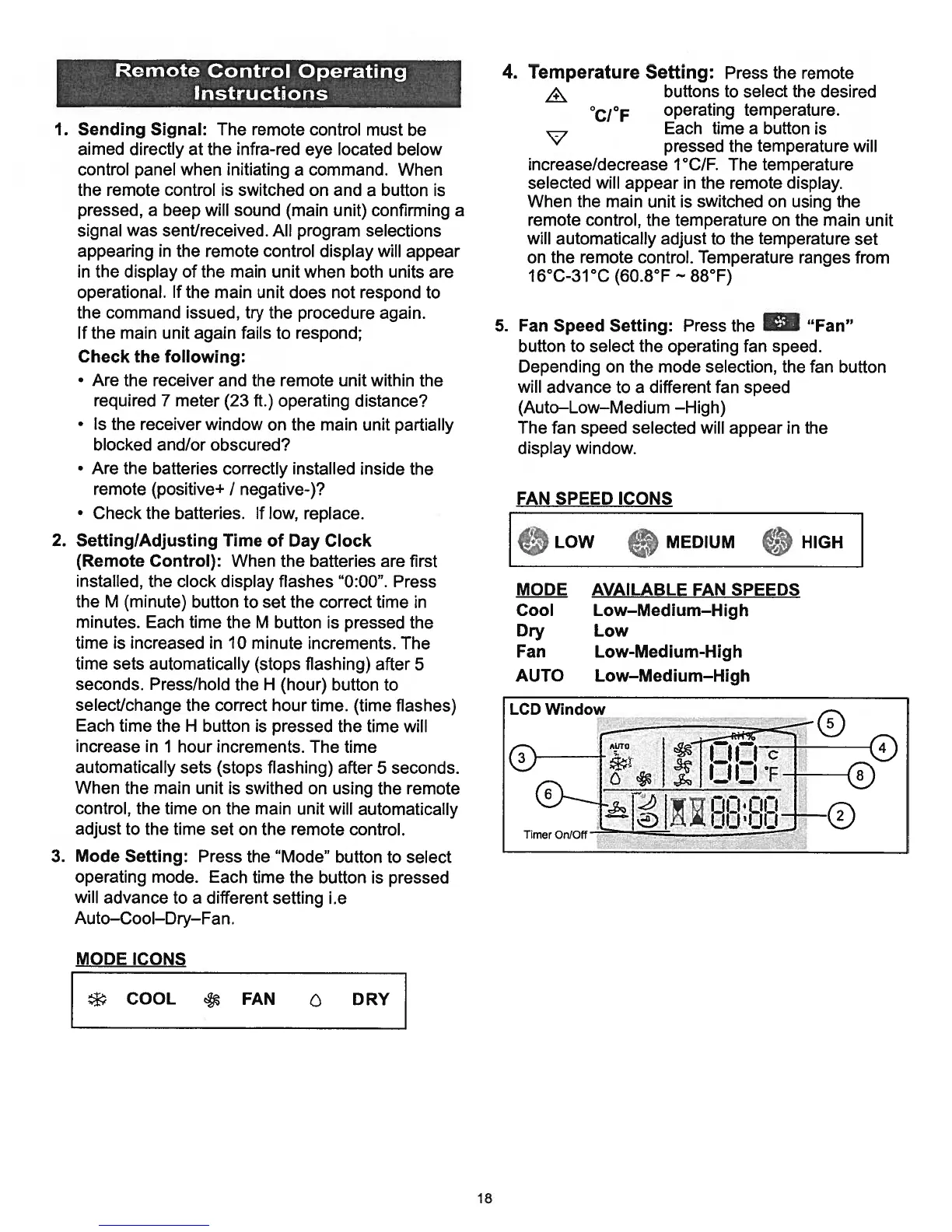
1.
Sending
Signal:
The
remote
control
must
be
aimed
directly
at
the
infra-red
eye
located
below
control
panel when
initiating
a
command.
When
the
remote
control
is
switched
on
and
a
button
is
pressed,
a
beep
will
sound
(main
unit)
confirming
a
signal
was
sent/received.
All
program
selections
appearing
in
the
remote
control
display
will
appear
in
the
display
of
the
main
unit
when
both units
are
operational.
If
the
main
unit
does
not
respond
to
the
command
issued,
try
the
procedure
again.
If
the
main
unit
again
fails
to
respond;
Check
the
following:
Are
the
receiver
and
the
remote
unit
within
the
required
7
meter
(23
ft.)
operating
distance?
Is
the
receiver
window
on
the
main
unit
partially
blocked
and/or
obscured?
Are
the
batteries
correctly
installed inside
the
remote
(positive+
/
negative-)?
Check
the
batteries.
If
low,
replace.
2.
SettinglAdjusting
Time
of
Day
Clock
(Remote
Control):
When
the
batteries
are
first
installed,
the
clock
display
flashes
“0:00”.
Press
the
M
(minute) button
to
set
the correct
time
in
minutes.
Each
time
the
M
button
is
pressed
the
time
is
increased
in
10
minute
increments.
The
time
sets
automatically
(stops
flashing)
after
5
seconds.
Press/hold
the
H
(hour)
button
to
select/change
the
correct
hour
time.
(time
flashes)
Each
time
the
H
button
is
pressed
the
time
will
increase
in
1
hour
increments.
The
time
automatically
sets
(stops
flashing)
after
5
seconds.
When
the
main
unit
is
swithed
on
using
the
remote
control,
the
time
on
the
main
unit
will
automatically
adjust
to
the
time
set
on
the
remote
control.
3.
Mode
Setting:
Press
the
“Mode”
button
to
select
operating
mode.
Each
time
the
button
is
pressed
will
advance
to
a
different
setting
i.e
Auto—Cool—Dry—Fan.
MODE
ICONS
4.
Temperature
Setting:
Press
the
remote
buttons
to
select
the
desired
°CI°F
operating
temperature.
Each
time
a
button
is
pressed
the
temperature
will
increase/decrease
1°C/F.
The
temperature
selected
will
appear
in
the remote
display.
When
the
main
unit
is
switched
on
using
the
remote
control,
the
temperature
on
the
main
unit
will
automatically
adjust
to
the
temperature
set
on
the
remote
control.
Temperature
ranges
from
16°C-31°C
(60.8°F
88°F)
5.
Fan
Speed
Setting:
Press
the
“Fan”
button
to
select
the operating
fan
speed.
Depending
on
the
mode selection, the
fan
button
will
advance
to
a
different
fan
speed
(Auto—Low—Medium
—High)
The
fan
speed
selected
will
appear
in
the
display
window.
MODE AVAILABLE
FAN
SPEEDS
Cool
Low—Medium—High
Dry
Low
Fan
Low-Medium-High
AUTO
Low—Medium—High
*‘
COOL
FAN
DRY
Remote Control
Operating
Instructions
FAN
SPEED
ICONS
LOW
MEDIUM
HIGH
LCD
Window
18

Related product manuals