EasyManua.ls Logo

Danby DPAC10071 - LCD Window

Danby DPAC10071
22 pages
Print Icon
To Next Page IconTo Next Page
To Previous Page IconTo Previous Page
Loading...
6.
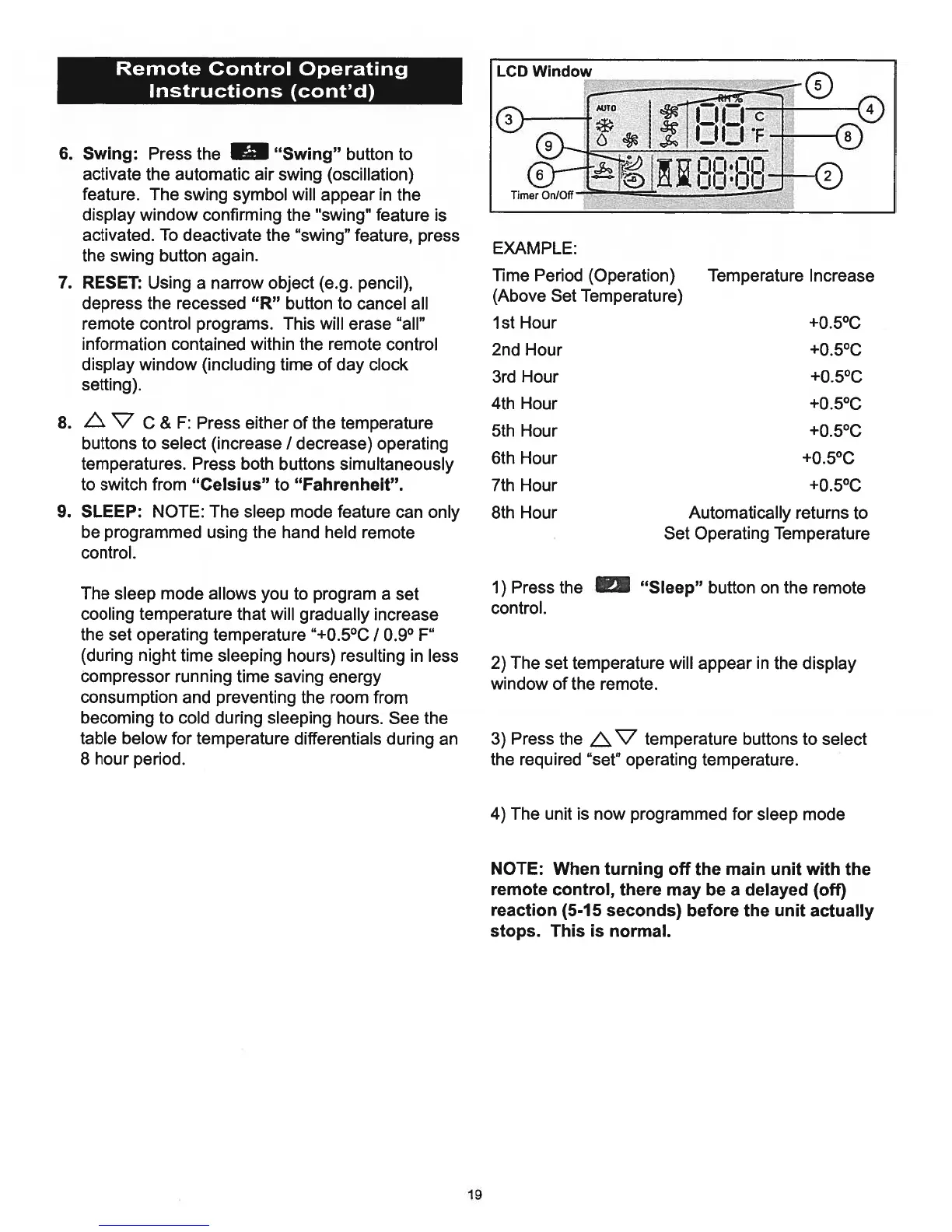
Swing:
Press
the
“Swing”
button
to
activate
the automatic
air
swing
(oscillation)
feature.
The
swing
symbol
will
appear
in
the
display
window
confirming
the
“swing”
feature
is
activated.
To
deactivate
the
“swing”
feature,
press
the
swing button
again.
7.
RESET:
Using
a
narrow
object
(e.g.
pencil),
depress
the
recessed
“R” button
to
cancel
all
remote
control
programs.
This
will
erase
“all”
information
contained
within
the
remote
control
display
window
(including
time
of
day
clock
setting).
8.
L.
V
C
&
F:
Press
either
of
the
temperature
buttons
to
select
(increase
I
decrease)
operating
temperatures.
Press
both
buttons
simultaneously
to
switch
from
“Celsius”
to
“Fahrenheit”.
9.
SLEEP:
NOTE:
The
sleep
mode
feature
can
only
be
programmed
using
the
hand
held
remote
control.
The
sleep
mode
allows
you
to
program
a
set
cooling
temperature
that
will
gradually
increase
the
set
operating
temperature
“+0.5°C
I
0.9°
F”
(during
night
time
sleeping
hours)
resulting
in
less
compressor
running
time
saving
energy
consumption
and
preventing
the
room
from
becoming
to
cold
during
sleeping
hours.
See
the
table
below
for
temperature
differentials
during
an
8
hour
period.
EXAMPLE:
Time
Period
(Operation)
Temperature
Increase
(Above
Set
Temperature)
1st
Hour
+0.5°C
2nd
Hour
+0.5°C
3rd
Hour
+0.5°C
4th
Hour
+0.5°C
5th
Hour
+0.5°C
6th
Hour
+0.5°C
7th
Hour
+0.5°C
8th
Hour
Automatically
returns
to
Set
Operating
Temperature
1)
Press
the
“Sleep”
button
on
the
remote
control.
2)
The
set
temperature
will
appear
in
the
display
window
of
the remote.
3)
Press
the
LV
temperature
buttons
to
select
the
required
“set”
operating
temperature.
4)
The
unit
is
now
programmed
for
sleep
mode
NOTE:
When
turning
off
the
main unit
with
the
remote
control,
there
may
be
a
delayed
(off)
reaction
(5-15
seconds)
before
the
unit
actually
stops.
This
is
normal.
Remote
Control
Operating
Instructions
(cont’d)
19

Related product manuals