EasyManua.ls Logo

Danby DPAC10071 - Air Conditioning Operation; AC Mode Operating Guide

Danby DPAC10071
22 pages
Print Icon
To Next Page IconTo Next Page
To Previous Page IconTo Previous Page
Loading...
Setting
TIME
OF
DAY
(Clock)
Instructions:
NOTE:
This
is
a
24:00
hour
clock
system
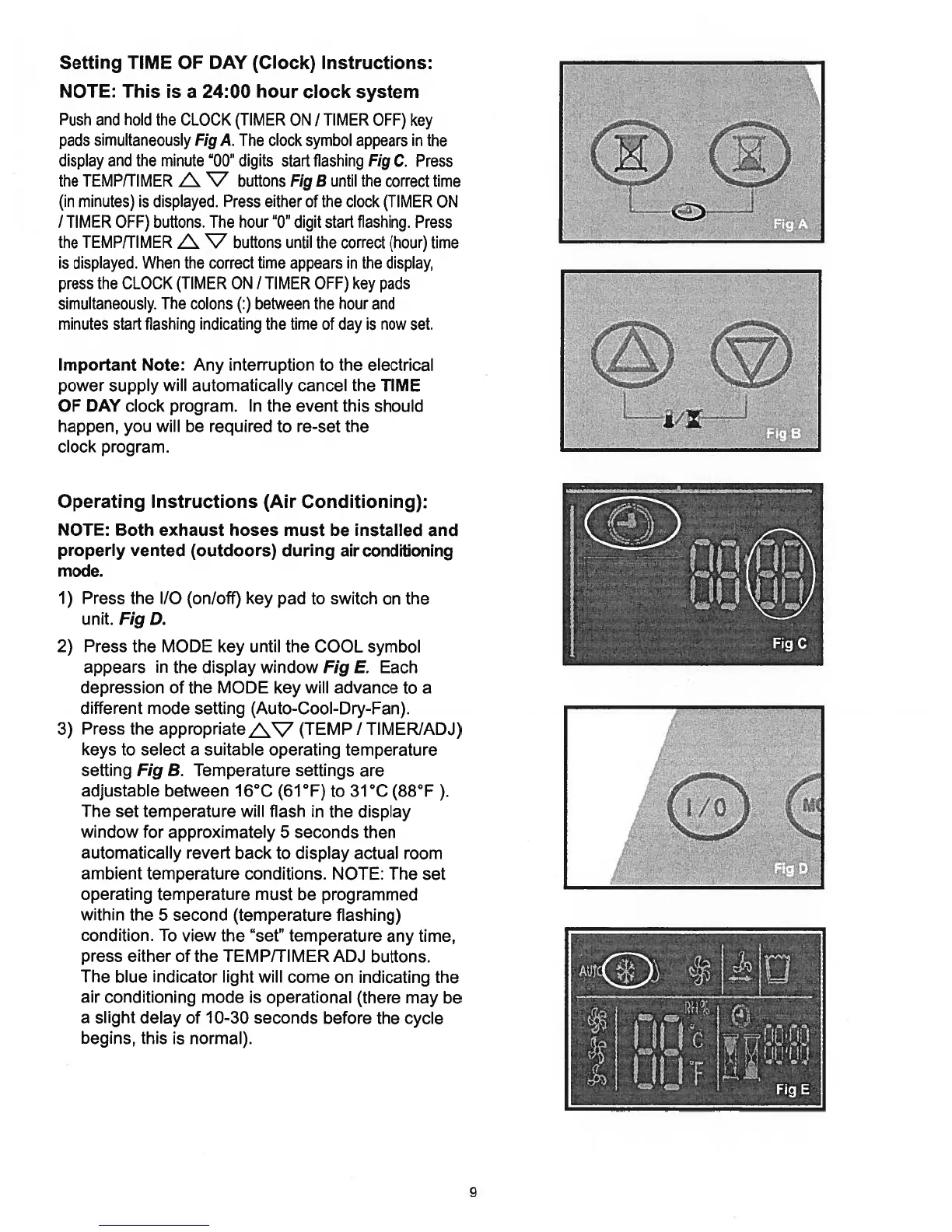
Push
and
hold
the
CLOCK
(TIMER
ON
/
TIMER
OFF)
key
pads
simultaneously
Fig
A.
The
clock
symbol
appears
in
the
display
and
the
minute
“00”
digits
start
flashing
Fig
C.
Press
the
TEMP/TIMER
L.
‘7
buttons
Fig
B
until
the
correct
time
(in
minutes)
is
displayed.
Press
either
of
the
clock
(TIMER
ON
/
TIMER
OFF)
buttons.
The
hour
“0”
digit
start
flashing.
Press
the
TEMP/TIMER
L.
‘7
buttons
until
the
correct
(hour)
time
is
displayed.
When
the
correct
time
appears
in
the
display,
press
the
CLOCK
(TIMER
ON
/
TIMER
OFF)
key
pads
simultaneously.
The
colons
(:)
between
the
hour and
minutes
start
flashing indicating
the
time
of
day
is
now
set.
Important
Note:
Any
interruption
to
the
electrical
power supply
will
automatically
cancel the
TIME
OF
DAY
clock
program.
In
the
event
this
should
happen,
you
will
be
required
to
re-set
the
clock
program.
Operating
Instructions
(Air
Conditioning):
NOTE:
Both
exhaust
hoses
must
be
installed
and
properly
vented
(outdoors)
during
air
conditioning
mode.
1)
Press
the
I/O
(on/off)
key
pad
to
switch
on
the
unit.
Fig
D.
2)
Press
the
MODE
key
until
the
COOL
symbol
appears
in
the
display
window
Fig
E.
Each
depression
of
the
MODE
key
will
advance
to a
different
mode setting
(Auto-Cool-Dry-Fan).
3)
Press
the
appropriateV
(TEMP
/
TIMERIADJ)
keys
to
select
a
suitable
operating
temperature
setting
Fig
B.
Temperature
settings
are
adjustable
between
16°C
(61°F)
to
31°C
(88°F).
The
set
temperature
will
flash
in
the
display
window
for
approximately
5
seconds
then
automatically
revert
back
to
display actual
room
ambient
temperature
conditions.
NOTE:
The
set
operating
temperature
must
be
programmed
within
the
5
second
(temperature
flashing)
condition.
To
view
the
“set”
temperature
any
time,
press
either
of
the
TEMP/TIMER
ADJ
buttons.
The
blue
indicator
light
will
come
on
indicating
the
air
conditioning
mode
is
operational
(there
may
be
a slight
delay
of
10-30
seconds
before
the
cycle
begins,
this
is
normal).
9

Related product manuals