EasyManua.ls Logo

Danby DPAC10071 - Setting the Auto-On & Auto-Off Timer During the same Program

Danby DPAC10071
22 pages
Print Icon
To Next Page IconTo Next Page
To Previous Page IconTo Previous Page
Loading...
Setting
the
AUTO-ON
&
AUTO-OFF
timer
during
the
same
program.
Before
setting
the
AUTO-ON
&
AUTO-OFF
Timer,
the
time
of
day
clock
must
be
set/operational.
You
must
select
all
appropriate
seffings
(i.e. MODE,
FAN
SPEED,
TEMP,
HUMIDITY,
SWING
etc.)
required
to
operate
under the
AUTO
TIMED
program
before
initiating
the
program.
1)
Select
the appropriate
MODE
under
which
you
want the
unit
to
operate
(Auto-Cool-Dry-Fan).
2)
Select
the
appropriate
FAN
SPEED
setting,
under
which
you
want
the
unit to
operate.
(Auto,
Hi,
Med,
Low)
(excluding
Dehumidifying,
as
this
mode
has
“1”
fan
speed
setting
only).
3)
Select
SWING
(oscillation)
by
pressing
the
SWING key
pad
and
the
“air
swing”
symbol
will
appear
in
the
display
window.
4)
Press
the
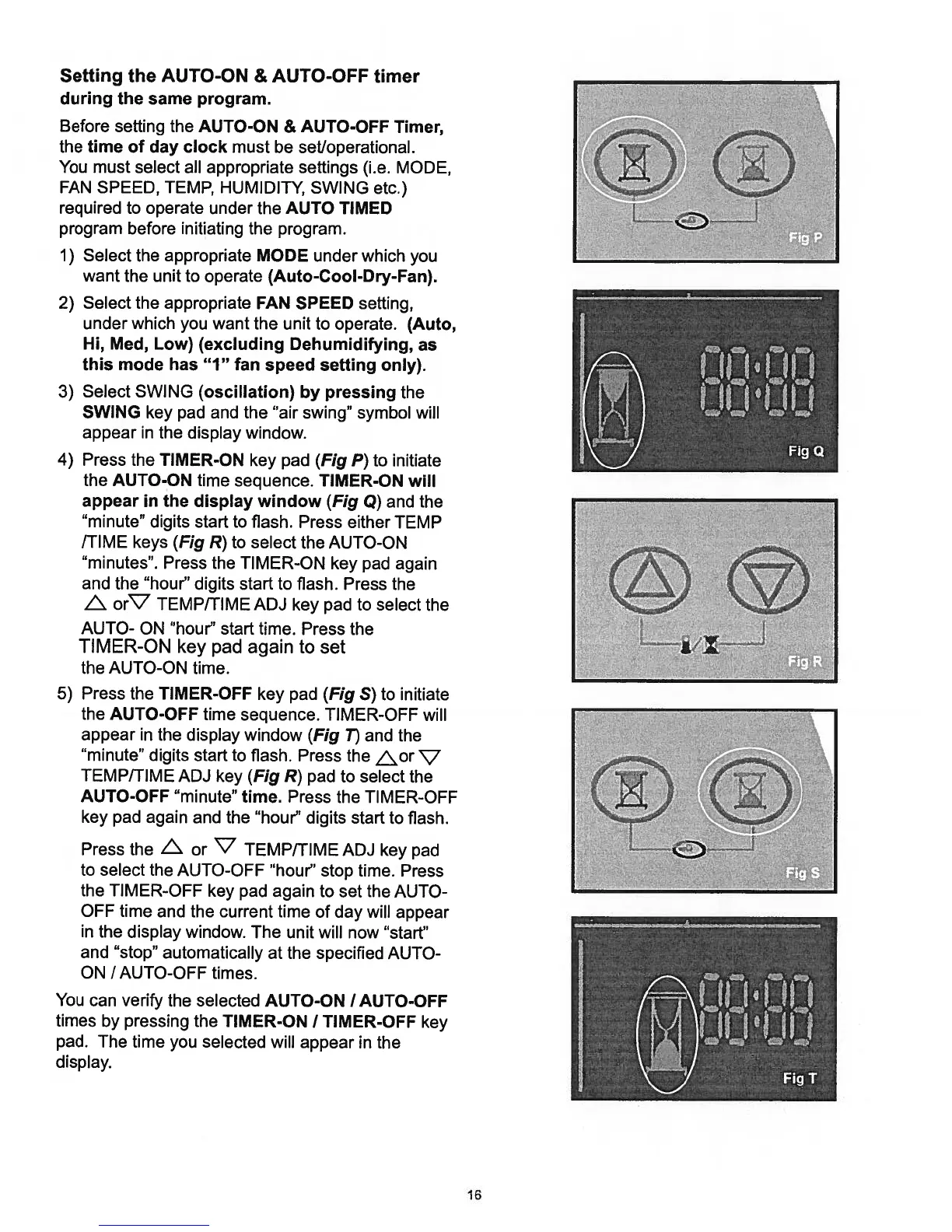
TIMER-ON
key
pad
(Fig
P)
to
initiate
the
AUTO-ON
time
sequence.
TIMER-ON
will
appear
in
the
display
window
(Fig
Q)
and the
“minute”
digits
start
to
flash.
Press
either
TEMP
/TIME
keys
(Fig
R)
to
select
the
AUTO-ON
“minutes”.
Press
the
TIMER-ON
key
pad
again
and the
“hour”
digits
start
to
flash.
Press
the
L.
orV
TEMP/TIME
ADJ
key
pad
to
select
the
AUTO-
ON
“hour”
start
time.
Press
the
TIMER-ON
key
pad
again
to
set
the
AUTO-ON
time.
5)
Press
the
TIMER-OFF
key
pad (Fig
S)
to
initiate
the
AUTO-OFF
time
sequence.
TIMER-OFF
will
appear
in
the
display
window
(Fig
T)
and
the
“minute”
digits
start
to
flash.
Press
the
or
ç7
TEMP/TIME
ADJ
key
(Fig
R)
pad
to
select
the
AUTO-OFF
“minute”
time.
Press
the
TIMER-OFF
key
pad
again
and the
“hour”
digits
start
to
flash.
Press
the
L\
or
V
TEMP/TIME
ADJ
key
pad
to
select
the
AUTO-OFF
“hour”
stop
time.
Press
the
TIMER-OFF
key
pad
again
to
set
the
AUTO
OFF
time
and
the
current
time
of
day
will
appear
in
the
display
window.
The
unit
will
now
“start”
and
“stop”
automatically
at
the
specified
AUTO-
ON
/AUTO-OFF
times.
You
can
verify
the
selected
AUTO-ON
I
AUTO-OFF
times
by
pressing
the
TIMER-ON
I
TIMER-OFF
key
pad.
The
time
you
selected
will
appear
in
the
display.
I
I
-
16

Related product manuals