EasyManua.ls Logo

Danby DPAC10071 - Setting the Auto-Off Timer

Danby DPAC10071
22 pages
Print Icon
To Next Page IconTo Next Page
To Previous Page IconTo Previous Page
Loading...
Setting
the
AUTO-ON
TIMER
(cont’d)
4)
All
of
the
settings
are
now
registered.
5)
To
set
the
AUTO-ON
timer,
the
unit
must
be
turned
“off”
(non-operational).
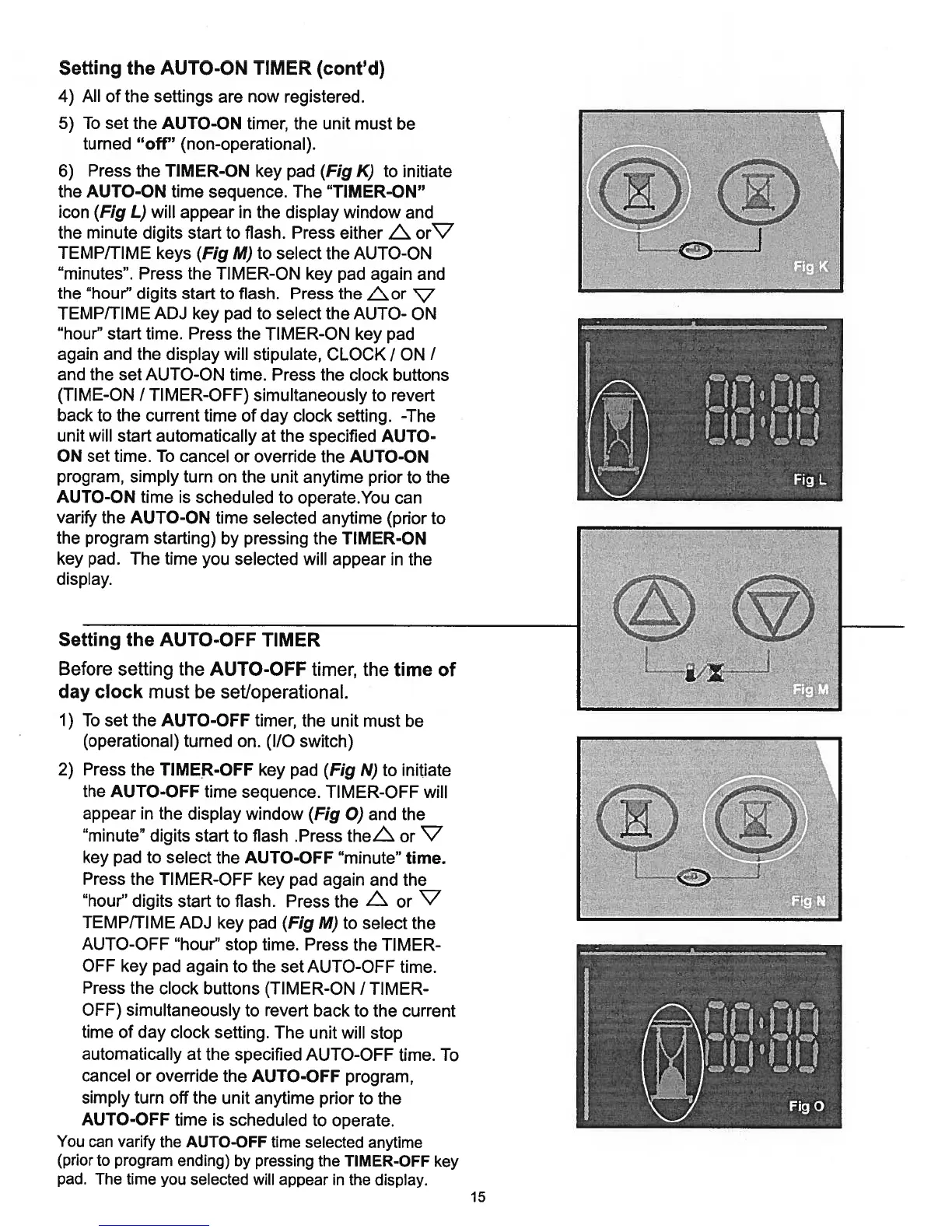
6)
Press
the
TIMER-ON
key
pad
(Fig
K)
to
initiate
the
AUTO-ON
time
sequence.
The
“TIMER-ON”
icon
(Fig
L)
will
appear
in
the
display
window
and
the
minute
digits
start
to
flash.
Press
either
Ls.
or’c7
TEMP/TIME
keys (Fig
M)
to
select
the
AUTO-ON
“minutes”.
Press
the
TIMER-ON
key
pad
again
and
the
“hour”
digits
start
to
flash.
Press
the
Lor
V
TEMP/TIME
ADJ
key
pad
to
select
the
AUTO-
ON
“hour”
start
time.
Press
the
TIMER-ON
key
pad
again
and
the
display
will
stipulate,
CLOCK
/
ON
I
and
the
set
AUTO-ON
time.
Press
the
clock
buttons
(TIME-ON
/
TIMER-OFF)
simultaneously
to
revert
back
to
the current
time
of
day
clock
setting.
-The
unit
will
start
automatically
at
the
specified
AUTO-
ON
set
time.
To
cancel
or
override
the
AUTO-ON
program,
simply
turn
on
the
unit
anytime
prior
to
the
AUTO-ON
time
is
scheduled
to
operate.You
can
varify
the
AUTO-ON
time
selected
anytime
(prior
to
the
program
starting)
by
pressing
the
TIMER-ON
key
pad.
The
time
you
selected
will
appear
in
the
display.
1)
To
set
the
AUTO-OFF
timer,
the
unit
must
be
(operational)
turned
on.
(I/O
switch)
2)
Press
the
TIMER-OFF
key
pad
(Fig
N)
to
initiate
the
AUTO-OFF
time
sequence.
TIMER-OFF
will
appear
in
the
display
window
(Fig
0)
and
the
“minute”
digits
start
to
flash
.Press
theZ
or
V
key
pad
to
select
the
AUTO-OFF
“minute”
time.
Press
the
TIMER-OFF
key
pad
again
and
the
“hour”
digits
start
to
flash.
Press
the
or
‘V
TEMP/TIME
ADJ
key
pad
(Fig
M)
to
select
the
AUTO-OFF
“hour”
stop
time.
Press
the
TIM
ER
OFF
key
pad
again
to
the
set
AUTO-OFF
time.
Press
the
clock
buttons
(TIMER-ON
/
TIM
ER
OFF)
simultaneously
to
revert
back
to
the current
time
of
day
clock
setting.
The
unit
will
stop
automatically
at
the
specified
AUTO-OFF
time.
To
cancel
or
override
the
AUTO-OFF
program,
simply turn
off
the
unit
anytime
prior
to
the
AUTO-OFF
time
is
scheduled
to
operate.
You
can
varify
the
AUTO-OFF
time
selected
anytime
(prior
to
program
ending)
by
pressing
the
TIMER-OFF
key
pad. The
time
you
selected
will
appear
in
the
display.
Setting
the
AUTO-OFF
TIMER
Before
setting
the
AUTO-OFF
timer,
the
time
of
day
clock
must
be
set/operational.
15

Related product manuals