EasyManua.ls Logo

Dascom 2610 - Power-On Operations

Dascom 2610
133 pages
Print Icon
To Next Page IconTo Next Page
To Previous Page IconTo Previous Page
Loading...
Tally Dascom 2610
22
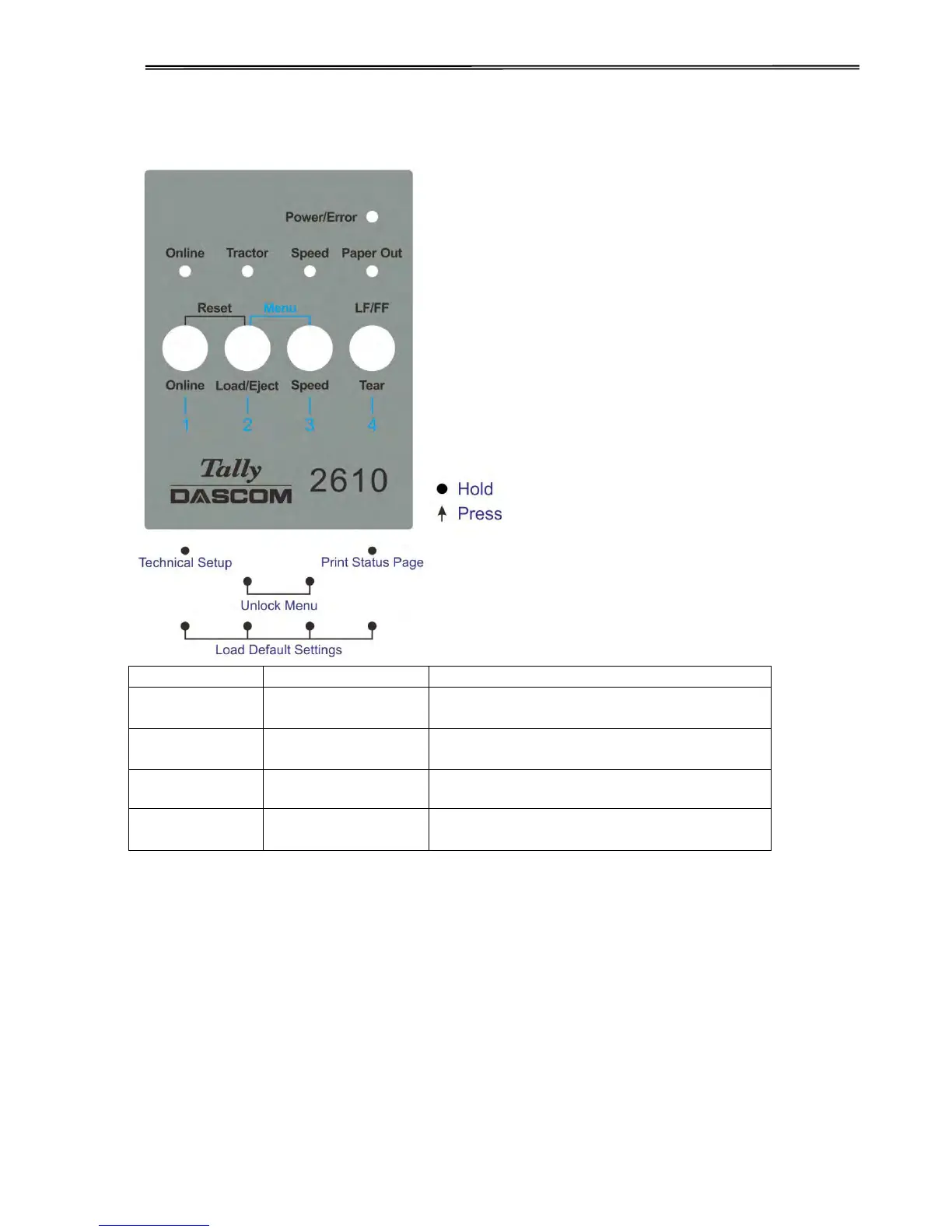
4.1.4 Power-On Operations
Function Name
Switch Operation
Function Description
Technical Setup
[S1]
Start Technical Setup / Advanced Menu
(This also includes Self Test Mode).
Menu Unlock
[S2]+[S3]
Override Menu Lock Function if Menu is
locked.
Status Page
[S4]
Print Status Page.
Load Defaults
[S1]+[S2]+ [S3]+[S4]
Load Default Settings.
Detail descriptions of the above functions:
Technical Setup
See Chapter 5 for details.
Menu Unlock
PressingLoad/EjectandSpeedkeys simultaneously overrides. Menu unlock function if menu is
locked.
Status Page
Print the setup of the printer (Menu).
Load Defaults
Print the setup of the menu and the parameters.

Table of Contents

Related product manuals