90 Error Recovery and Messages
Mending a Broken Ink Ribbon or Retransfer Film
Iftheinkribbonorretransferfilmbreaks,InkSearchorMediaSearchisdisplayedontheLCD
panel.Brok eninkribbonisshowninthefollowingexample;repairingbrokenretransferfilmuses
thesamesteps.
1. Powerofftheprinter.
2. Opentheprinterdoor.
3. Pressthereleasebuttonfortheappropriate
cartridgeandremovethecartridgefromthe
printer.
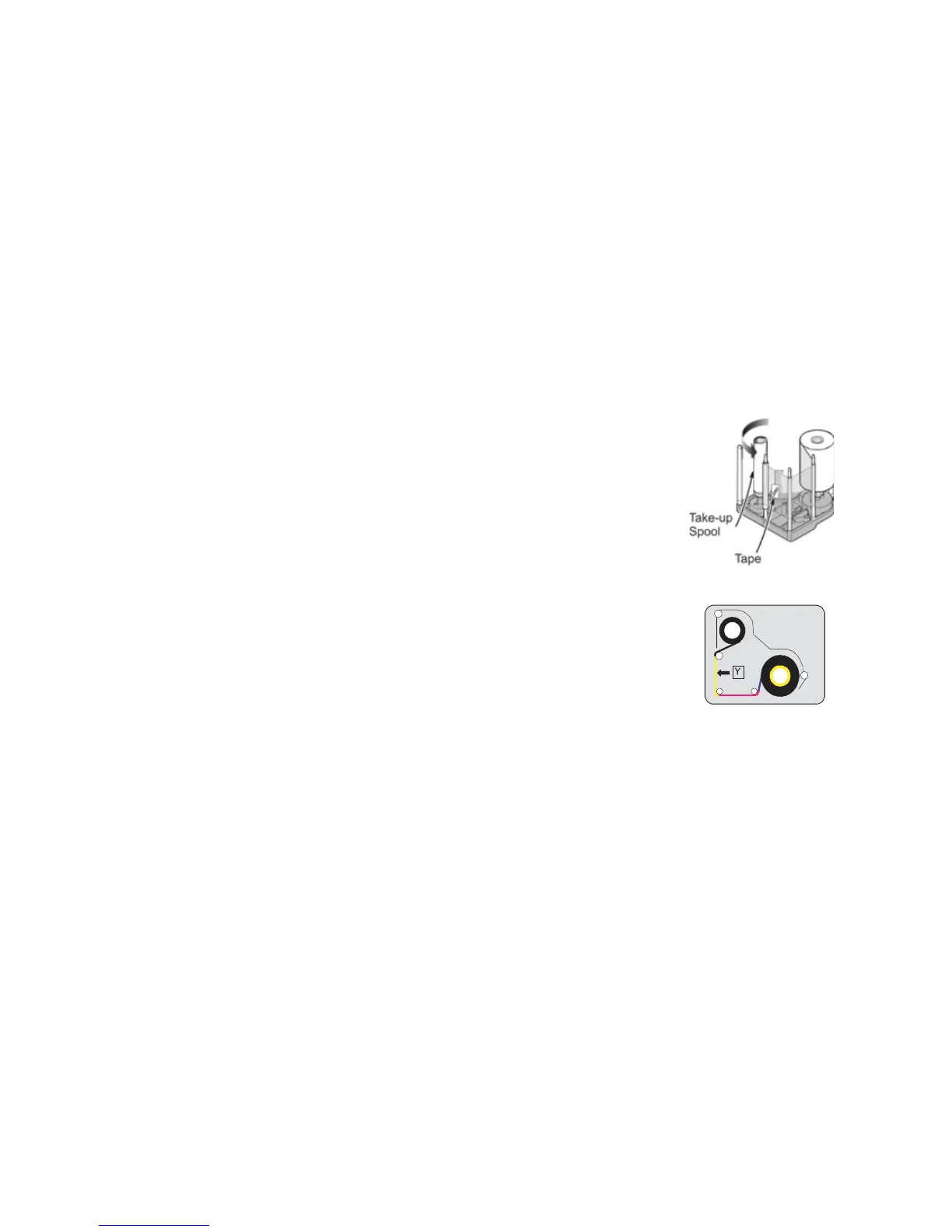
4. Trimtheendsofthebrokenportionsevenly.
Donotremovetheusedinkribbonorfilmfromthetake‐upspool.
(Removingandthenreinstallingtheribbononthetake‐upspoolmay
causeprintqualityissuesforthenextfewcards.)
5. Aligntheendsofthebrokenmediaevenlyandapplytapetosecure
them.
6. Turnthetake‐upspoolcounterclockwiseuntilthemendedportionis
woundontothespooltwoorthreeturns.
7. Makesurethattheyellowpanelalignswiththearrowonthe
cartridge.
8. Reinstallthecartridgeinto
theprinteruntilitclicksintoposition.
9. Closetheprinterdoor.
10. Initializethesuppliesasdescribedin“InitializingtheInkRi bbonand
RetransferFilm”onpage 22.


 To Next Page