Need help?
Do you have a question about the Datakom DKG-509 and is the answer not in the manual?
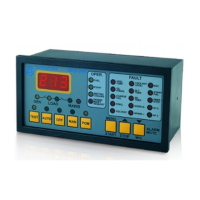
The unit is a control and protection panel used in gensets. It shows the measured values on its displays.
The unit is designed for panel mounting. The user should not be able to access parts of the unit other than the front panel.
Provides instructions and warnings for wiring the unit, including fuse requirements and safety precautions.
Provides serial data input and output for remote monitoring and programming.
Intended for connection to output extension modules, providing additional relay outputs.
Describes the function, color, and purpose of the 12 LEDs, grouped by operating mode, mimic diagram, and warnings.
Details how to select the display language (English, Turkish, Chinese) via programming.
Describes the graphical LCD display capabilities, navigation, and automatic screen switching.
Defines three priority levels: ALARMS, LOAD_DUMPS, and WARNINGS, with their causes and effects.
Explains first-occurring basis, alarm muting, latching behavior, and cancellation methods.
Describes the STOP mode where the mains contactor is energized if mains voltages are within limits and the engine is stopped.
Details automatic transfer between mains and genset, including engine start, heating, and transfer sequences.
Used to test the generator with mains on or keep it running in emergency backup mode.
Used to test the genset under load indefinitely until another mode is selected.
Allows assigning any digital input for remote start, controlling mains monitoring status.
Enables adapting to various oil pressure, temperature, and fuel level senders by selecting predefined types.
Provides two methods for engine heating: timer-controlled or timer/temperature-controlled before load transfer.
Allows the engine to run at idle speed for a programmed duration, disabling speed/voltage protections.
Provides a relay output to drive a block heater resistor, controlled by coolant temperature.
Provides a relay output to drive the fuel pump motor based on fuel level sender readings.
Optional input to simulate mains presence, preventing genset start even during mains failure.
Feature for battery-backed telecom systems, triggering genset only when battery voltage drops critically.
Describes intermittent operation of two gensets, including switching logic and priority input.
Indicates periodic maintenance needs based on engine hours or time, with a dedicated LED and relay output.
A non-erasable meter for tracking total engine hours, stored in non-volatile memory.
Details connecting GSM or PSTN modems for remote calls, alarms, and compatibility with RAINBOW software.
Enables sending SMS messages for faults, mains changes, fuel theft, or fuelling events.
Explains remote monitoring and programming using the RAINBOW PC software via RS-232 or USB adapters.
Describes external control capabilities using programmable digital inputs for various modes like STOP, AUTO, TEST.
Details automatic exerciser functions for daily, weekly, or monthly operation, with or without load.
Features for disconnecting non-critical loads (load shedding) or connecting a dummy load based on power levels.
Procedure for updating the unit's firmware via RS-232 serial port using Rainbow or DOS program.
Allows switching between primary and secondary engine speeds for Volvo engines via J1939-CANBUS.
Mode for controlling an engine without an alternator, disabling AC parameters and protections.
Offers two sets of voltage/frequency protection limits, switchable manually or via digital input.
Details installation and usage of an internal GSM modem, noting serial port unavailability for programming.
Enables communication with ECUs via J1939 port for engine monitoring and control, displaying up to 21 parameters.
Details connection methods via RS232, RS485 converter, or external modem for MODBUS communication.
Provides a shortlist of readable MODBUS registers for data acquisition, including voltage, current, frequency, and power.
Allows programming turn-on/turn-off time pairs for each day of the week to control genset operation.
Details the stored information for logged events, including status, measurements, date, and time.
Provides a set of non-resettable counters for tracking engine hours, genset runs, and service intervals.
States that the unit has no serviceable parts inside and recommends cleaning with a soft damp cloth.
Instructions on how to enter program mode, including password entry and program lock.
Details how to navigate through program groups and parameters using front panel buttons.
Allows selection of display language (English, Turkish, Chinese) via programming.
Enables single-phase operation and measurement on L1 phase for single-phase networks.
Troubleshooting steps when AC mains are OK or genset continues to operate after AC mains are OK.
Troubleshooting for incorrect AC voltages or frequency readings on the unit.
Troubleshooting for incorrect phase-to-phase AC voltages compared to phase-to-neutral.
Troubleshooting for faulty KW and cos readings despite correct Amp readings.
Confirms compliance with EU low voltage and electromagnetic compatibility directives.
Lists UL and CSA certifications and standards followed by the product.
Details voltage, current, frequency, power, and DC supply range specifications.
Covers operating temperature, humidity, dimensions, weight, and IP protection ratings.
Illustrates wiring for mains, load, and alternator phases, including fuses and contactors.
Shows detailed wiring for unit terminals, including inputs, outputs, and communication ports.
 General
| Operating Temperature | -40°C to +70°C |
|---|---|
| Protection Class | IP65 (front panel) |
| Digital Inputs | 4 |
| Analog Inputs | 2 |
| Power Supply | 8 to 35 VDC |
| Input Voltage Range | 8 to 35 VDC |
| Cranking Dropouts | 0 VDC for 100 ms |
| Alternator Frequency | 0 to 100 Hz |
| Magnetic Pickup Voltage | 0.5-30 VAC |
| Magnetic Pickup Frequency | 0 to 10 kHz |
| Maximum Humidity | 95% non-condensing |
| Weight | 300 g |
| Display | LCD |
| Frequency | 0 to 100 Hz |


 To Next Page