EasyManua.ls Logo

Datron 1061 - Page 19

Default Icon
197 pages
Print Icon
To Next Page IconTo Next Page
To Previous Page IconTo Previous Page
Loading...
r.;1,,:i'':
:,-.-.
10
1.7
CALIBRATION
USING
'KEYBOARD'
1.7.1
General
The 'KEYBOARD'
method
of
calibration
is useful
when a calibratíon
source
although
set
to
a nominal
value
has
known
errors.
ln
this
situation
the
known
value of the
calibration
source
can
be
entered
into
the
DVM
before
the
'AUTOCAL' process
is
executed.
The
process is
functional
during any
calibration
with a source
of
magnitude
between
20o/o and
2OOo/o
of the
range
selected,
but
it
should
be noted
that for
equal
magnitude
source
errors,
calibrating
at the
lower
percentage
end
of range
produces a
higher
percentage
calibration
error.
The 'KEYBOARD' method
operates
for
both
the 'Gain'
and 'AcHf'
calibration
operations.
An
example
using 'KEYBOARD'
to
calíbrate
directly
against
a
Standard
Cell is
shown
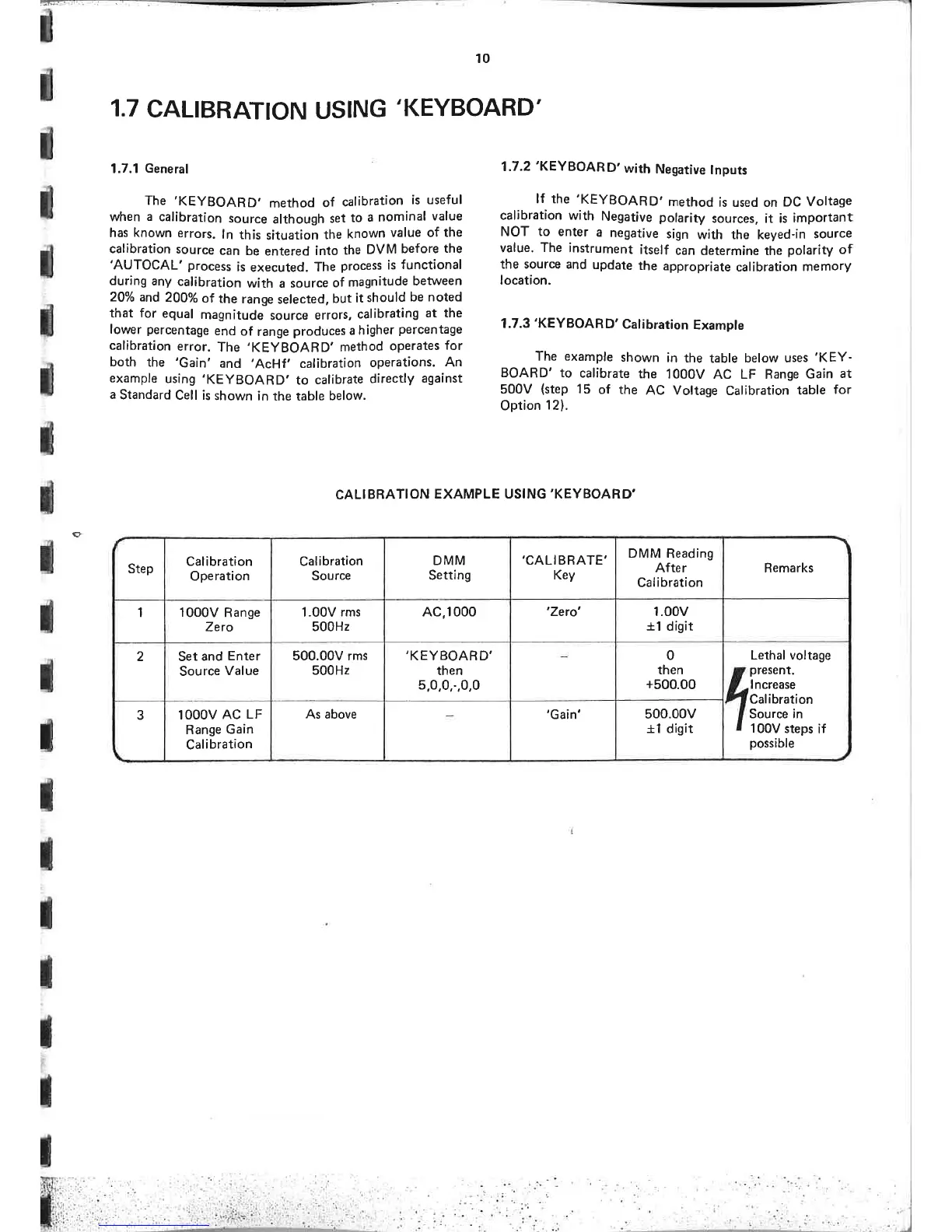
in the table below.
CAL¡
BBAT¡ON
EXAMPLE USING'KEYBOARD'
1.7.2'KEYBOAR
D'
with
Negative
tnputs
lf
the
'KEYBOARD,
method
is used on
DC
Voltage
calibration with
Negative
polarity
sources, it is
important
NOT
to enter
a
negative
sign
with the keyed-in
source
value,
The
instrument
itself
can
determine the
polarity
of
the source and
update
the
appropriate
calibration
memory
location.
1.7.3'KEYBOARD'
Calibration
Example
The example
shown
in
the table
below uses
'KEY-
BOARD' to
calibrate
the
1000V
AC LF Range
Gain
at
500V
(step
15
of
the
AC
Voltage Calibration
table
for
Option
121.
o
-l
Remarks
Lethal
voltage
present.
I ncrease
Calibration
Source in
100V
steps
if
possible
rl
DMM
Reading
After
Calibration
1.00v
+1
digit
0
then
+500.00
500.00v
+1 disit
,CALIBRATE'
Key
'Zero'
'Gain'
DMM
Settíng
AC,1000
,KEYBOARD'
then
5,0,0,-,0,0
Calibration
Source
1.00V
rms
500H2
500.00V rms
500H2
As above
Calibration
Operation
1000V
Range
Zero
Set
and
Enter
Source
Value
lOOOV
AC
LF
Range
Gain
Calibration
r
Step
1
2
3
I
I

Table of Contents