15
SECTION
3
TECHNICAL
DESCRIPTION
3.1
INTRODUCTION
The
internal
circuits
of the
basic
DC
only
instrument
are
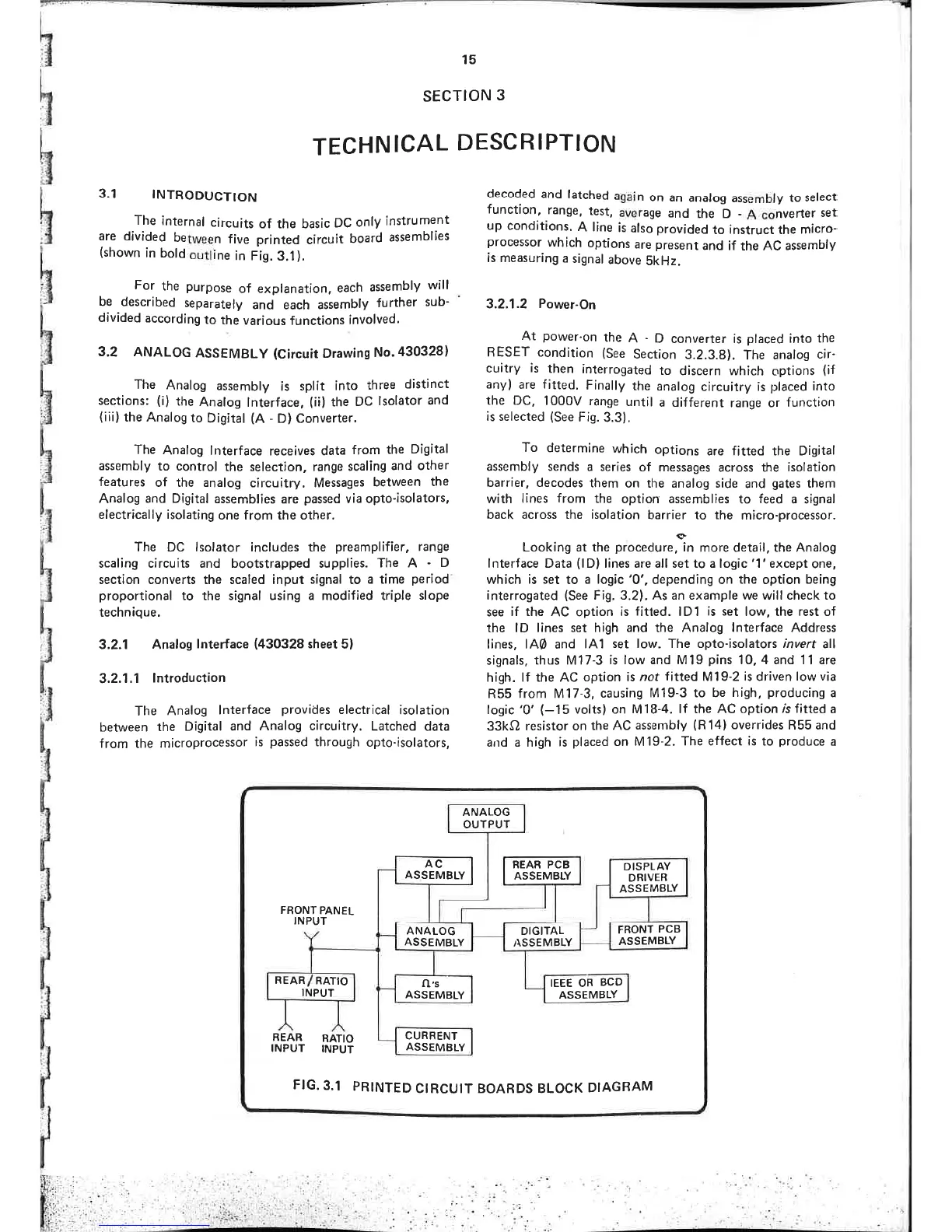
divided
between
five printed
circuit
board
assemblies
(shown
in
bold
outline
in Fig.3..l).
For
the
purpose
of explanation,
each
assembly
will
be
described
separately
and
each
assembly
further
sub-
divided
according
to
the
various
functions
involved.
3.2
ANALOG
ASSEMBLY
(Circuit
Drawins
No.430328)
The
Analog
assembly
is
split
into
three
distinct
sections:
(i)
the
Analog
lnterface,
(ii)
the
DC
lsolator
and
(iii)
the
Analog
ro
Digiral
(A -
D) Converter.
The
Analog
lnterface
receives data
from
the
Digital
assembly
to control
the
selection, range
scaling
and other
features
of the analog
círcuitry. Messages
between
the
Analog
and Digital
assemblies
are
passed
via opto-isolators,
electrically isolating
one from the other.
The DC lsolator includes the
preamplifier,
range
scaling circuits and bootstrapped supplies. The
A
D
sect¡on converts the scaled input signal to
a time
period
proportional
to the signal using a modified triple
slope
technique.
3.2.1 Analog
lnterface
(430328
sheet 5)
3.2.1
.1
lntroduction
The
Analog
lnterface
provides
electrical
isolation
between
the
Digital
and
Analog circuitry.
Latched
data
from
the
microprocessor
is
passed
through
opto-isolators,
decoded
and
latched
again
on
an
analog
assembly
to
select
functíon,
range.
test,
average
and
the
D
-
A
converter
set
up conditions.
A line
is
also
provided
to instruct the
micro-
processor
which
options
are
present
and
if the AC
assembly
is measuring
a signal
above
SkHz.
3.2.1.2
Power-On
At
power-on
the
A
-
D
converter is
placed
into the
RESET conclition
(See
Section
3.2.3.8).
The
analog
cir-
cuitry is
then
interrogated
to
discern which
options
(if
anyl are f itted.
Finally
the
analog
circuitry
is
placed
into
the DC, 1000V
range
until
a different
range or
function
is selected
(See
Fig.
3.3).
To
determine
which
options
are fitted the Digital
assembly sends
a series
of
messages across the
isolation
barrier, decodes
them
on the analog side
and
gates
them
with
lines
from
the
option assemblies
to
feed
a signal
back across the isolation
barrier to the
micro-processor.
Looking at
the
proceduruin
more detail, the Analog
lnterface Data
(l
D) lines are all set
to
a logic '1'except
one,
whích
is
set to
a logic'0',
depending on the option
being
interrogated
(See
Fig. 3.2). As an example we will check to
see
if
the AC option
¡s
f¡tted.
lD1
is
set low, the rest of
the
lD lines set high and the Analog
lnterface
Address
lines, lAØ and
lA1
set low. The opto-isolators ¡nvert
all
signals, thus M17-3
is low and M19
pins
10,4 and 11
are
high.
lf the AC option
is
not
fitted
M19-2
is driven
lowvia
R55
from M17-3,
causing
M19-3 to be
high,
producing
a
logic
'0' (-15
volts) on M18-4.
lf the
AC
optíon
rb fitted
a
33kO
resistor on
the AC
assembly
(R14)
overrides
R55 and
arrd a high
is
placed
on M19-2.
The
effect ¡s
to
produce
a
DISPLAY
DRIVER
ASSEMBLY
FRONT
PCB
ASSEMBLY
IEEE OR
BCD
ASSEMBLY
REAR PCB
ASSEMBLY
DIGITAL
¡\SSEMBLY
ANALOG
OUTPUT
AC
ASSEMBLY
ANALOG
ASSEMBLY
o,s
ASSEMBLY
CURRENT
ASSEMBLY
RATIO
REAR
INPUT
FIG.3.1
PRINTED
C¡RCUIT
BOARDS
BLOCK
DIAGRAM
RATIO
INPUT
FRONT
PANEL
INPUT
REAR
INPUT
:
.
.
.: .'



 To Next Page