EasyManua.ls Logo

Datron 1061 - Ohmsassembly

Default Icon
197 pages
Print Icon
To Next Page IconTo Next Page
To Previous Page IconTo Previous Page
Loading...
53
Analog
Assembly
(A-D
converter)
23.
Select
100V
range
and apply
short
circuit
between
Hi
and
Lo.
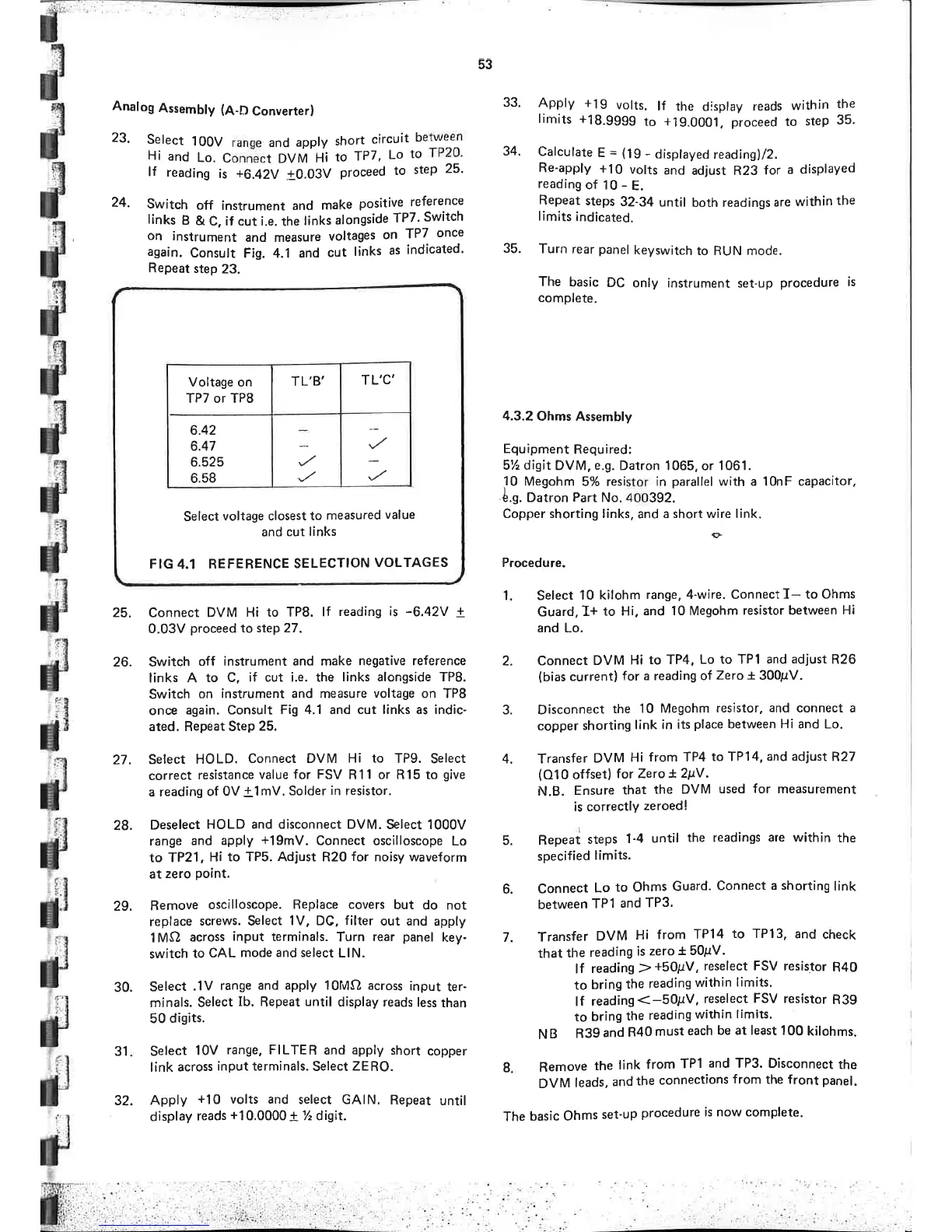
Conn-ect
OVI¡'H¡
þ
-fP7,
Lo
to
TP20'
lf
reading
is
+6.42y +0.03V
proceed
to
step
25'
24.
Switch
off
instrument and
make
positive
reference
links
B
&
C, if cut ¡.e.
the
links
alongside
TP7'
Switch
on
instrument
and measure
voltages
on
TP7
once
again.
Consult
F¡g. 4.1 and
cut
links
as
indicated'
Repeat
step
23.
33.
Apply +19
volts.
lf
the display
reads
within
the
limits +18.99g9
to
+19.0001.
proceed
to
step
35.
34.
Calculate
E
=
(lg
-
displayed
readingl/2.
Re-apply
+10
volts
and
adjust R23
for
a displayed
reading
of
10
-
E.
Repeat
steps
32-34
until
both readings
are
within
the
lim¡ts
¡ndicated.
35.
Turn
rear
panel
keyswitch
to RUN mode.
The
basic
DC
only
instrument set-up
procedure
is
complete.
4.3.2
Ohms
Assembly
Equipment
Required:
5% digit
DVM,
e.g.
Datron 1065,
or
1061.
10
Megohm
5% resistor
in
parallel
with
a
10nF capacitor,
ê.9. Datron
Part
No.400392.
Copper shorting links,
and a
short wire link.
Procedure.
e
25.
Connect
DVM
Hi to TP8.
lf
reading
is
-6.42V
+
0.03V
proceed
to
step 27.
26. Switch
off
instrument and make
negative reference
links A
to C,
if cut i.e. the
links alongside TP8.
Switch
on
instrument and measure
voltage
on TP8
once
again. Consult Fig
4.1 and cut links as indic-
ated. Repeat Step
25.
27. Select
HOLD.
Connect
DVM
Hi
to TP9.
Select
correct
resistance
value
for FSV
R11 or R15 to
give
a reading
of
0V
!1
mV.
Solder
in resistor.
28.
Deselect
HOLD
and disconnect
DVM. Select 1000V
range and
apply
+19mV.
Connect oscilloscope
Lo
to
TP21
,
Hi to TPS. Adjust R20
for
noisy waveform
at
zero
Point.
29.
Remove
oscilloscope. Replace
covers
but
do not
replace
screws. Select
1V, DC, filter
out and
apply
l MCl
across
input
terminals.
Turn
rear
panel
key-
switch
to
CAL
mode and select
LlN.
30.
Select
.lV
range
and apply
l0lVlf) across
input
ter-
minals.
Select
Ib. Repeat
until
display reads
less
than
50
digits.
31
Select
10V
range, FILTER
and
apply
short
copper
link
across
input terminals.
Select
ZERO.
32.
Apply
+10
volts and
select GAIN.
Repeat
until
display
reads
+10.0000 +
% digit.
Select
10 kilohm
range, 4-wire. Connectf-
to Ohms
Guard,
L+
to Hi, and
10 Megohm
resistor between
Hi
and Lo.
Connect
DVM
to TP4,
Lo to TPI and
adjust
R26
(bias
current)
for
a
reading of
Zero
t
300¡tV.
Disconnect
the
10 Megohm
resistor, and connect a
copper
shorting
link in
its
place
between Hi and Lo.
Transfer
DVM
Hi
from TP4
to TP14,
and adjust
R27
(010
offset)
f
or
Zero
+ 2pY .
N.B.
Ensure
that
the DVM
used
for
measurement
is correctlY
zeroed!
Repeaì
steps
1'4
unt¡l
the readings
are
wíthin
the
specified
limits.
Connect
Lo
to Ohms
Guard.
Connect
a shorting
link
between
TPl
and
TP3'
Transfer
DVM
Hi
from
TP14
to
TP13,
and
check
that
the
reading
is zero
* 50¡rV.
lf
reading
2
+50¡rV, reselect FSV resistor
R40
to
bring
the
reading
within
limits'
lf
reading<-50¡¡V,
reselect
FSV
resistor
R39
to
bring
the
reading
within
limits.
N
B
R39
and
R40
must
each
be at least
100
kilohms.
Remove
the
link
from
TPI
and TP3. Disconnect
the
DVM
leads,
and
the
connections
from
the front panel.
The basic
Ohms
set'up
procedure
is now complete.
1
2.
3.
4.
5.
6.
7
I
TL'C'
TL'B'
Voltage on
TP7 or TP8
6.42
6.47
6.525
6.58
Select
voltage
closest to
measured
value
and
cut links
FIG
4.1
REFERENCE
SELECTION
VOLTAGES

Table of Contents