EasyManua.ls Logo

Datron 1061 - General Lnterface Update Sequence; Test; Preamplifier Scaling

Default Icon
197 pages
Print Icon
To Next Page IconTo Next Page
To Previous Page IconTo Previous Page
Loading...
17
Secondly,
the
latches
of the D
-
A
converter
(M13,
M14)
are
set
up
with
the
input
bias
current
(lb)
compensatíon
data'
The
lD
lines
are
set
to the appropriate
pattern
and
the
information
is
clocked
on
to
M13
and
M14
by
a delayed
low
to
high
edge
from
M17-4, originating
from
lAØgoing
low.
The
delay
makes
sure
that
the
signal
from
M17-10
has
disabled
the
,'F.E.T.,,
latch
M21.
Once
again,
the
lAØ
line
returns
to
the
resting state
of
logic'1'.
Thirdly,
the
DC
analog
circuits
are
enabled
by
setting
all
the
lD
lines
high
except
for
lD0,
rhen
clocking
M20
by
a
low
to high
edge
from
M16-6
caused
by
both
lA
lines
going
low.
Once
DC
has
been
selected,
the
F.E.T.
pattern
latch
is
enabled
from
M12-1,
and
the
penultimate
step
is to
load
this
latch
with
1000V
range data
from
the
lD
lines
(lD4
low,
the
rest
high).
This
is executed
by
clocking
the
'F.E.T.'
latch
from
M17-4
once
again, but
this
time
being
due to
lAl
going
low.
The
final
step is to
reselect
DC
as described
above.
3.2.1.3
General
lnterface
Update Sequence
Before
the
start
of each reading,
the
analog
interface
undergoes
a
complete
update. The
series of
events
is the
same
as the
power-up
seguence for
selectíon
of
function
and
range,
as can
be seen by comparing
the two
flowcharts
(Figs.
3.3 and
3.5). When
Ohms
or Current
is selected,
the DC lsolator
or AC assembly is
also used in the measure-
ment
procedure
as seen in
the
following table.
UseofD-A
lnput Bias
Current
Compensation
Frequency
Compensation
Frequency
Compensation
lnput
Bias
Current
Compensation
lnput
Eias
Current
Compensation
Frequency
Compensation
Frequency
Compensation
C¡rcuits Selected
Analog Assembly
AC Assembly
AC
Assembly
Ohms
Assembly
and
Analog
Assembly
Current
Assembly
and
Analog
Assembly
Current
Assembly
and
AC Assembly
Current
Assembly
and
AC
Assembly
Type of
Measurement
DC Volts
AC Volls
AC
+
DC
Volts
Resistance
DC Current
AC Current
AC
+
DC Current
The
update
sequence
order
is
(i)
Deselect
all
assemblies,
(ii)
Load
D
-
A
latches,
(iii)
Select
AC
assembly
or
DC
lsolator,
(iv)
Load
range
pattern
into
DC
or
AC
range
latches,
(v)
Deselect
DC
or
AC
and
select
either
the
Ohms
or Current
assembly,
(vi)
Load
range
pattern
into
Q's
or I
range
latches,
(vii)
Reselect
circuits
selected
in
(iii)
and
(iv).
Note:
Steps
(v)
and
(vi)
are
used
only
when
I
or
e is
selected,
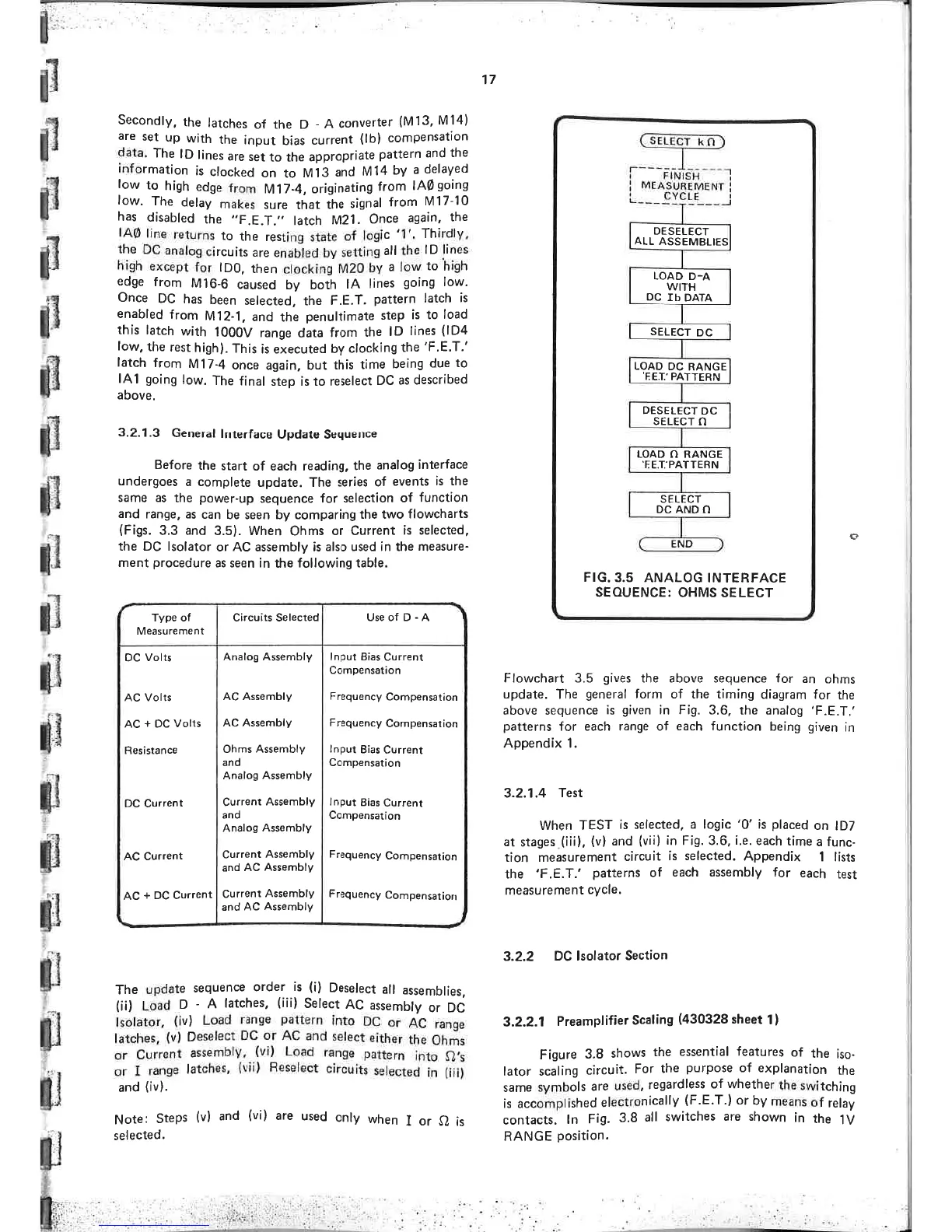
Flowchart 3.5
gives
the above sequence for
an
ohms
update. The
general
form
of
the timing
diagram for
the
above
sequence
is
given
in Fig.
3.6. the analog
'F.E.T,'
patterns
for each range of each
function
being
given
in
Appendix 1.
3.2.1.4
Test
When TEST
is
selected,
a
logic '0' is
placed
on
lD7
at stages
(¡ii),
(vl
and
(viil
in
Fi9.3.6,
i.e.
each
time
a func-
tion
measurement
circuit
is
selected. Appendix
1 lists
the
'F.E.T.'patterns
of
each assembly for
each
test
measurement
cycle.
3.2.2
DC lsolator
Section
3.2.2.1
Preamplifier
Scaling
(430328
sheet
1)
Figure
3.8
shows
the
essential
features
of
the
iso.
lator scaling
circuit.
For
the
purpose
of
explanation
the
same symbols
are
used,
regardless
of whether
the
switch¡ng
is accomplished
electronically
(F.E.T.)
or by
means
of
relay
contacts.
ln
Fig.
3.8
all
switches
are
shown
in
the
iV
RANGE
position.
0
END
DESELECT
ALL
A,SSEMBLIES
LOAD
D-A
WITH
DC
Tb
DATA
SELECT
DC
DC
PA
RANGE
TTERN
LOAD
'EET,
DESELECT
DC
SELECT
N
LOAD
N
RANGE
.FE.T'PATTERN
SELECT
DC AND
N
FIG.
3.5
ANALOG INTERFACE
SEOUENCE:
OHMS SELECT

Table of Contents