42
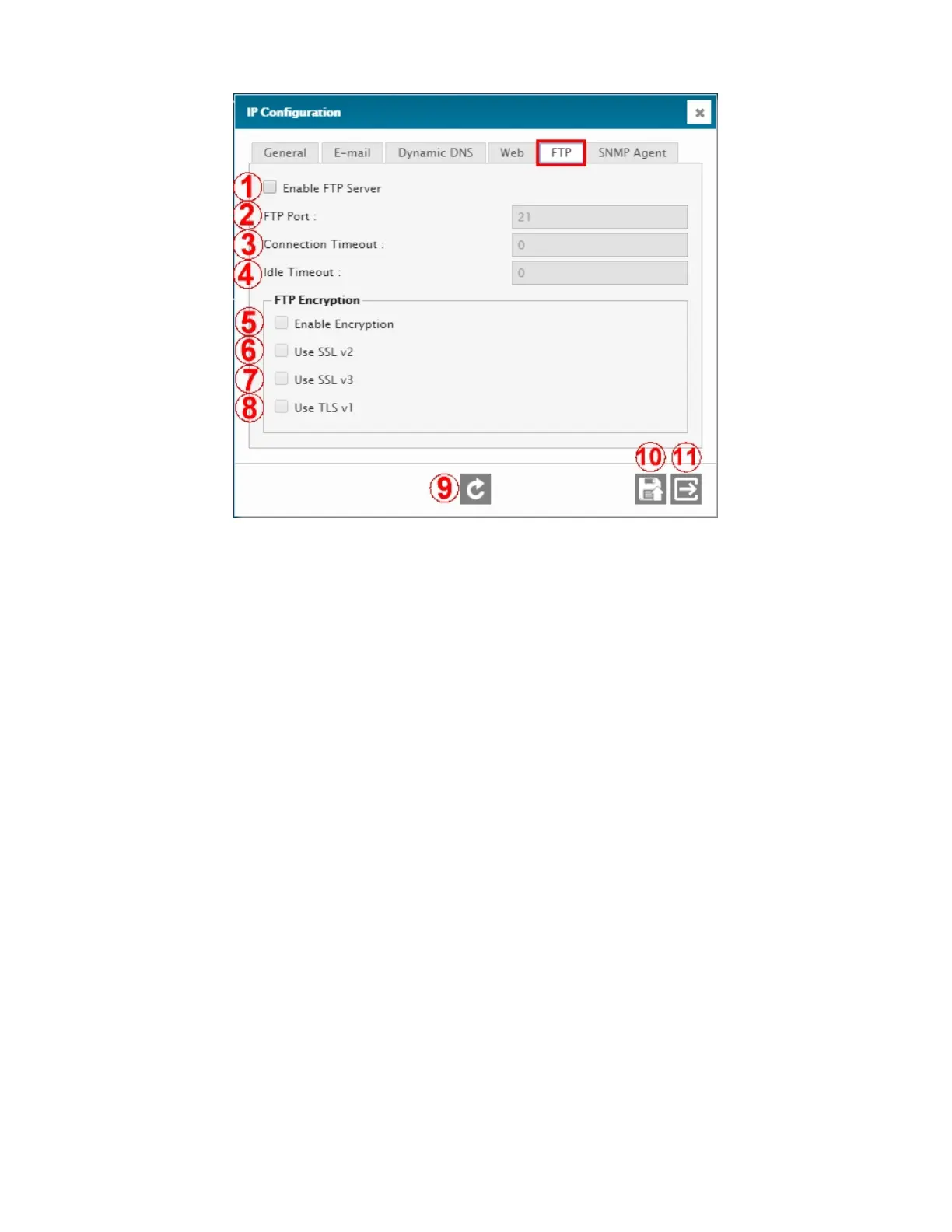
4.2.4.4. IP Configuration – FTP tab
1 – ENABLE FTP SERVER
Enable / disable the FTP server.
2 – FTP PORT
IP port of the FTP server.
3 – CONNECTION TIMEOUT
This setting is the absolute maximum time (in munites) after which the FTP server will disconnect.
4 – IDLE TIMEOUT
This setting is the time (in minutes) after which the FTP server will disconnect following no activity (idle).
5 – ENABLE ENCRYPTION
Enable / disable the FTP encryption.
6 – USE SSL V2
Use SSL version 2 for FTP encryption.
7 – USE SSL V3
Use SSL version 3 for FTP encryption.
8 – USE TLS V1
Use TLS version 1 for FTP encryption.
9 – REFRESH / READ
Refresh / read the screen content.
10 – SAVE
Save the screen content.
11 – EXIT
Exit menu.



 To Next Page