English
33
Fifty Line Cod. 420120397 REV. 1.0
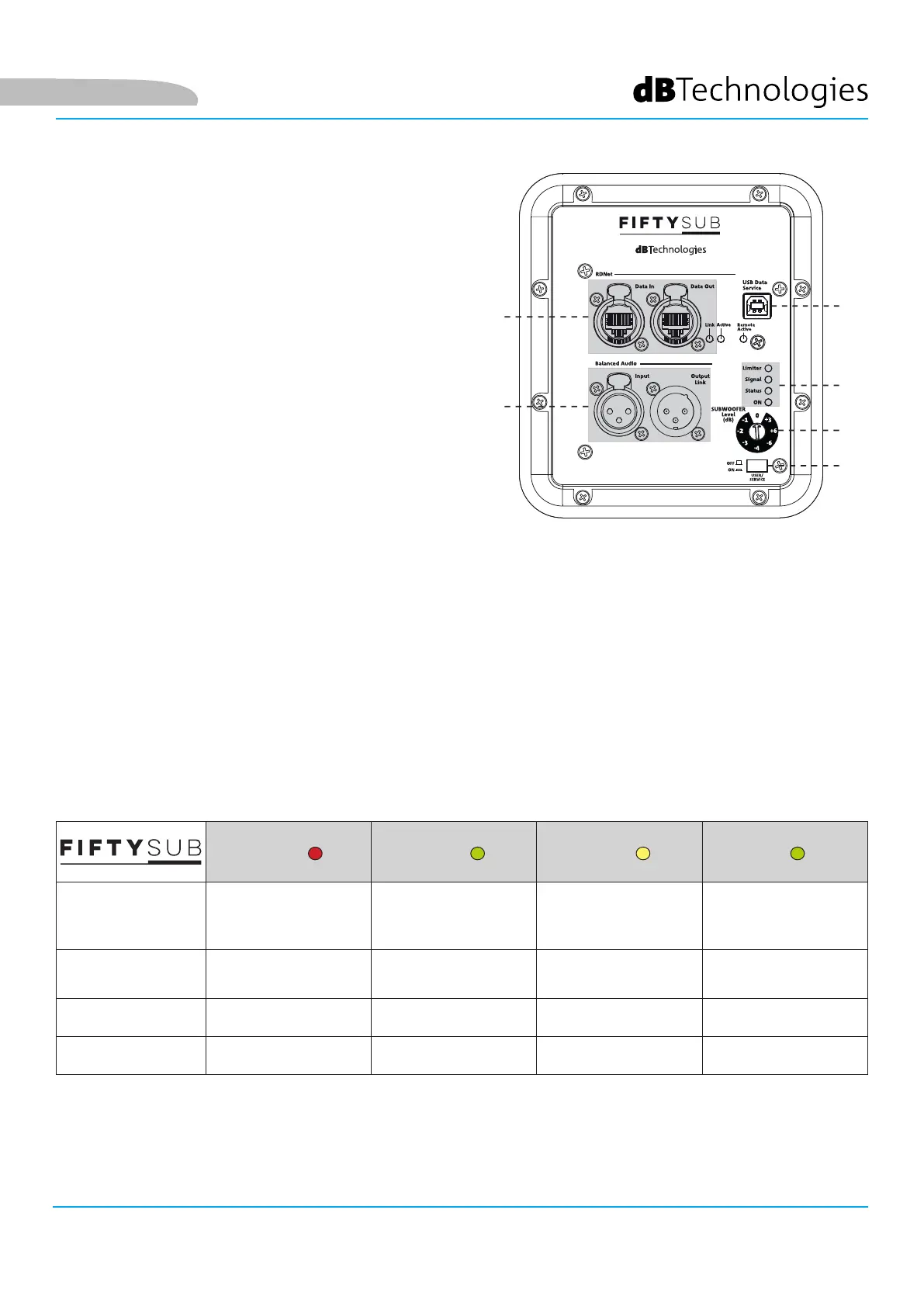
FIFTY SUB INPUT, OUTPUT AND CONTROL SECTION
1. AUDIO INPUT AND LINKING (“Balanced audio”)
Input and output compatible with balanced XLR cables.
In particular:
• “Input” is used to connect the audio signal from
the mixer;
• “Output Link” is used to link the signal to other
devices in a daisy-chain conguration.
2. RDNet NETWORK CONECTION INPUT AND
LINKING, RDNet STATUS LEDS
Section compatible with network cables tted with
etherCON/RJ45 connectors. In particular:
• “Data In” must be connected to devices such as
RDNet Control 2 or Control 8
• “Data Out” is used to link the network to other
devices in a daisy-chain conguration
The LEDs indicate the network (RDNet) operating status
of the monitor.
In particular:
• “Link” illuminates to indicate that the RDNet network is active and has recognised the device
• “Active” ashes to indicate the presence of data trafc
• “Remote Preset Active” signals that all the local controls on the amplier panel are bypassed by the RDNet
remote control
3. USB SERVICE DATA
Using this standard type B USB port, you can update the product's rmware using a PC and USB BURNER
MANAGER. For further information, refer to the “DOWNLOADS” section of the http://www.dbtechnologies.com
website and the “UPDATING THE FIRMWARE” chapter.
4. STATUS LEDs
The LEDs provide an immediate indication of the subwoofer status, in accordance with the logic summarised in
the table below:
Limiter Signal Status On
Power up OFF OFF
STEADILY LIT FOR A
FEW SECONDS
OFF
Use
COMPRESSION
LIMITER STATUS
SIGNAL OUTPUT
STATUS
OFF STEADILY LIT
Partial malfunction ACTIVE ACTIVE CYCLIC FLASHING STEADILY LIT
Total malfunction CYCLIC FLASHING OFF STEADILY LIT OFF
1
2
6
3
5
4



 To Next Page