8
Connecting The l 60XT To Your System
System Connections
FROM
LINE LEVEL
SOURCE
160XT
IN OUT
LINE
0
0 0
INPUT
0 0
0 0 0
©
© ©
© © 0
© 0 ©
0
.
0 0
0
.
© 0
©
©
.
©
0
0
0
©
0
©
®
0
0
0 0
0 0 0 0
0
0 0 0 0 0
0 0 0 0 0 0
0 0 ©
.
© © 0
0 © © 0 0 0
.
@
© 0
0
© 0
© 0 © 0 0 ©
© 0
.
© 0 G 0
0 0 © 0 © ®
160XT
IN OUT
INSERT
0
0 0 0 0
0 0 0 0
0 0
0 0 0 0
0 0 0 0
0 0 0
0 0 0
0 0 0 0
0 © © © 0
0
B
B
©
0 0 © 0 ©
. .
© 0 0
© 0 ©
.
0
0 0 0
© 0
D D D D
.
0
.
0 0 G 0
0
.
0 0 0 0
© 0 0 © ®
0
0 0 0 0
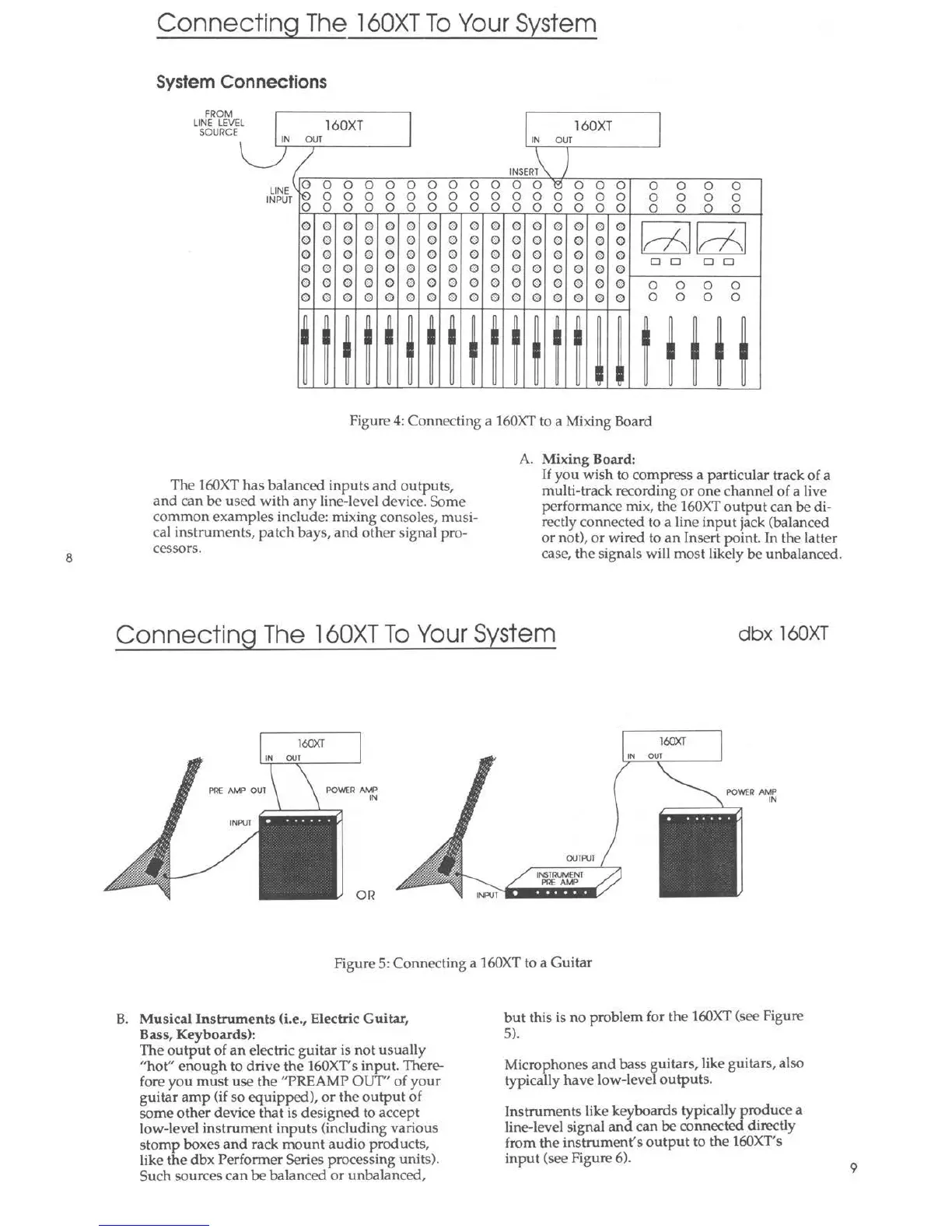
Figure 4: Connecting a 160XT to a Mixing Board
The 160XT has balanced inputs and outputs,
and can be used with any line-level device. Some
common examples include: mixing consoles, n1usi-
cal instruments, patch bays, and other signal pro-
cessors.
A. Mixing Board:
If you wish to compress a particular track of a
multi-track recording or one channel of a live
performance mix, the 160XT output can be di-
rectly connected to a line input jack (balanced
or not), or wired to an Insert point. In the latter
case, the signals will most likely be unbalanced.
Connecting The l 60XT To Your System
dbx 160XT
160XT
IN our
P1lE AMP OUT
POWER AMP
IN
OR
160XT
OUTP\/1
POWER AMP
IN
Figure 5: Connecting a 160XT to a Guitar
B. Musical Instruments (i.e., Electric Guitar,
Bass, Keyboards):
The output of an electric guitar is not usually
"hot" enough to drive the 160XT's input. There-
fore you must use the "PREAMP OUT" of your
guitar amp (if so equipped), or the output of
some other device that is designed to accept
low-level instrument input s (including various
stomp boxes and rack mount audio products,
like the dbx Performer Series processing units).
Such sources can be balanced or unbalanced,
but this is no problem for the 160XT (see Figure
5).
Microphones and bass guitars, like guitars, also
typica lly have low-level outputs.
Instruments like keyboards typically produce a
line-level signal and can be connected directly
from the instrument's output to the 160XT's
input (see Figure 6).
9



 To Next Page