12
Connecting The l 60XT To Your System
Multi-Channel Connections
"MASTER"
"SLAVE"
160XT
160XT
IN OUT
IN OUT
STEREO
I
STEREO
STRAPPING STRAPPING
L IN
R IN
LOU T
ROUT
TRS 'STEREO' CABlE
(Shield pl1.11 two conductor1)
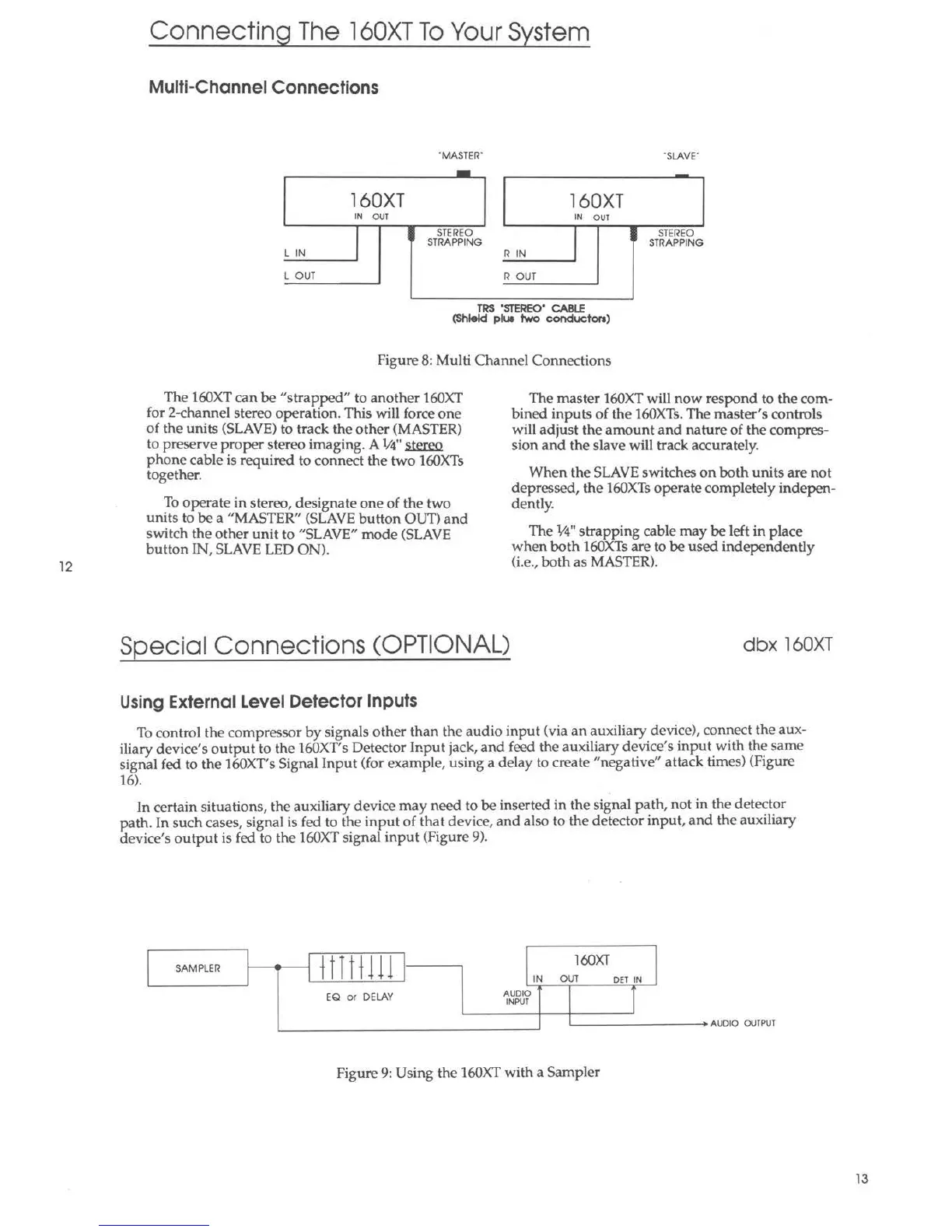
Figure 8: Multi Channel Connections
The 160XT can be "strapped" to another 160XT
for 2-channel stereo operation. This will force one
of the units (SLAVE) to track the other (MASTER)
to preserve proper stereo imaging. A ¼" stereo
phone cable is required to connect the two 160XTs
together.
To operate in stereo, designate one of the two
units to be a "MASTER" (SLAVE button OUT) and
switch the other unit to "SLAVE" mode (SLAVE
button IN, SLAVE LED ON).
The master 160XT will now respond to the com-
bined inputs of the 160XTs. The master's controls
will adjust the amount and nature of the compres-
sion and the slave will track accurately.
When the SLAVE switches on both units are not
depressed, the 160XTs operate completely indepen-
dently.
The 1/4" strapping cable may be left in place
when both 160XTs are to be used independently
(i.e., both as MASTER).
Special Connections (OPTIONAL)
dbx l60XT
Using External Level Detector Inputs
To control the compressor by signals other than the audio input (via an auxiliary device), connect the aux -
iliary device 's output to the 160XT's Detector Ir.put jack, and feed the auxiliary device's input with the same
signal fed to the 160XT's Signal Input (for example, using a delay to create "negative" attack time s) (Figure
16).
In certain situation s, the auxiliary device may need to be inserted in the signal path, not in the detector
path. In such cases, signal is fed to the input of that device, and also to the detector input, and the auxiliary
device's output is fed to the 160XT signa l input (Figure 9).
SAMPLER
t tit tll l
160XT
IN
OUT
DET IN
EQ or DELAY
AUDIO
INPUT
A UDIO OUTPUT
Figure 9: Using the 160XT with a Sampler
13



 To Next Page