30
Section 5
DriveRack
™
PA
This Application guide section is provided to offer suggested installation applications of the
DriveRack™ PA that will allow you to optimize peak performance of the units. Note that the
25 included application programs represent the extensive flexibility of the DriveRack™ units.
These applications can be used verbatim, or as sample reference guide templates for designing
countless audio applications.
Hardware
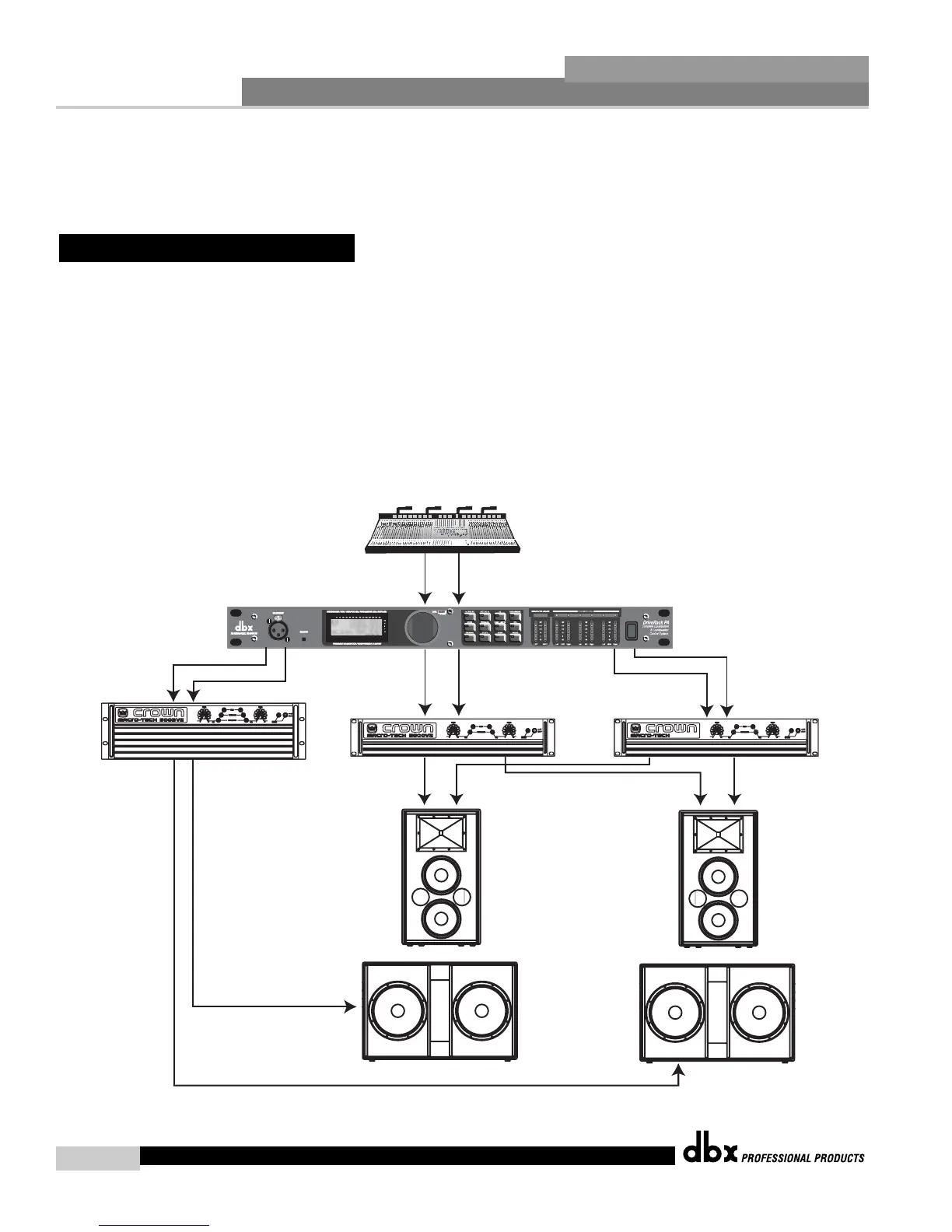
1. Connect the outputs from the mixer to the inputs of the DriveRack™.
2. Connect the outputs of the DriveRack™ PA and run to the selected speaker amplifier.
3. Make sure that the mixer and power amps are turned off prior to powering up the
DriveRack™ PA.
Software
1. From Program mode, select factory program #F10 (SR4702 2X6) as a template, or use the
Wizard to setup the specific program.
2. Once the program has been chosen, press the DATA wheel to load the program.
5.1 2X6 Crossover
DriveRack™ PA User Manual














 To Next Page