dCS Rossini CD / Network Player User Manual Software Issue 1.0x
February 2016
Rossini Player Manual v1_0x Page 12 English version
• For iPhone/iPod, download the dCS Rossini app from the App Store and install it.
• Connect the Player’s Network interface to the Ethernet network.
• Connect the control device (e.g. iPhone) to the network.
• Launch the dCS Rossini App.
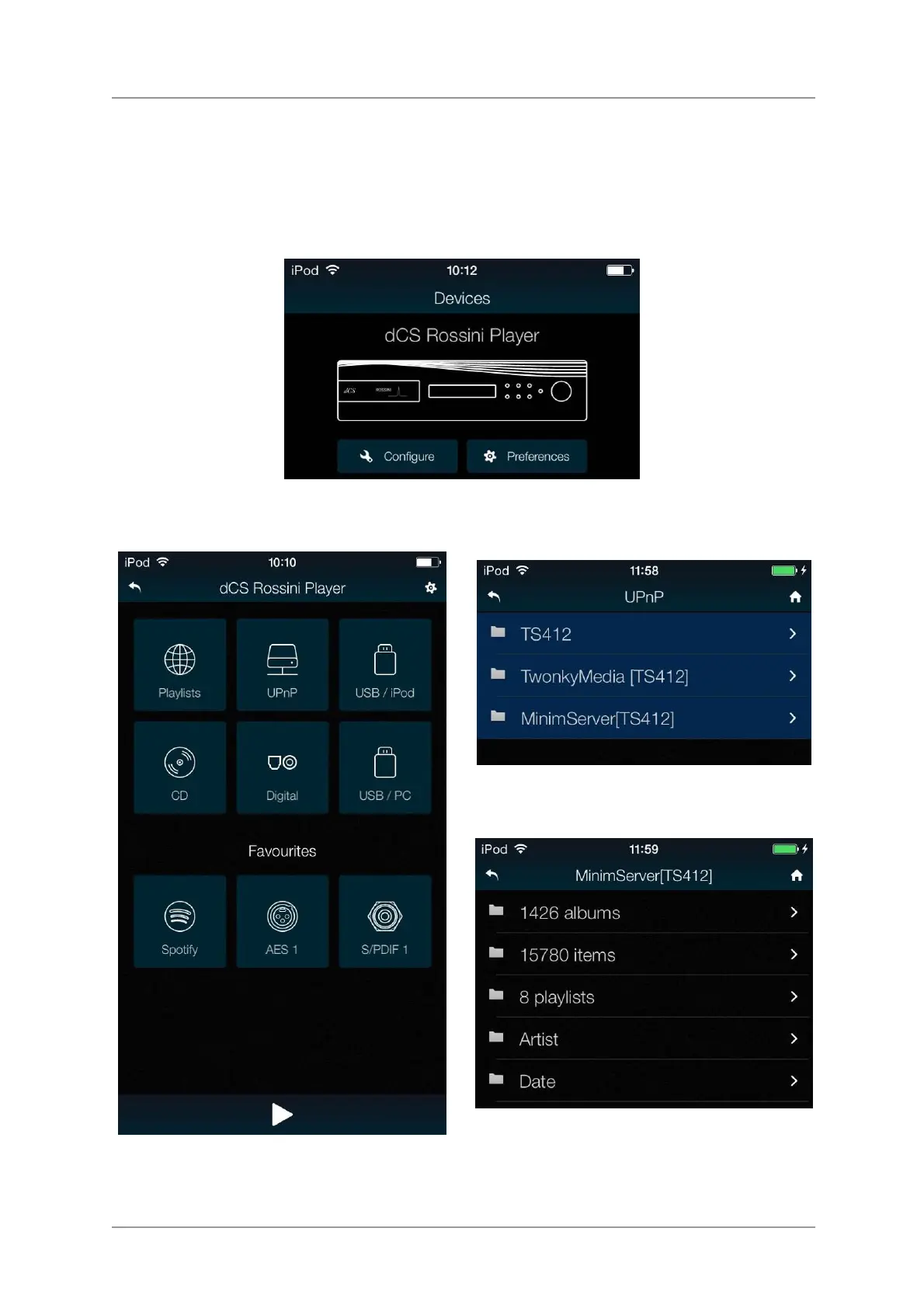
• The system will search for Rossini Players / DACs. Tap Configure to change the Rossini’s
settings, find information about the unit or use the test features. Tap Preferences to optimise the
unit for your use.
• Tap the picture of the Player to go to the
Home page.
Tap UPnP to select a NAS on the same
network. (Alternatively, tap USB/iPod to select
a flash drive connected to the USB2 port.)
• Tap on a server to select it.
• Select the browsing method (Artist, Album,
etc.).


 To Next Page