dCS Rossini CD / Network Player User Manual Software Issue 1.0x
February 2016
Rossini Player Manual v1_0x Page 28 English version
Using the Rossini Player and Clock with a Transport
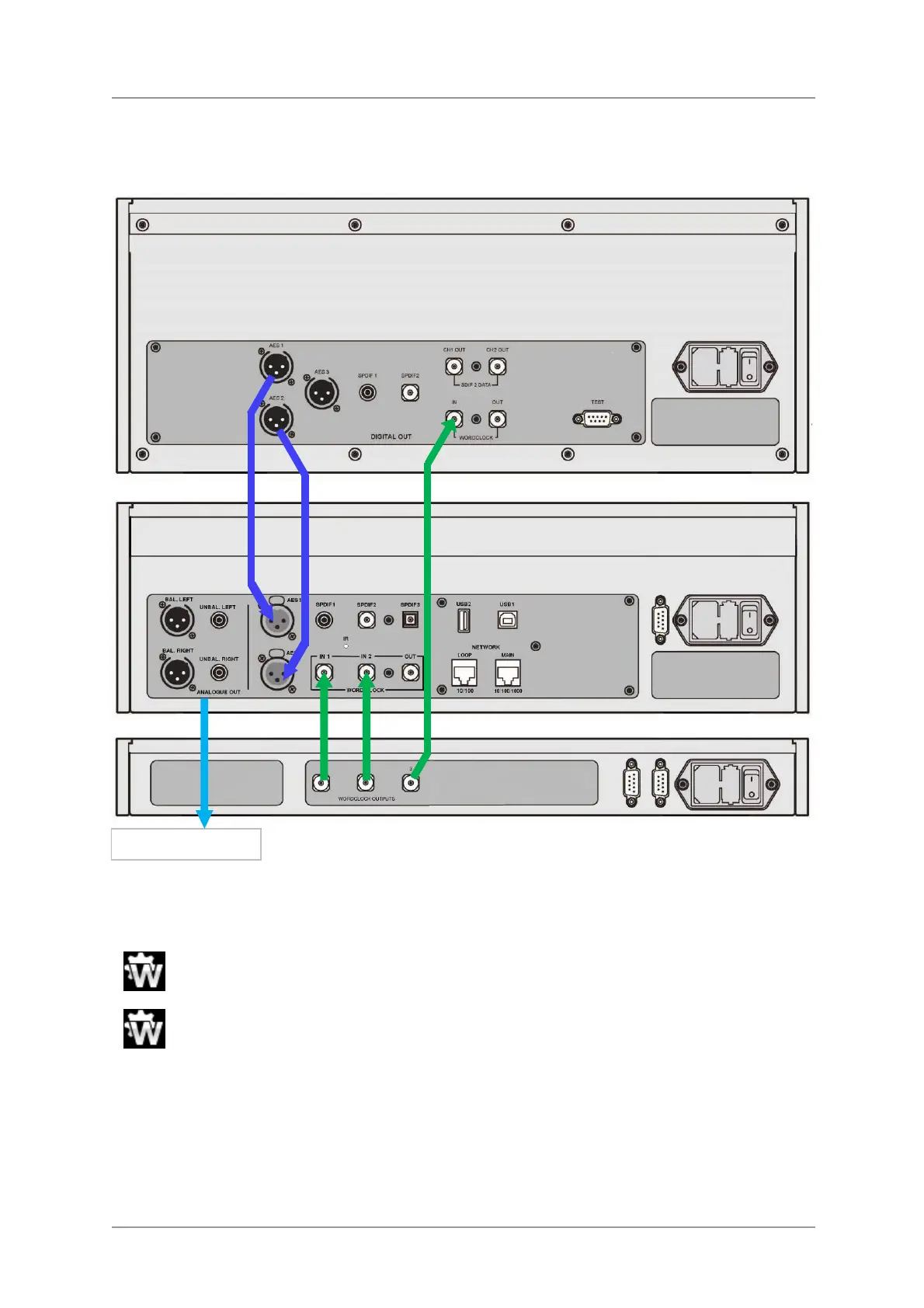
The Rossini Clock has a third output (normally fixed at 44.1kHz), which may be used to clock another
source, such as an SACD Transport.
Figure 7 – Using the Rossini Player and Clock with a Vivaldi Transport
• Connect the system as shown above.
• Use the Player’s Input button to select the input you want to use (AES1+2 in the example).
Set the Player’s Unit Settings > Sync Mode menu page to Word Clock 1-2 Auto mode.
The Vivaldi Transport will lock to the word clock and display this icon.
• If you want to listen to CD playback in native 16/44.1 format, connect one of the Transport’s SPDIF
outputs to the Player’s matching input. Select that input and set it to Master Mode also.
Now, sit back and enjoy the music.
When you have finished listening, you can either keep the Player warm by setting it to Sleep mode
(press the Power button briefly) or switch off (hold down the Power button until SWITCHING OFF is
displayed, then release).
Analogue outputs


 To Next Page