dCS Rossini CD / Network Player User Manual Software Issue 1.0x
February 2016
Rossini Player Manual v1_0x Page 31 English version
FRONT PANEL
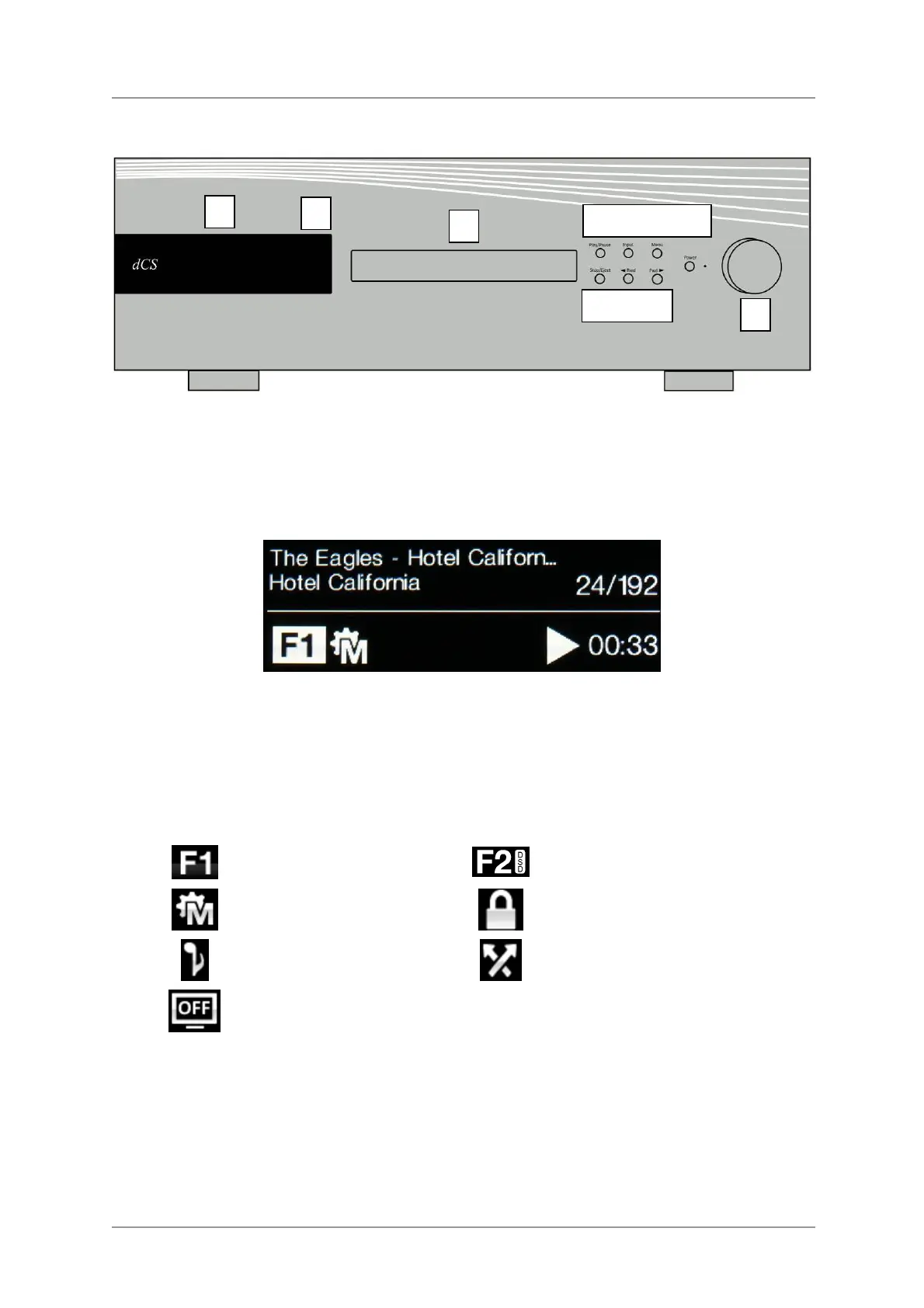
Figure 8 – Front panel
Display – Network Renderer
While streaming music from the Network or a USB flash drive, the display (A) is split into 4 areas:
-----------------------1------------------------ --------2--------
---------3---------- ---------4-----------
Area 1: The Artist, Album name & Track name or File name (this depends on the file type and the
metadata).
Area 2: The data rate - word length and sample rate for PCM, DSD or DSDx2.
Area 3: The status icons are displayed here.
Filter setting when receiving
PCM data.
Filter setting when receiving
DSD data.
The sync source
(see Sync Mode on page 43)
Settings Lock is on
Phase is inverted.
Channels are swapped.
The display is turned off.
Area 4: The Play or Pause icon and the track elapsed time.
When the volume is changed, the volume setting is displayed in large text for a few seconds.
A
C
H I J
D E F G
B


 To Next Page