dCS Rossini CD / Network Player User Manual Software Issue 1.0x
February 2016
Rossini Player Manual v1_0x Page 11 English version
STEP 2 – UPnP Network Connection
UPnP (Universal Plug and Play) is a set of protocols designed to allow consumer devices to interact
over a network. The Rossini Player complies with the UPnP AV protocol, enabling it to communicate
with other non-dCS devices, provided they also comply with this protocol.
A network streaming system is made up of three standard UPnP components: UPnP Control Point,
UPnP Media Renderer and UPnP Media Server. A system may consist of one or more of each of
these components. In such a system, all of the media (songs, tracks, videos etc) is stored on the
server. This storage device can be a NAS or a Computer. The control point (e.g. a tablet or smart
phone) requests the address of a particular item of media from the server (e.g. a NAS drive). It then
passes this address to the renderer (e.g. a Rossini Player) to play. The renderer directly retrieves the
item from the specified address on the server, decodes and plays the media as it arrives over the
network from the server.
Enabling network streaming of audio using a Rossini Player relies on the presence of standard
network infrastructure in your system. A description of the network will not be discussed in this manual
but at a minimum the following components are required for system setup: Router, Computer, Rossini
Player, NAS, Wireless access point (WAP), Wireless control point.
Please note that Ethernet cables are required to connect the devices and the NAS must have UPnP
media server software (e.g. Twonky, Asset, MinimServer) installed. If the UPnP control point is having
problems seeing the UPnP media server or the UPnP media renderer, you might need to disable
IGMP snooping in the router or enable UPnP discovery mode in the router or the NAS drive.
The dCS Rossini App is a control point application that will allow users to view / select available
renderers, view / select available media servers and browse / select / playback music via the Rossini
Player. The dCS Rossini App is currently available for iOS.
Compatibility
The Rossini Player and the App are compatible with:
• iPad 2 or later.
• iPhone 5 or later.
• iPod Touch 5
th
generation.
Rossini App version 1.0.3 has been tested with iOS8.
Basic set-up
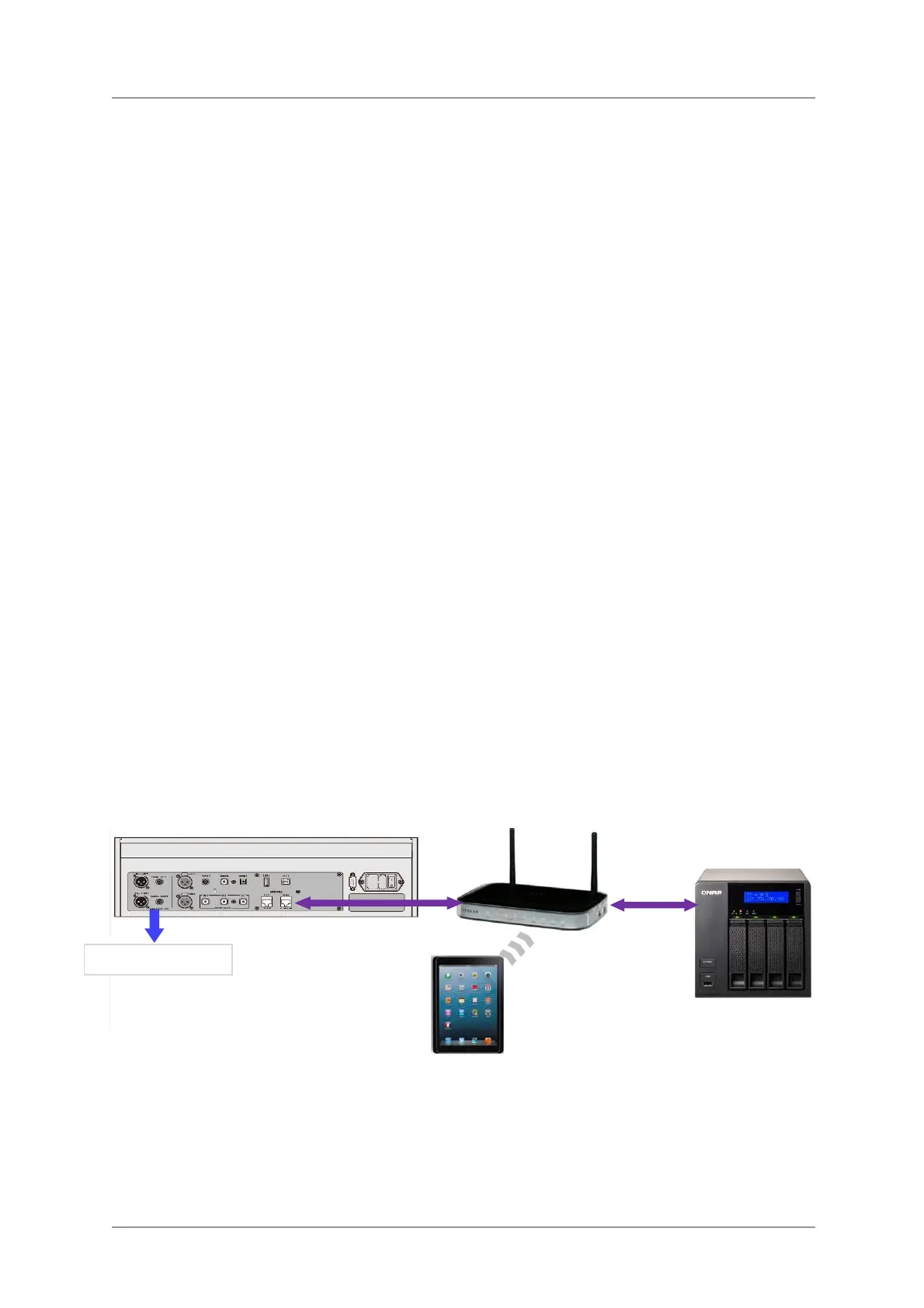
• Connect the system as shown below.
Figure 2 – Using a Rossini Player with a NAS
Router
NAS
Analogue outputs


 To Next Page