SN301-8CH
12
FUNCTION MENU
1. By right clicking the mouse.
To access items on this menu with the mouse move
the mouse pointer over the option to highlight
it and left click. To exit, move the pointer o the
menu and left click.
2. Pressing select on the remote.
To access items on this menu with the remote, use
the arrow keys to move and when the option is
highlighted, press select. To exit, press the
menu button.
3. Pressing the function button on DVR
To access items on this menu with the front of
the DVR use the navigational key pad on the
front of the DVR to move and when the option is
highlighted, press enter. To exit, press the
menu button.
The Function Menu can be accessed 3 dierent ways:
FUNCTION MENU
Function Menu
FUNCTION MENU OPTIONS
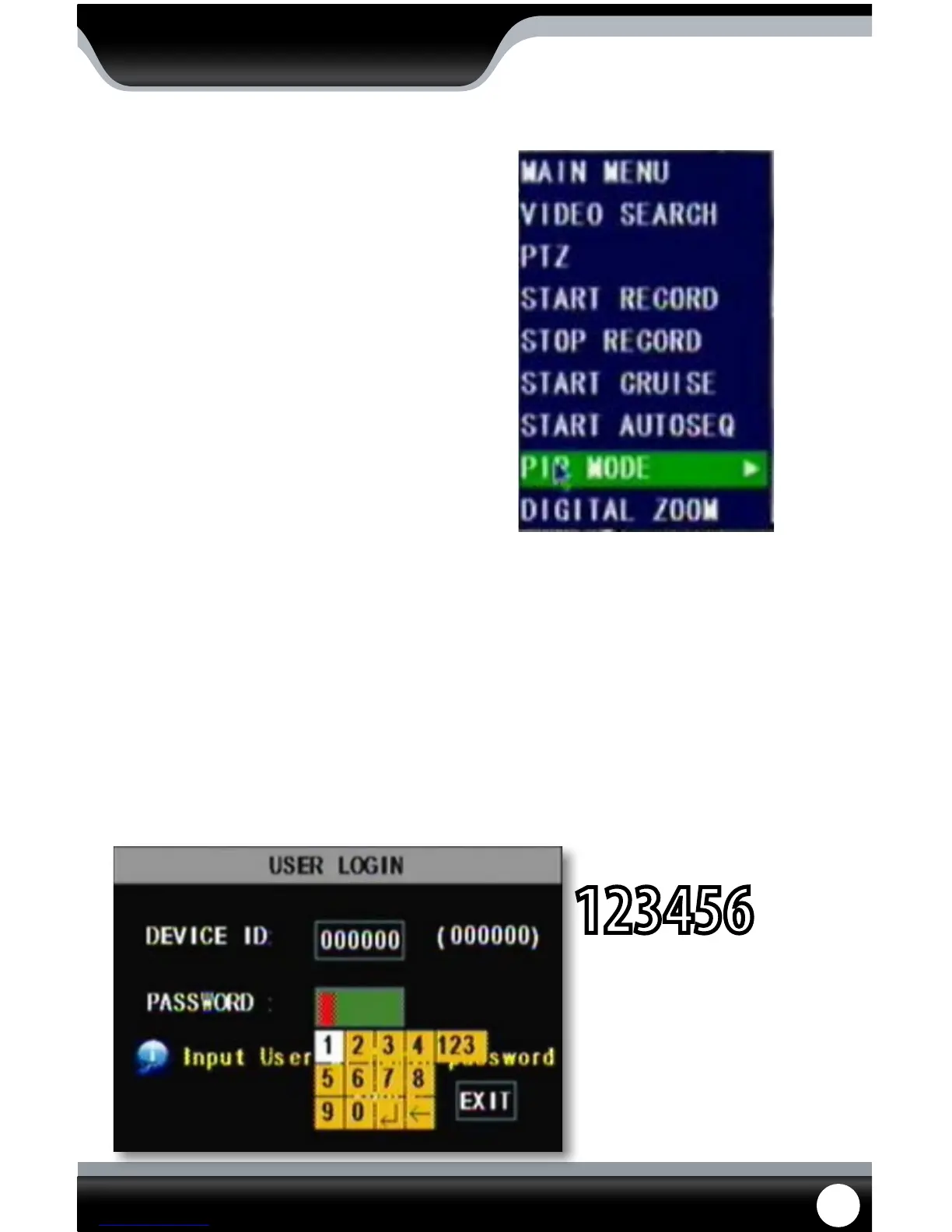
Main menu
Selecting this accesses the Main menu. If the menu is locked, you may need to unlock rst.
DEFAULT PASSWORD
123456
To unlock the menu:
Select the area the password will be typed and a digital number pad will appear.
Type in the password. The default password is 123456.
Once you have typed in the password, press the enter button to close the digital number pad.
Click “APPLY,” if the password is correct the main menu will open.
Unlock Menu Prompt



 To Next Page