SN301-8CH
30
MAIN MENU
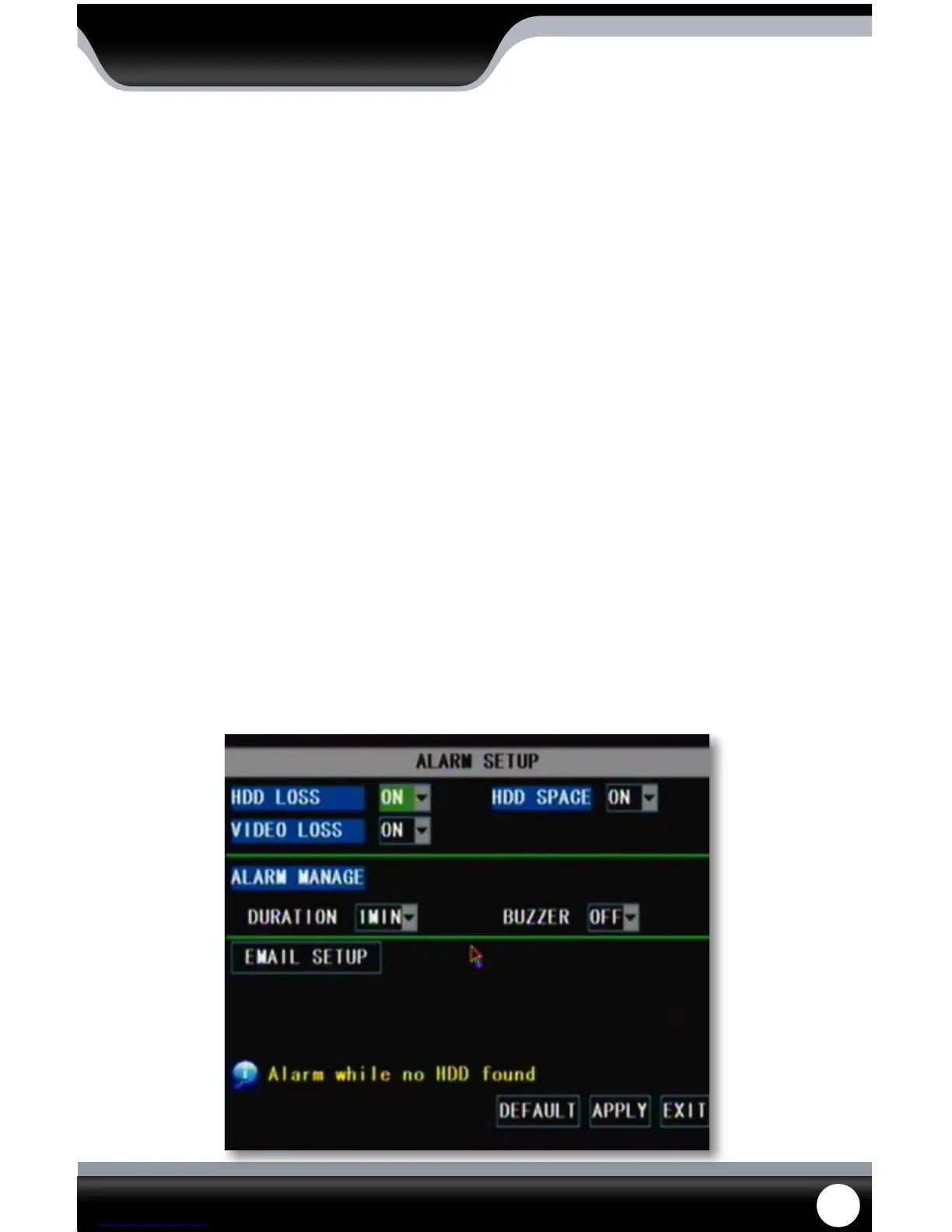
Alarm Setup
The alarm menu allows you to adjust for which alarms you would like set, adjust the time the internal buzzer will
sound for.
To turn on alarm:
1. In the alarm menu go to the alarm notication(s) you would like to be notied on (HDD LOSS, HDD SPACE, VIDEO
LOSS) and press select to open the drop down list.
2. Highlight and select “ON” for each function you would like to be notied on.
3. Next to the word “Buzzer”, highlight and select the drop down list and highlight and select if you would like the
alarm on or o.
4. Next to the word “Duration”, highlight and select how long you would like the alarm to sound for when the alarm
is triggered.
5. Once you have set the alarm settings to your liking, select “apply” to save your settings.
To set notications:
1. In the alarm menu go to the notication(s) you would like (HDD LOSS, HDD SPACE, VIDEO LOSS) and select to open
the drop down list.
2. Highlight and select “ON” for each function you would like to be notied on.
3. Highlight and select “apply” to save your settings.
• Now that you have set which alarms you would like to be notied on, you can set up your DVR to give an
audio alert when those alarms are triggered. You can also set up your DVR for an audio alert and/or email
alert when motion is detected.
Alarm Setup



 To Next Page