SN301-8CH
6
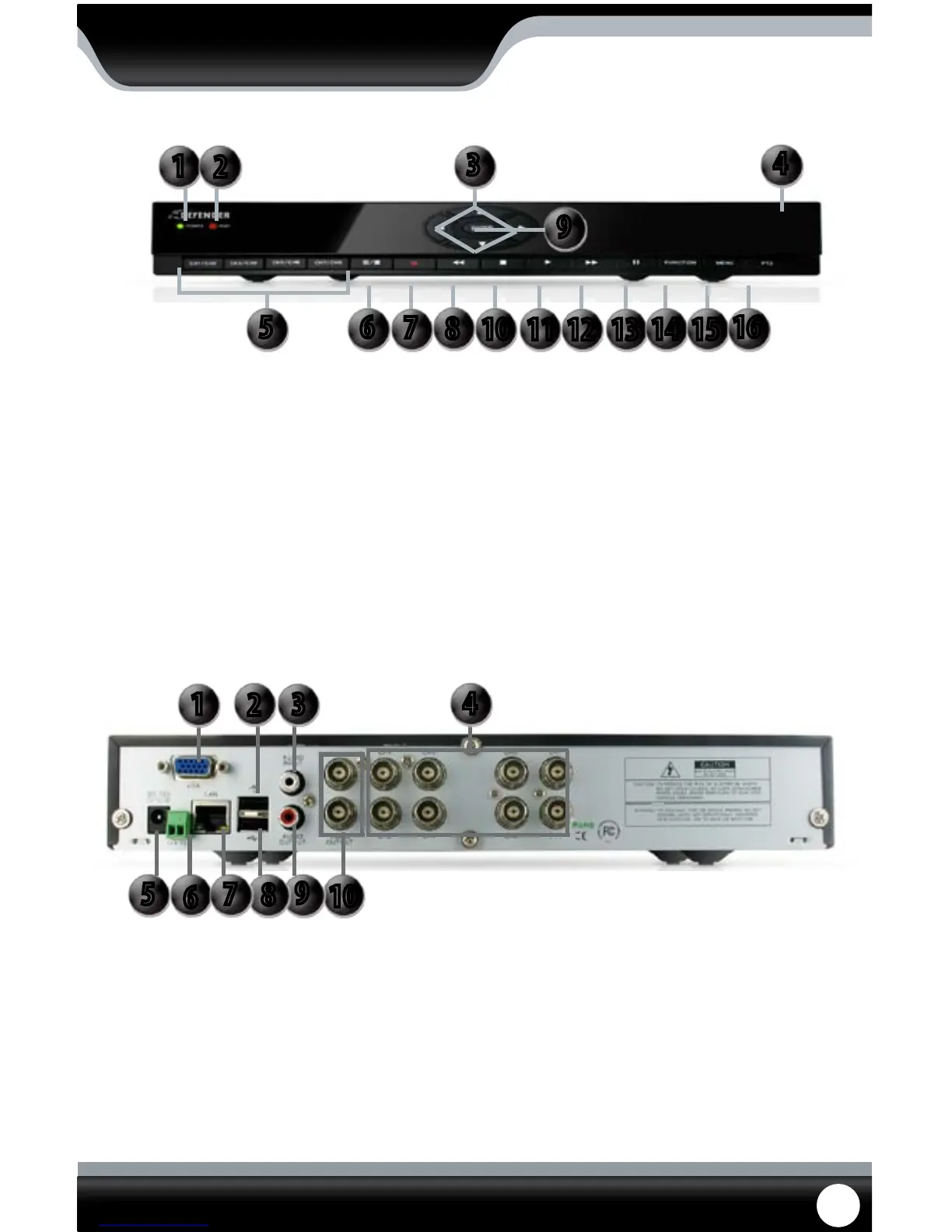
BUTTON AND CONNECTIONS
1. Power: Glows green when DVR is
turned on
2. HDD: Flashes when hard drive is
in use
3. Directional Keys: Used to navigate through
the menu
4. IR Sensor: For the remote control
5. Channel Selection: Selects channels to view. Press
once to view rst channel
listed and a second time to
view second channel listed
6. Screen View: Press once to view quad screen
and twice to view eight
7. Record: Press this to prompt
manual record
8. Rewind: Rewinds playback footage
9. Enter Button: Selection button
10. Stop: Stops playback footage
11. Play: Plays playback footage
12. Fast Forward: Fast forwards playback footage
13. Pause: Pauses playback footage
14. Function: Opens up sub menu
15. Menu: Opens up main menu
16. PTZ: Opens up PTZ control buttons
DVR FRONT
1. VGA: Connects to VGA monitor
2. Mouse: Connect USB mouse here
(before power up)
3. Audio Input: Connects to a microphone
and/or audio supported
camera (not included)
4. Camera Connect: Camera connections for
eight cameras
5. Power Connection: Connect DVR to power source
with this connection
6. PTZ: Connects to two wire
PTZ camera
7. LAN Connection: Connects to router
8. USB Connection: Connect USB drive here to
backup footage
9. Audio Output: Connects to speaker/
audio input
10. Video Output: Allows you to attach two
dierent monitors
DVR BACK
5
10
9
8
6
7
1
2
3
4
5 6
7
8
10
11
12 13
14
15
16
9
3
4
1
2



 To Next Page