7 User Interface 16
7 USER INTERFACE
This and the following chapters inform you how to use the AUSTROMAT D4.
The menu control system is designed to display warnings or messages on the screen
when you do something wrong or make incorrect entries. If you have experience with
graphic user interfaces (such as Windows™ on a PC), you can skip the section entitled
FIRST STEPS
7.1 FIRST STEPS
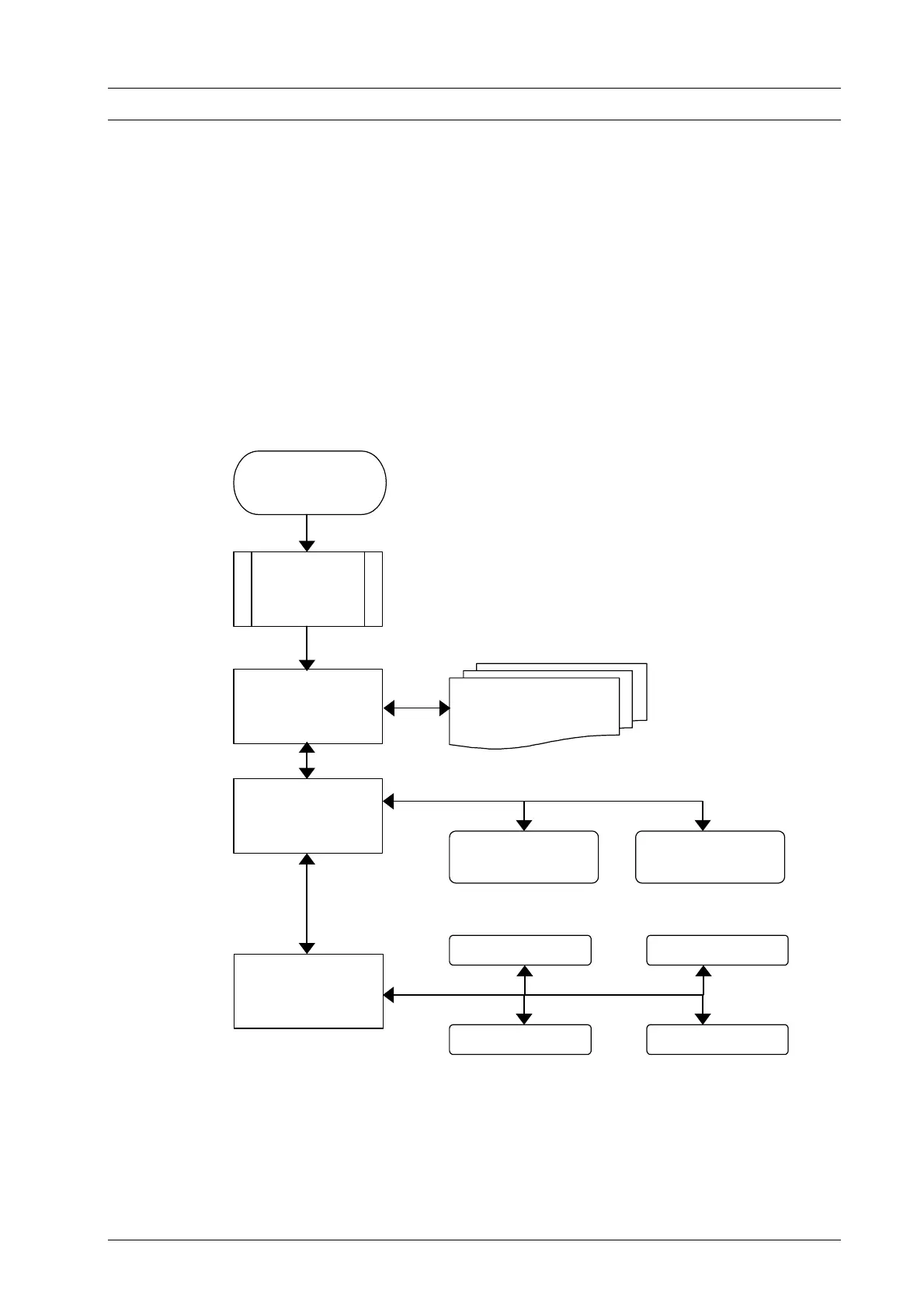
The basic operating mode of the menu control system is shown in Fig.5. This diagram
will help familiarize you with the operation of the device.
Figure 5
Operating diagram
After the oven is turned on, you are initially shown information on the device software
and device settings.
Then you automatically go to Program Manager menu. Here you can select firing
programs and administer the memories (i.e., delete or copy firing programs).
he most important menu for the user, the Program Display, is accessed from the
Program Manager. This shows you the firing progress of the individual programs, and
Switching on
Equipment
Information
Program Manager
Program Display
Setup
Managing
Programs
Program Editor Program Procedure
Device Settings
Maintenance Programs
Data Recording Additional Functions
DEKEMA Dental-Keramiköfen GmbH, AUSTROMAT
®
D4, Version 3, 2006


 To Next Page