7 User Interface 30
Please note the restricted options of the Program Manager when the general code is
activated (see Section 7.6.4).
7.5.1 INDIVIDUAL PROGRAMS – STANDARD
When creating an individual program, you can choose between the STANDARD and
PROFESSIONAL entry masks. STANDARD mode allows faster and easier
programming. Table 1 lists the permissible values for the individual program steps in
STANDARD mode.
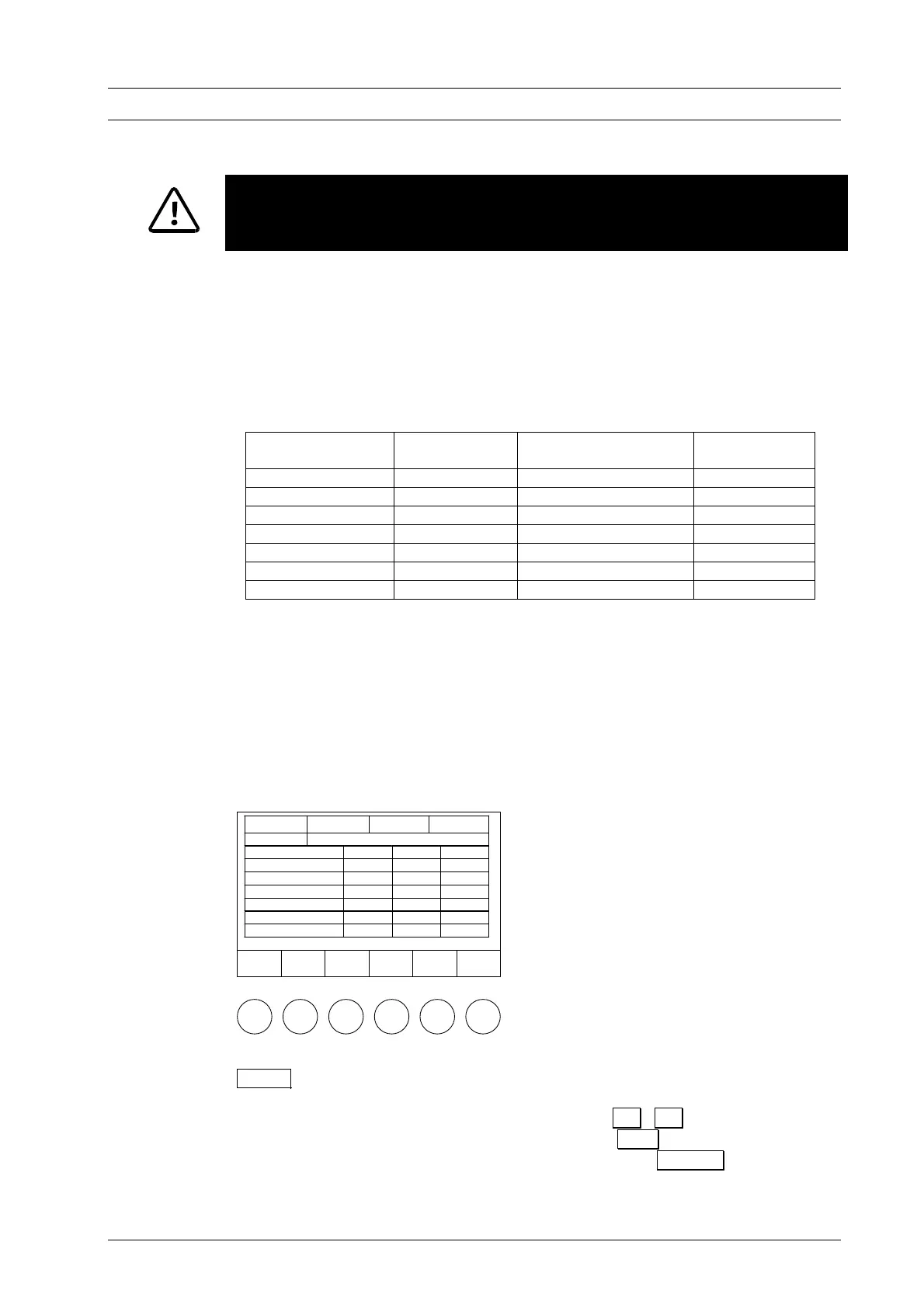
Table 1: Permissible range of values of program steps in Standard mode.
Program Step Temperature Temperature rise
°C/min
Holding period
min
Drying 0:00 – 9:59
Closing 0:00 – 9:59
Preheating 100 – 700 0:00 – 9:59
Firing temperature 100 – 1200 2 – 99, MAX
1)
0:00 – 99:59
Cooling
2) 4)
0.00 – 9:59
Relaxing
3) 4)
0:00 – 9:59
Vacuum
5)
level in %
6)
0:00 – 99:59
1) maximum rise for input 0°C/min (see technical specifications)
2) cooling temperature predefined as 90 % of firing temperature
3) relaxation temperature predefined as 65 % of firing temperature
4) cooling / relaxation temperature is activated as quickly as possible (opening of firing chamber)
5) venting (vacuum off) when firing temperature is reached
6) 0 % = pump off; 100 % = continuous pump operation
The permissible values for VAC level are divided in steps of ten from 0 % to 100%.
The function bar in the Program Editor (Fig. 19) provides the following options.
Figure 19
Save
Å
Position
Æ
Position
Program
Start
Cancel
Tc 550°C # 123456789 00:12:22
102
Drying -:--
Closing -:--
Preheating ----°C -:--
Firing temperature ----°C ---°C/min --:--
Cooling -:--
Relief -:--
VAC (level) --- %
Save The program is saved after editing has been completed. The
Save as menu is displayed. Select the number under which the
program is to be saved ( ↓ ↑ , "+" "-", input via
alphanumeric keypad). Press O.K. to save the program and
access the Program Display; press Cancel to abort saving
and return to the Program Editor. If the selected program
number is already allocated, a prompt is displayed asking
DEKEMA Dental-Keramiköfen GmbH, AUSTROMAT
®
D4, Version 3, 2006


 To Next Page