7 User Interface 33
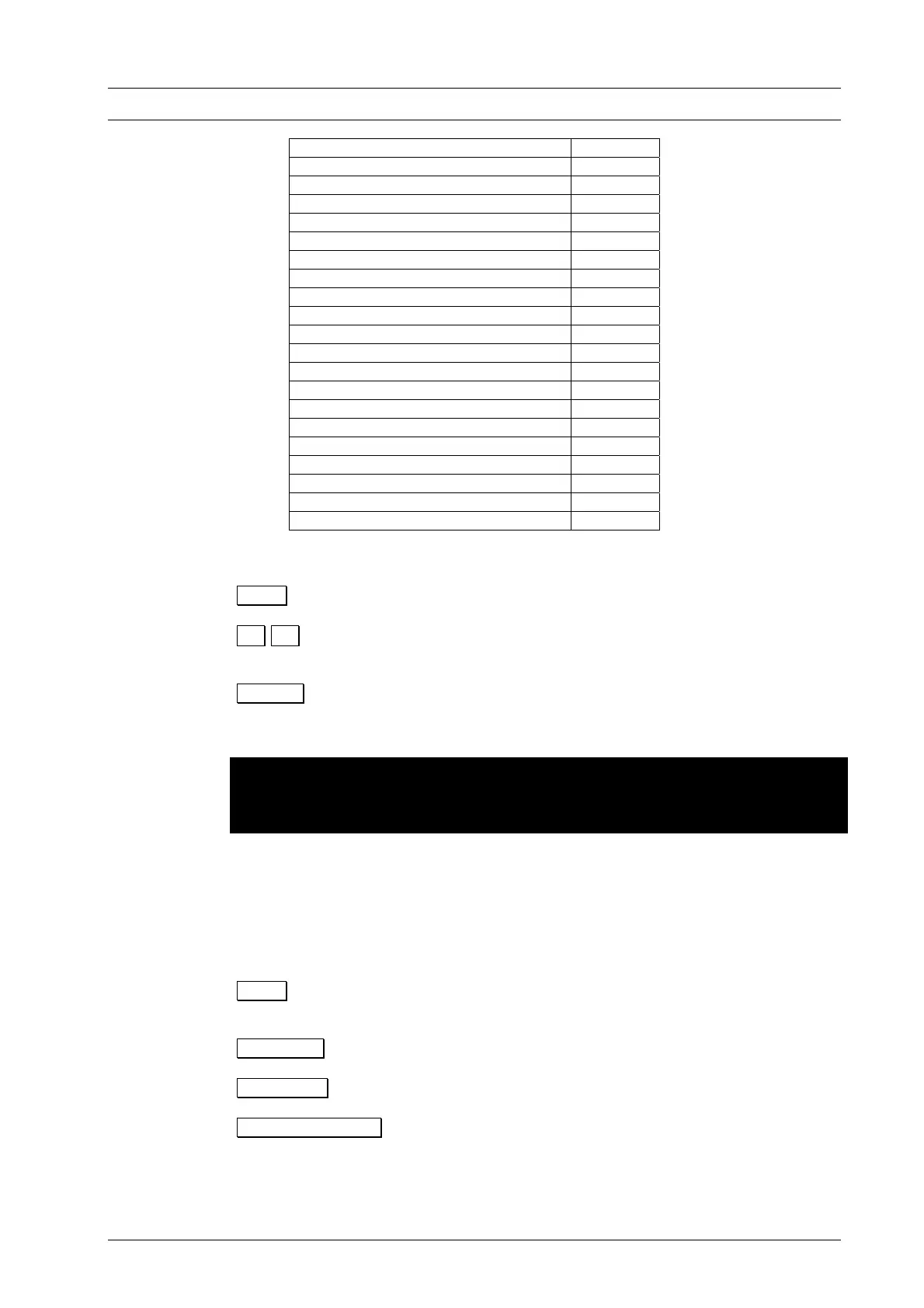
Save data to computer 7.6.3
ID 7.6.4
Print all programs 7.6.4
Cleaning firing 7.6.2
Temperature calibration 7.6.2
Check program 7.6.2
Diagnosis data 7.6.2
Leak test 7.6.2
General code 7.6.4
Set acoustic signal 7.6.1
Language 7.6.1
Data transfer with memory module 7.6.3
Update set programs 7.6.3
°C / °F switchover 7.6.1
Screen saver 7.6.4
Set date and time 7.6.1
Changing battery 7.6.2
Service functions 7.6.4
Long-term readiness 7.6.2
Drying temperature 7.6.2
Safe lift position 7.6.1
In the Setup menu, the function bar provides the following options:
O.K. Open the menu item on light background (highlighted).
↓ ↑ Select a menu item. The selected function is displayed on a light
background.
Cancel Exit the Setup menu and return to the previous menu (e.g.
Program Display).
Please note the restricted options of the Setup menu when the general code is
activated (Section 7.6.4)
7.6.1 FURNACE SETTINGS
Set display contrast
A contrast test picture is displayed on the screen. The function bar offers the following
options:
O.K. Confirms screen contrast setting and returns to the Setup
menu.
Contrast - Reduce contrast one step.
Contrast + Increase contrast one step.
Contrast Standard Set contrast to default value.
Set acoustic signal
There are 5 acoustic signals to choose from, consisting of individual tones whose
duration can be varied from 0 and 9 or 1 to 9. The active signal is displayed on a
DEKEMA Dental-Keramiköfen GmbH, AUSTROMAT
®
D4, Version 3, 2006


 To Next Page