7 User Interface 20
Specifically, the vacuum entry line has the following functions: After preheating, before
the temperature rises temperature 1 begins, a maximum vacuum is generated (VAC
ected from the Program Display menu:
level 100 %). When a temperature of 980°C has been reached, the furnace is
immediately vented (VAC off: 980°C), as no holding time has been entered for vacuum
(VAC hold: empty entry).
The following functions can be sel
Program Start Starts a firing program.
Program Edit Opens the Program Editor (Section 7.5).
Program Manag Opens the Program Manager (Section 7.2er ).
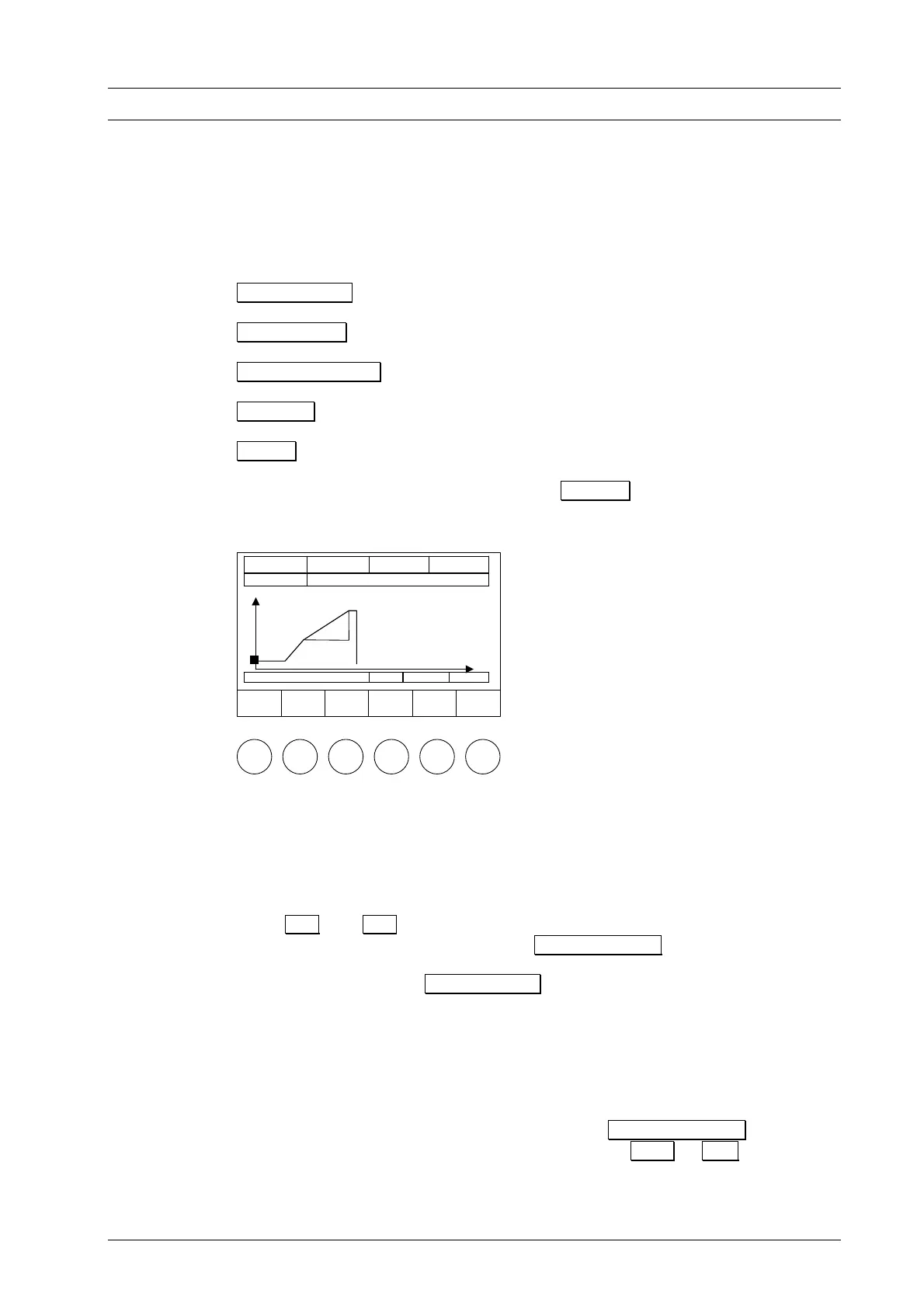
Diagram Displays a diagram of the time-line of the firing program.
Setup Opens the Setup menu (Section 7.6).
The followi 0) is shown for the Diagram ng display (Fig. 1
zontal axis (min) and the firing temperature is
n the vertical axis (°C).
he time-line of the firing program is displayed by the temperature curve, and the
current program step are displayed in the line below
Figure 10
Program
Start
Å
Position
Æ
Position
Program
Display
Setup
Tc 550°C # 123456789 00:12:22
011 Wash firing
°C
980°C
550°C
min
Drying
04:00
The firing time is indicated on the hori
indicated o
T
vacuum curve indicated in a different color. The current program step is indicated by a
square marker. The values of the
the diagram (e.g. Drying, 04:00 min holding time).
With Å and Æ you can move the marker along the program time-line and
browse through the individual steps. Use Program Display to return to text display
mode. In this way you can switch between text and graphic display. You can start the
firing program by pressing Program Start both in text mode and graphic mode.
If the firing chamber is closed when the firing program begins, the lift automatically
moves down to the lowest position. Only then does the actual program commence. In
text display mode, the current program step being processed is displayed by a flashing
input field. At the same time, the time display provides information about the expected
remaining duration of the program. The current program step is indicated in the diagram
by the position of a vertical bar that moves to the right as the program progresses, and
in the information line below the diagram.
If you wish to abort the program prematurely, press Program Cancel . You will be
asked whether you really want to abort the program ( yes or no ). This safety
query is displayed on the screen for approx. 10 s. If you do not press a function key
within this time, the furnace automatically returns to processing the program. However,
the program is not interrupted during this time, but continues to run. It is possible to
DEKEMA Dental-Keramiköfen GmbH, AUSTROMAT
®
D4, Version 3, 2006


 To Next Page