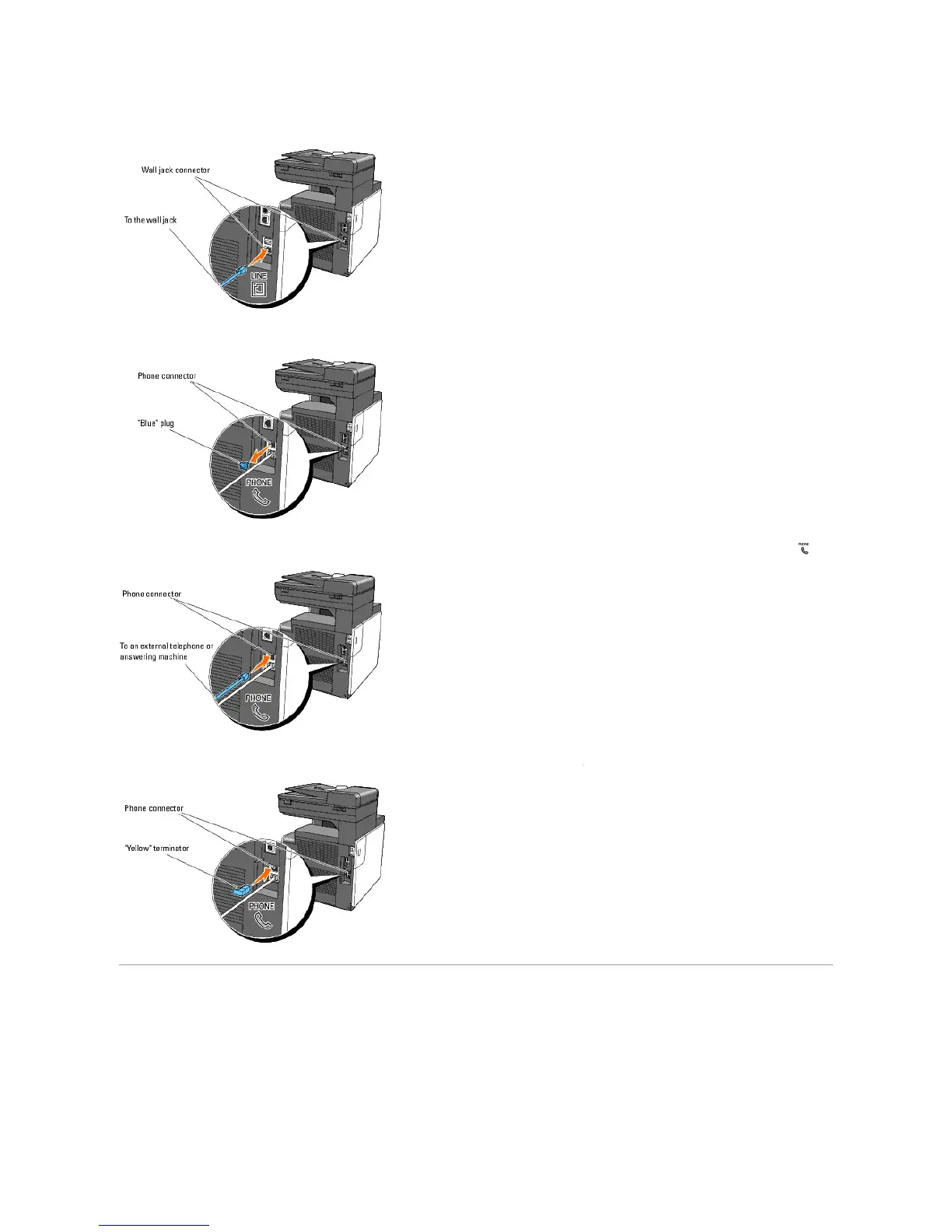
1. Plug one end of a telephone line cord into the wall jack connector and the other end into an active wall jack.
2. Remove the "Blue" plug from the phone connector.
3. To connect a telephone and/or answering machine to your printer, plug the telephone or answering machine line cord into the phone connector ( ).
If the phone communication is serial in your country (such as Germany, Sweden, Denmark, Austria, Belgium, Italy, France and Switzerland), and that you
are supplied with a "Yellow" terminator, insert the "Yellow" terminator into the phone connector ( ).
Using the RESET Button
Your printer is supplied with an electric leakage detector, which prevents an electric shock or fire due to an electric leakage by automatically cutting circuits
inside the printer.
When an electric leakage is detected, the RESET button is tripped. In this case, press the RESET button to turn the printer back on. If the RESET button is
tripped again after you press the RESET button, contact Dell.















 To Next Page