Setting Up and Using Your Computer 21
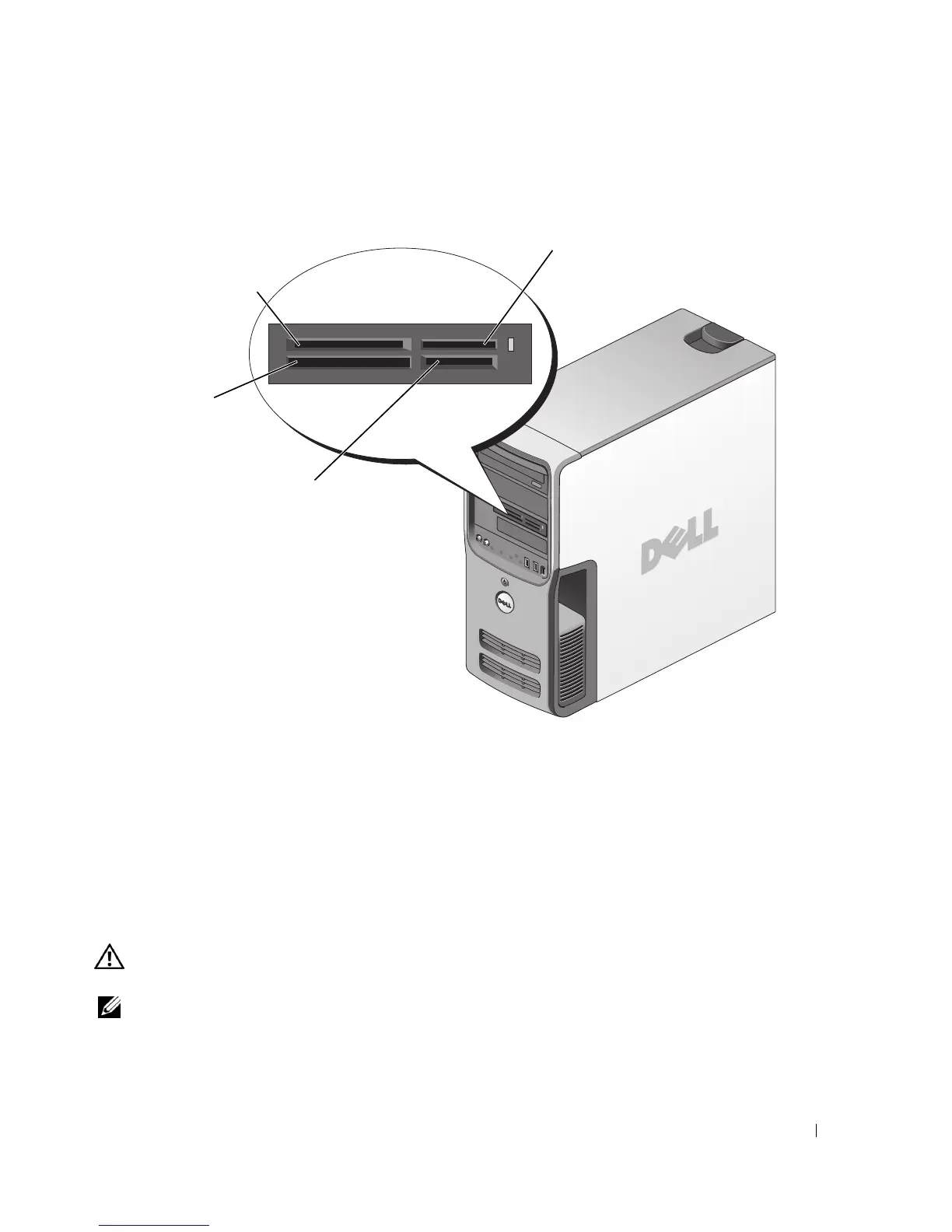
For information on installing a Media Card Reader, see "Installing a Media Card Reader" on
page 104.
To use the Media Card Reader:
1
Check the media or card to determine the proper orientation for insertion.
2
Slide the media or card into the appropriate slot until it is completely seated in the connector.
If you encounter resistance, do not force the media or card. Check the card orientation and
try again.
Connecting Two Monitors
CAUTION: Before you begin any of the procedures in this section, follow the safety instructions in the
Product Information Guide.
NOTE: If you are connecting two monitors that have VGA connectors, you must have the optional DVI
adapter. If you are connecting two flat-panel monitors, at least one of them must have a VGA connector.
If you are connecting a television, you may connect only one monitor (VGA or DVI) in addition to the
television.
xD-Picture Card
and SmartMedia (SMC)
Memory Stick
(MS/MS Pro)
SecureDigital Card (SD)/
MultiMediaCard (MMC)
CompactFlash Type I
and II (CF I/II) and
MicroDrive Card











 To Next Page