94 Removing and Installing Parts
www.dell.com | support.dell.com
General Installation Guidelines
Connect hard drives to the connector labeled "SATA" and connect CD/DVD drives to the
connector labeled “IDE".
Serial ATA hard drives should be connected to the connector labeled SATA on the system board.
IDE CD/DVD drives should be connected to the connector labeled IDE.
When connecting an IDE cable, ensure you align the colored stripe with the pin 1 connector.
When disconnecting an IDE cable, grasp the colored pull tab and pull until the connector
detaches.
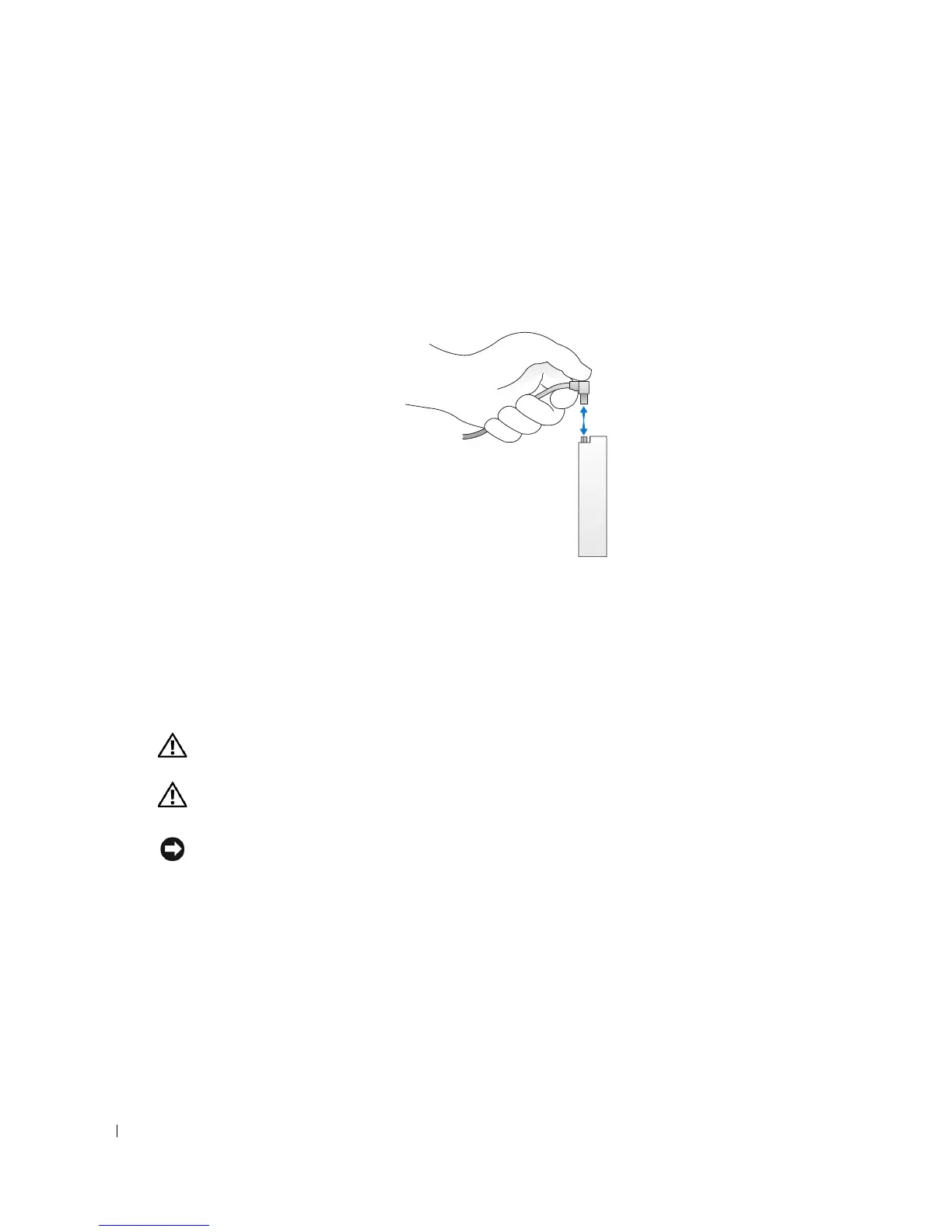
When connecting and disconnecting a serial ATA cable, hold the cable by the connector at each
end.
Hard Drive
CAUTION: Before you begin any of the procedures in this section, follow the safety instructions in the
Product Information Guide.
CAUTION: To guard against electrical shock, always unplug your computer from the electrical outlet
before opening the cover.
NOTICE: To avoid damage to the drive, do not set it on a hard surface. Instead, set the drive on a
surface, such as a foam pad, that will sufficiently cushion it.
1
If you are replacing a hard drive that contains data you want to keep, back up your files before
you begin this procedure.
2
Follow the procedures in "Before You Begin" on page 63.
3
Remove the computer cover (see page 68).











 To Next Page