1. táblázat: Screw list (folytatódik)
Component Secured to Screw type Quantity Screw image
Front I/O-panel Front bezel M3x4 4
System board Chassis #6-32 8
Bal oldali burkolat
Removing the left-side cover
Prerequisites
1. Follow the procedure in Before working inside your computer.
About this task
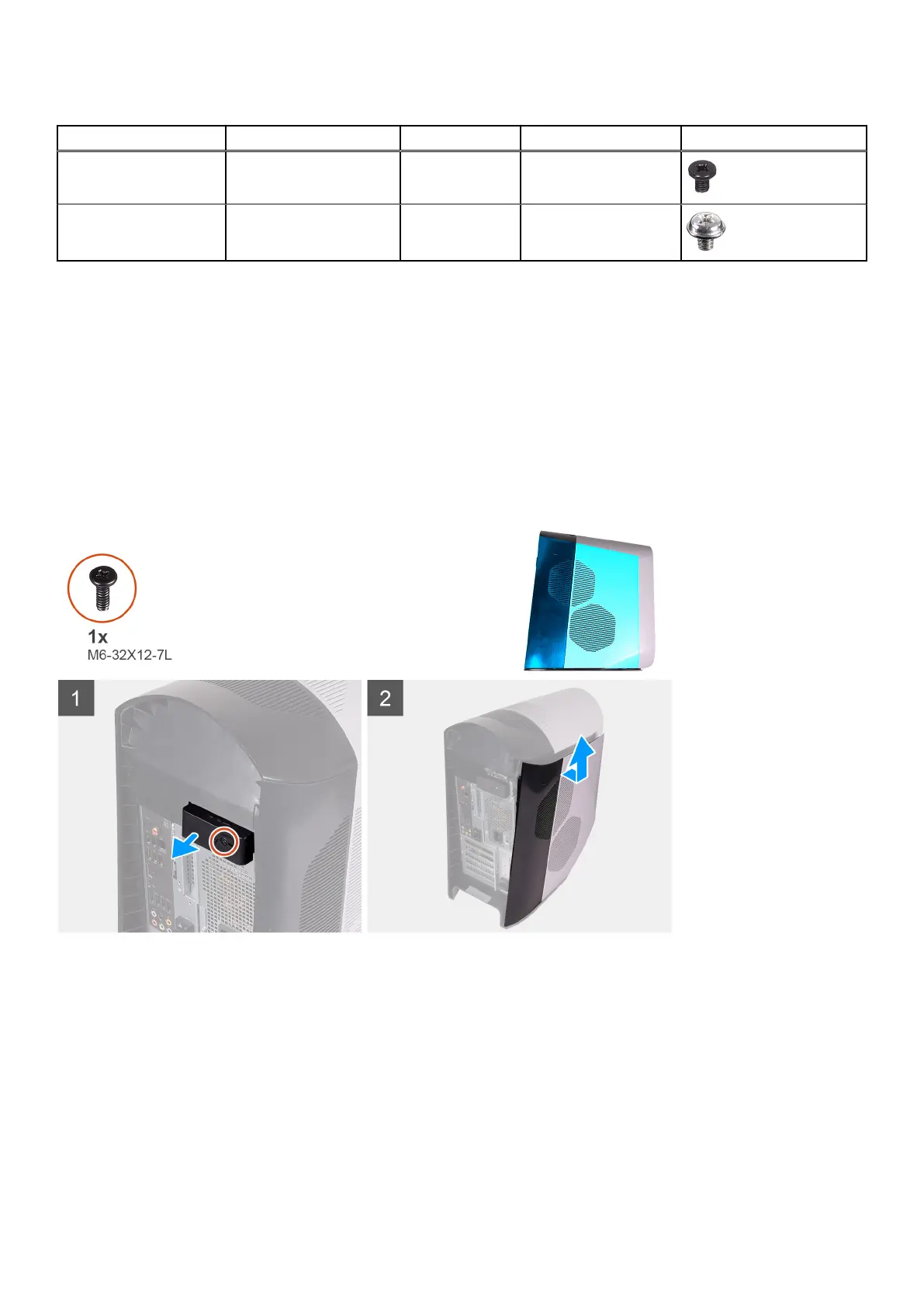
The following images indicate the location of the left-side cover and provides a visual representation of the removal procedure.
Steps
1. Remove the screw (6-32x12-7L) that secures the side-cover release latch to the chassis.
2. Pull the side-cover release latch to release the left-side cover away from the chassis.
3. Lift the left-side panel from the chassis.
Installing the left-side cover
Prerequisites
Ha valamelyik alkatrész cseréjére van szükség, távolítsa el az eredetileg beszerelt alkatrészt, és ezt követően végezze el a
beszerelési eljárást.
Alkatrészek eltávolítása és beszerelése
13











 To Next Page