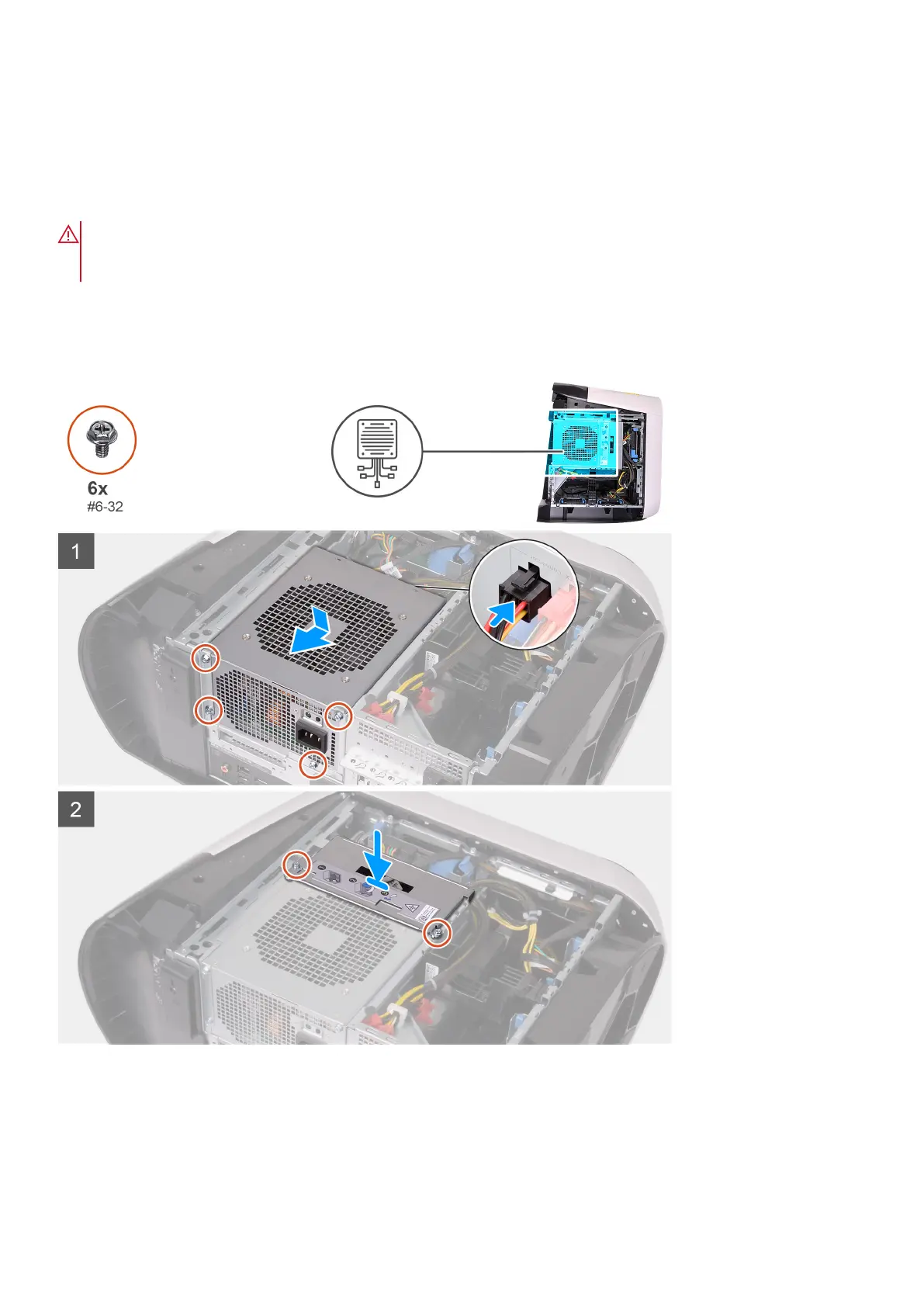
Installing the 1000 W power-supply unit
Prerequisites
Ha valamelyik alkatrész cseréjére van szükség, távolítsa el az eredetileg beszerelt alkatrészt, és ezt követően végezze el a
beszerelési eljárást.
WARNING: A tápegység hátsó részén található kábeleknél és nyílásoknál színkódok jelzik a különböző
teljesítményeket. A megfelelő kábeleket a megfelelő csatlakozókba dugja be. Ha nem így tesz, az a tápegység
és/vagy az alkatrészek károsodásához vezethet.
About this task
The following images indicate the location of the power-supply unit and provides a visual representation of the installation
procedure.
Steps
1. Place the power supply on the chassis.
2. Align the screw holes on the power-supply unit with the screw holes on the chassis.
3. Replace the four screws (#6-32) that secure the power-supply unit to the chassis.
4. Connect all the power cables to the power-supply unit.
34
Alkatrészek eltávolítása és beszerelése











 To Next Page