NOTE: Az eltávolítás során jegyezze meg a kábelek elvezetését, hogy a tápegység visszaszerelését követően megfelelően
tudja őket visszahelyezni.
About this task
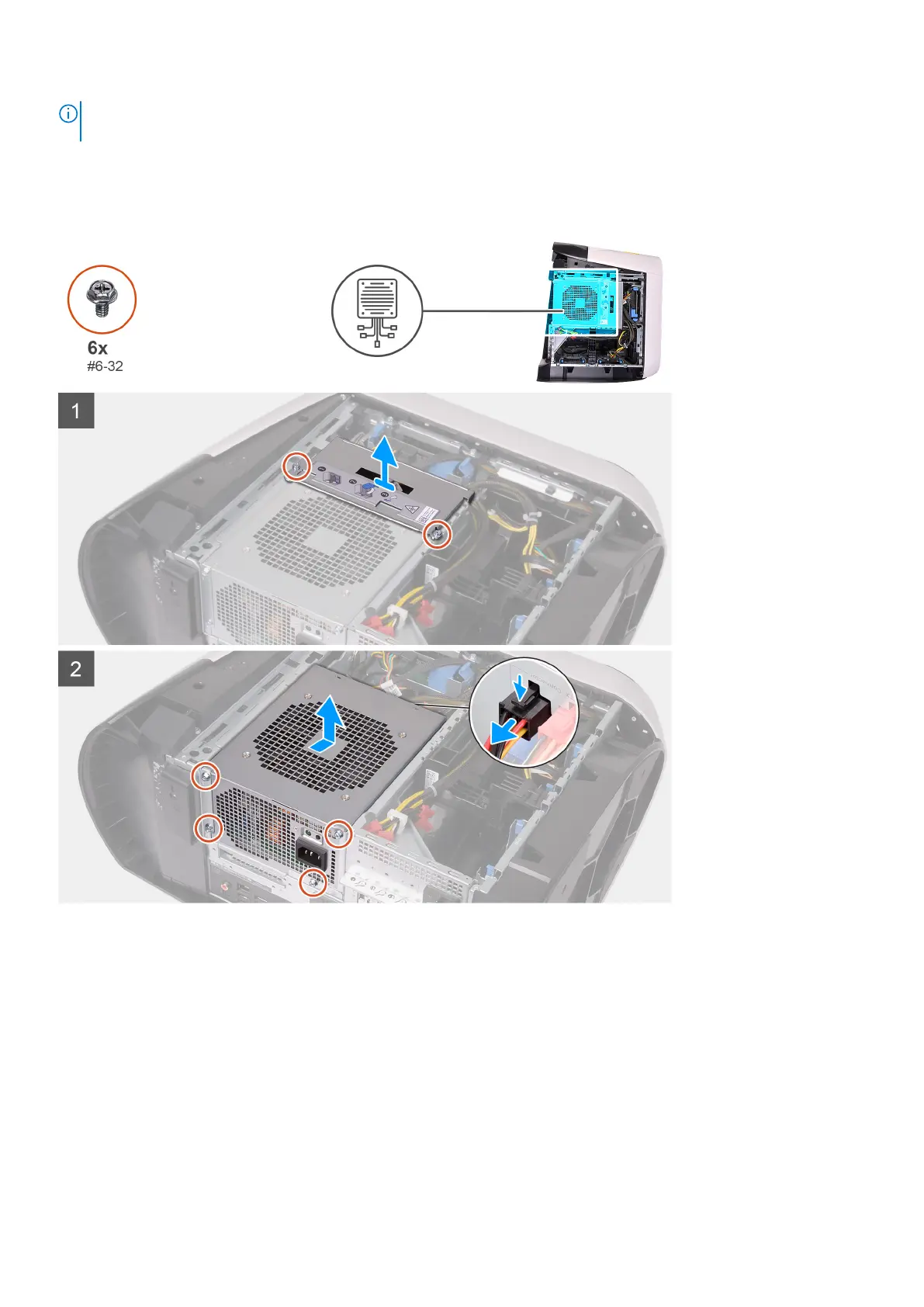
The following images indicate the location of the power-supply unit and provides a visual representation of the removal
procedure.
Steps
1. Remove the two screws (#6-32) that secure the power-supply unit bracket to the power-supply unit cage.
2. Lift the power-supply unit bracket off the power-supply unit cage.
3. Slide the power-supply unit cage release latches to the unlock position.
4. Lift the power-supply unit cage and rotate the power-supply unit cage away from the chassis.
5. Press the releasing clip on the power-cable connectors and disconnect all the power cables from the power-supply unit.
6. Remove the four screws (#6-32) that secure the power-supply unit to the chassis.
7. Slide and lift the power-supply unit, along with the cables, off the chassis.
Alkatrészek eltávolítása és beszerelése
33











 To Next Page