Setting up the monitor | 19
Setting up the monitor
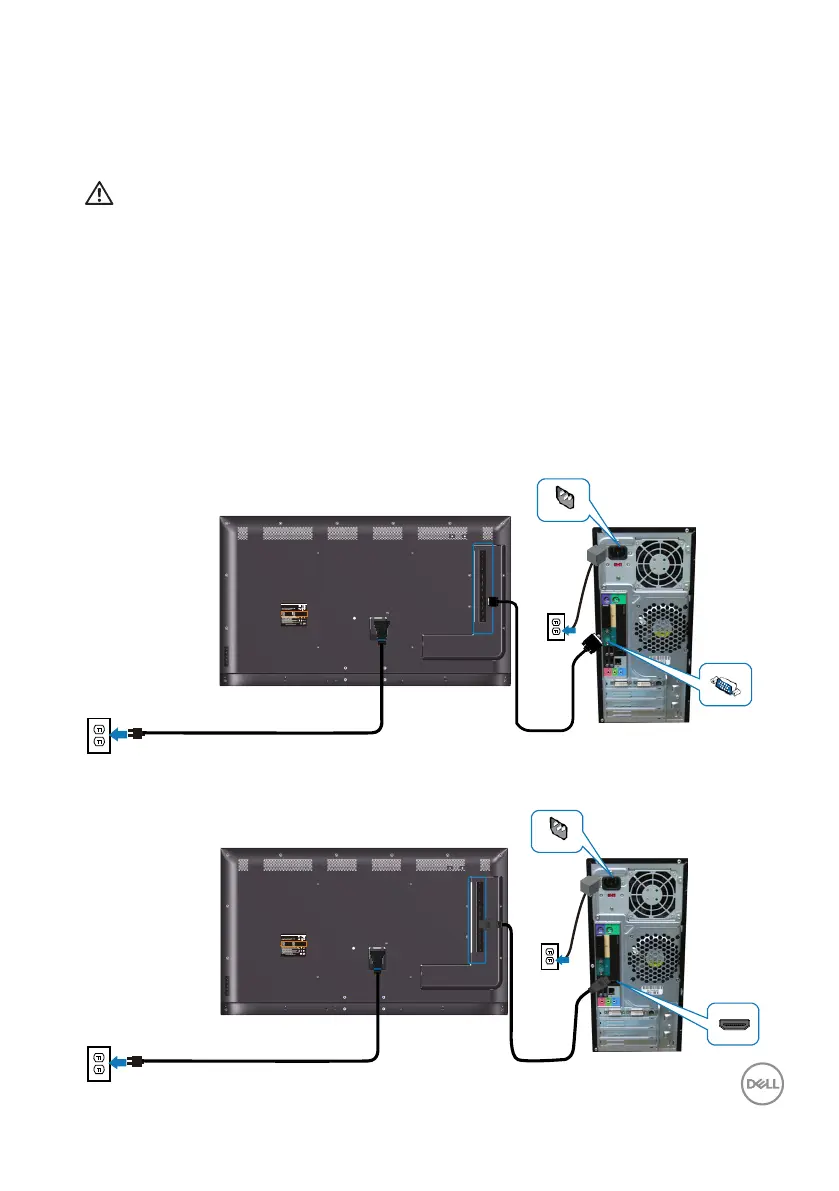
Connecting your monitor
WARNING: Before you begin any of the procedures in this section,
follow the Safety instructions.
To connect your monitor to the computer:
1.
Turn off your computer.
2.
Connect the HDMI/DP/VGA/USB cable from your monitor to thecomputer.
3.
Switch on your monitor.
4.
Select the correct input source at monitor OSD Menu and turn on your
computer.
Connecting the VGA cable
DELL C5519QA
SVC Tag:
xxxxxxx
Express Service
Code:
xxx xxx xxx x
S/N: XXXXXXXX
XXXXXXXXXXXX
XXX
Date of Mfg: August. 2022
Flat Panel Monitor /Monitor Plano Panel /Moniteur écran plat
Model No. /Modelo /N°de modelo: C5519Qc
courant munie d'une mise à la terre.
Q40G055N-700-06A XX P
Made in China/
For UK only: One Creechurch Place, London EC3A 5AF
100-240V 50/60Hz,2.5A
Input Ra�ng /Entrada /Daya Tegangan /Tension d’entrée:
Connecting the HDMI cable
DELL C5519QA
SVC Tag:
xxxxxxx
Express Service
Code:
xxx xxx xxx x
S/N: XXXXXXXX
XXXXXXXXXXXX
XXX
Date of Mfg: August. 2022
Flat Panel Monitor /Monitor Plano Panel /Moniteur écran plat
Model No. /Modelo /N°de modelo: C5519Qc
courant munie d'une mise à la terre.
Q40G055N-700-06A XX P
Made in China/
For UK only: One Creechurch Place, London EC3A 5AF
100-240V 50/60Hz,2.5A
Input Ra�ng /Entrada /Daya Tegangan /Tension d’entrée:














 To Next Page