Removing and Installing Parts 65
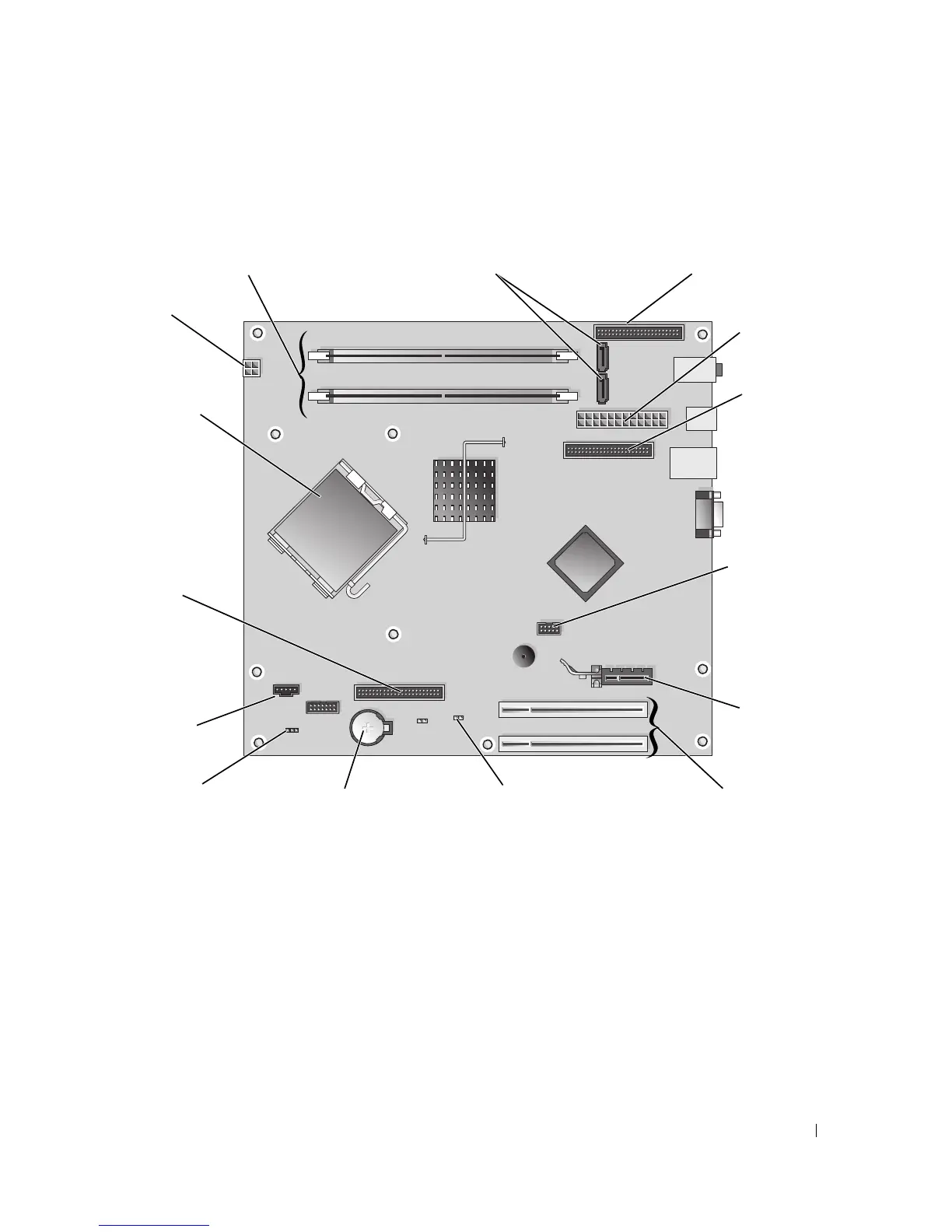
System Board Components
Memory
If your computer only has one memory module installed on the system board, you can increase your
computer memory by installing an additional memory module.
Your computer supports DDR2 memory. For additional information on the type of memory
supported by your computer, see "Specifications" on page 99.
memory module
connectors (1, 2)
main power
connector
processor and
heat sink
connector
fan connector
(CPU FAN)
processor
power
connector
battery socket
(BATTERY)
SATA connectors
(SATA-0 and SATA-1)
IDE drive
connector
floppy drive
connector
(FLOPPY)
front panel I/O
connector
password jumper
(PSWD)
PCI Express x1
card connector
clear CMOS jumper
(RTCRST)
FlexBay USB
connector
PCI card
connectors














 To Next Page