NOTE: It is recommended that only a technically knowledgeable person perform this
procedure.
CAUTION: The processor can get very hot during normal operation. Ensure that the processor has had
sufficient time to cool before you touch it.
1. Follow the instructions in "Before You Begin."
2. Open the computer cover.
3. Remove the processor airflow shroud.
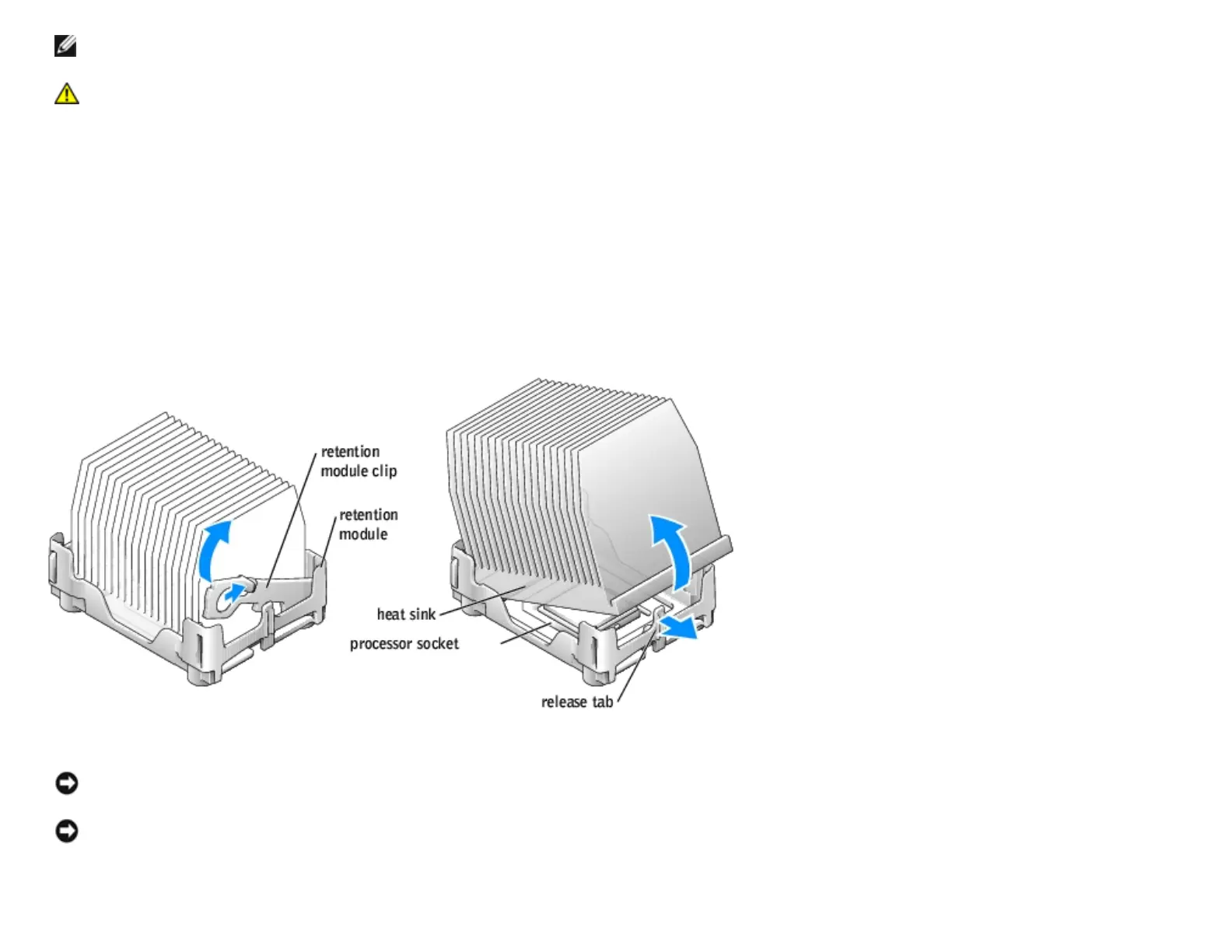
4. Remove the processor heat sink:
a. Remove the retention module clip by pressing in on the tab and lifting the retention module clip up.
b. Pull the release lever out until the heat sink is released.
c. Lift the heat sink away from the processor.
NOTICE: Lay the heat sink down with the thermal grease facing
upward.
NOTICE: If you are installing a processor upgrade kit from Dell, discard the original heat sink. If you are not installing
a processor upgrade kit from Dell, reuse the original heat sink when you install your new processor.
5. Pull the release lever straight up until the processor is released.
http://support.dell.com/support/edocs/systems/dimxpsg2/en/SM/parts.htm (24 of 37) [3/26/2008 3:57:09 PM]










 To Next Page