PCI Cards
CAUTION: Before you begin any of the procedures in this section, follow the safety instructions in your
Owner's Manual.
Your Dell™ computer provides slots for up to four 32-bit, 33-MHz cards. For more information, see "Specifications."
NOTE: For optimum performance, install a PCI sound card only in PCI slot 3 or 4 and a modem card only in PCI slot 2,
3, or 4.
Installing a PCI Card
1. If you are replacing a card, remove the current driver for the card from the operating system.
2. Follow the instructions in "Before You Begin."
3. Open the computer cover.
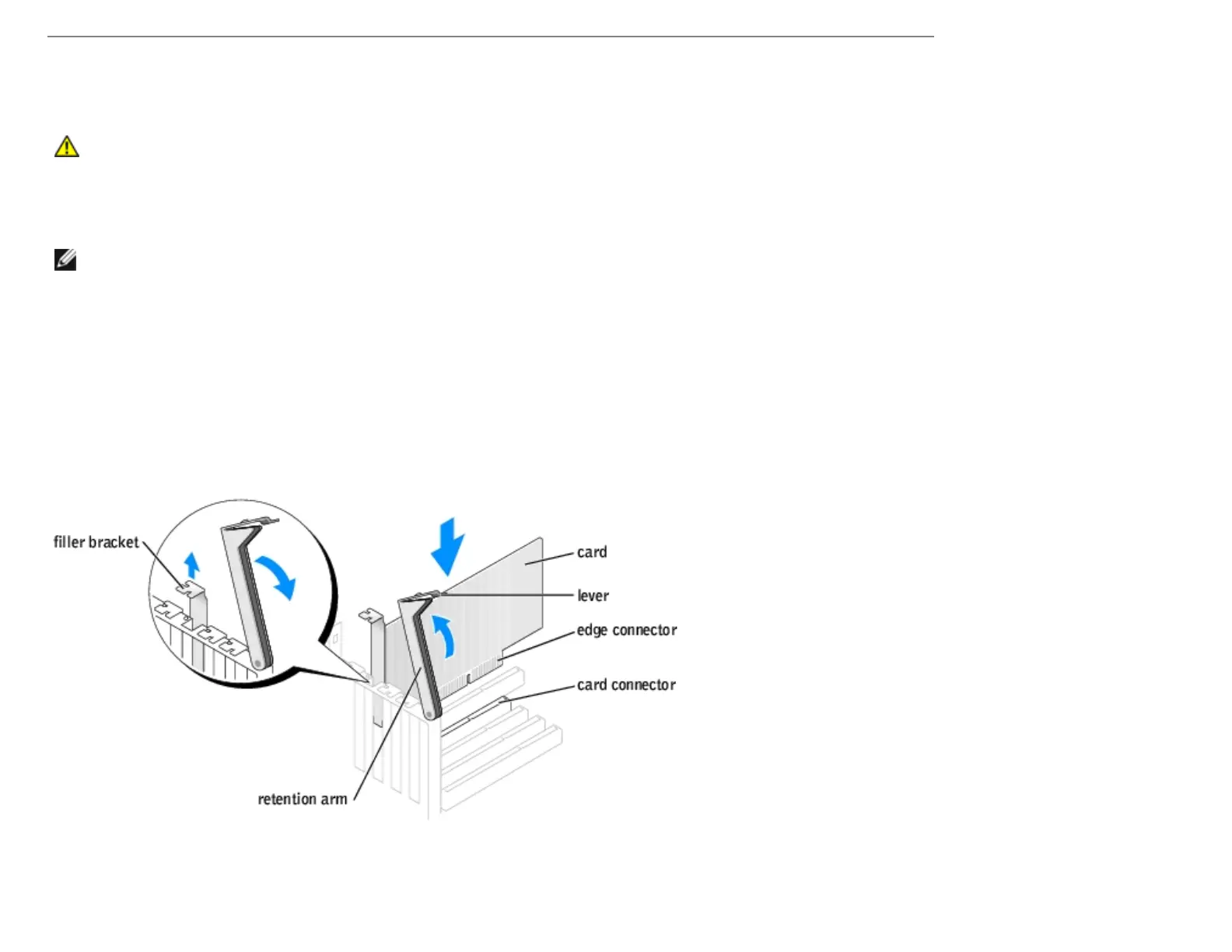
4. Press the lever on the card retention arm and raise the retention arm.
5. If you are installing a new card, remove the filler bracket to create a card-slot opening. Then continue with step 7.
6. If you are replacing a card that is already installed in the computer, remove the card.
http://support.dell.com/support/edocs/systems/dimxpsg2/en/SM/parts.htm (5 of 37) [3/26/2008 3:57:09 PM]










 To Next Page