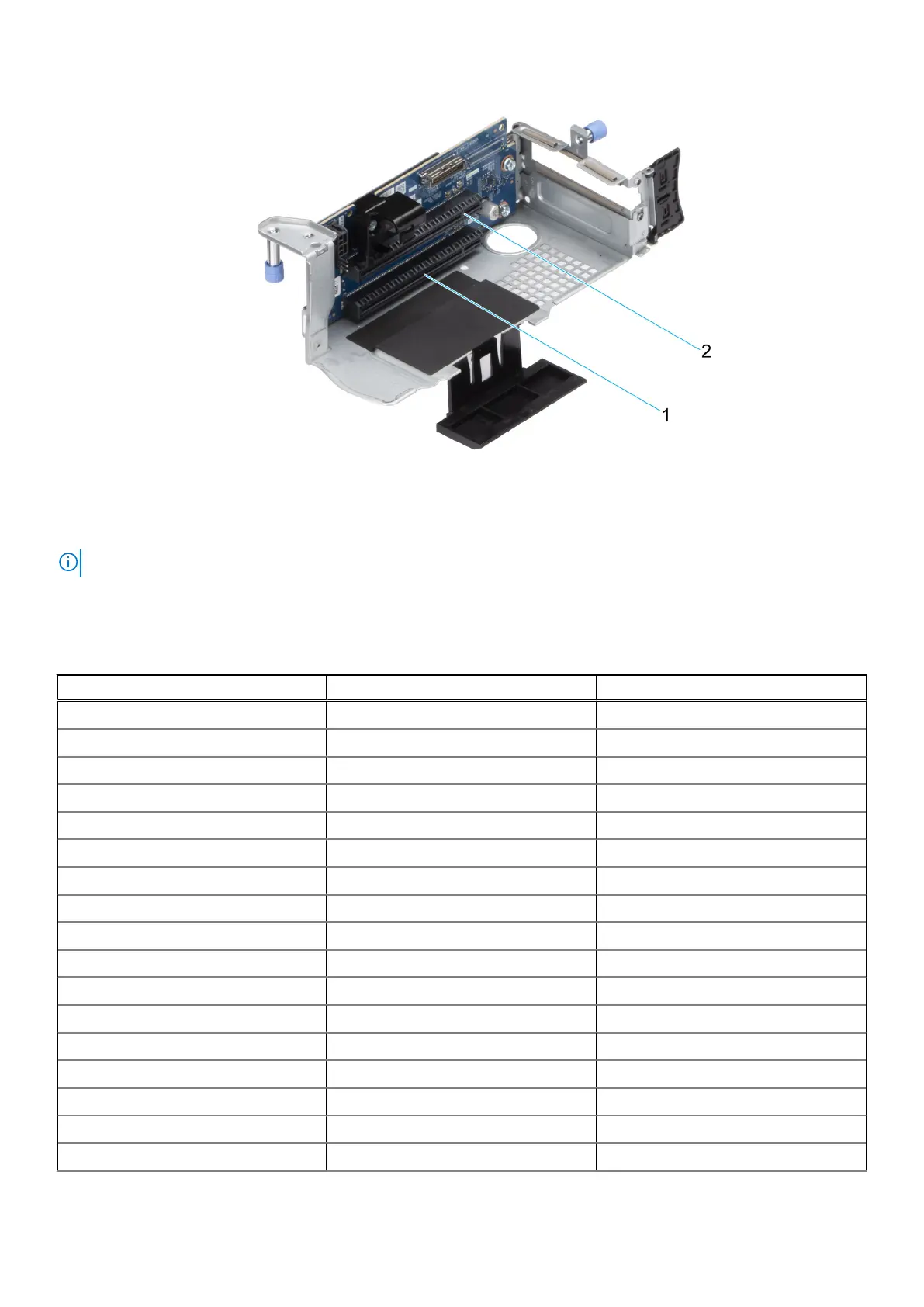
Figure 79. Riser 1B (SNAPI)
1. Slot 3
2. Slot 4
NOTE: The expansion-card slots are not hot-swappable.
The following table provides guidelines for installing expansion cards to ensure proper cooling and mechanical fit. The expansion
cards with the highest priority should be installed first using the slot priority indicated. All the other expansion cards should be
installed in the card priority and slot priority order.
Table 29. Configuration 0: R1A
Card type Slot priority Maximum number of cards
Dell Serial port module (LP) 2 1
fPERC Integrated slot 1
Internal PERC adapter 1 1
Dell External Adapter 4, 3, 5, 6, 1, 2 6
Mellanox (NIC: 100Gb) 4, 3, 5, 6, 1 5
Broadcom (NIC: 25Gb) 4, 3, 5, 6, 1, 2 6
Intel (NIC: 25Gb) 4, 3, 5, 6, 1, 2 6
Qlogic (NIC: 25Gb) 4, 3, 5, 6, 1, 2 6
Qlogic (NIC: 10Gb) 4, 3, 5, 6, 1, 2 6
SolarFlare (NIC: 25Gb) 4, 3, 5, 6, 1, 2 6
Broadcom (HBA: FC32) 4, 3, 5, 6, 1, 2 6
Marvell (HBA: FC32) 4, 3, 5, 6, 1, 2 6
Avago (HBA: FC16) 4, 3, 5, 6, 1, 2 6
Qlogic (HBA: FC16) 4, 3, 5, 6, 1, 2 6
Broadcom (NIC: 10Gb) 4, 3, 5, 6, 1, 2 6
Intel (NIC: 10Gb) 4, 3, 5, 6, 1, 2 6
Qlogic (NIC: 10Gb) 4, 3, 5, 6, 1, 2 6
Installing and removing system components 83





 To Next Page