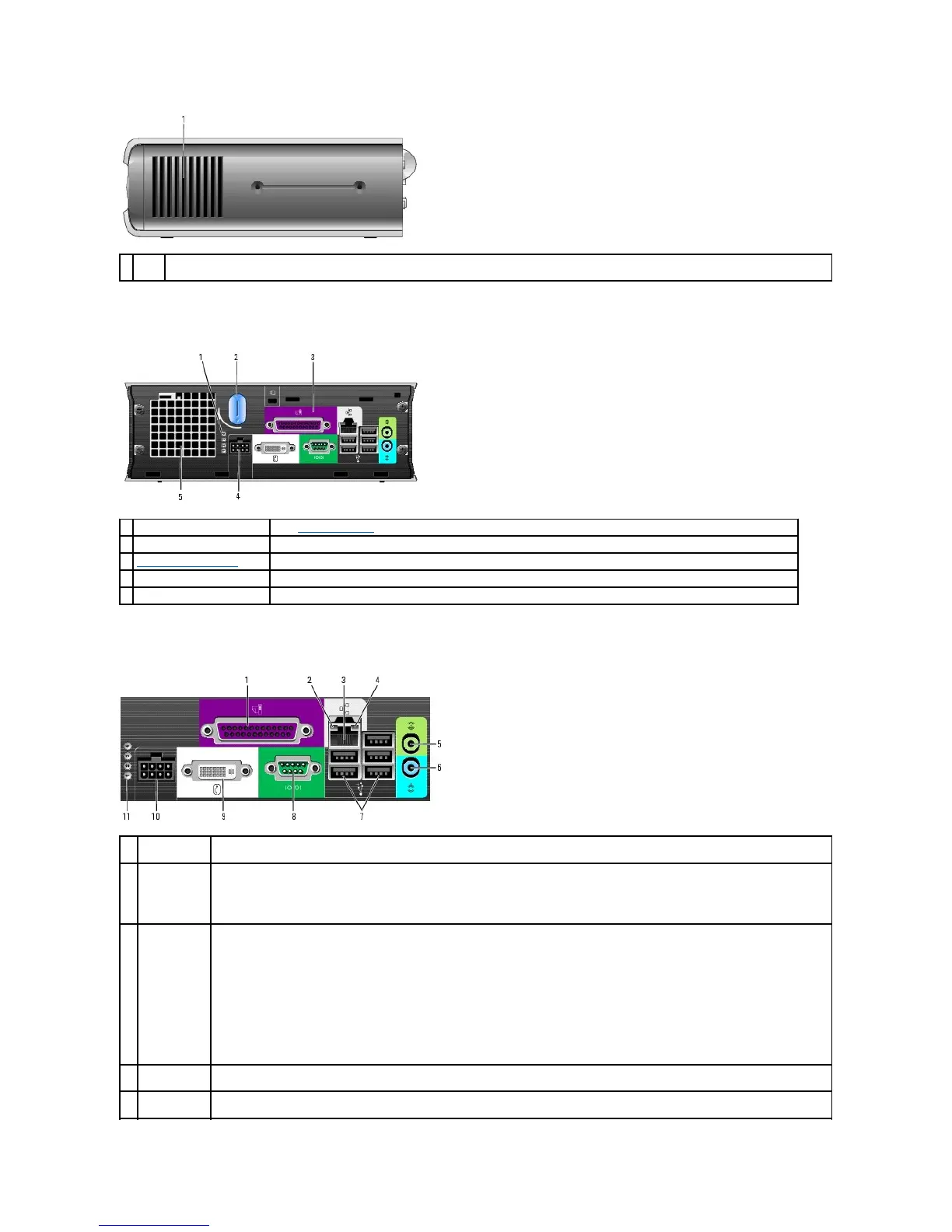
Back View
Back-Panel Connectors
The vents, which are on each side of the computer, allow air to flow through your computer. To ensure proper ventilation, do not block these
cooling vents.
See "Diagnostic Lights" for a description of light codes that can help you troubleshoot problems with your computer.
computer cover release knob
Rotate this knob in a clockwise direction to remove the cover.
The connectors for your computer.
The connector for the power adapter.
The vents allow air to flow through your computer. To ensure proper ventilation, do not block these cooling vents.
Connect a parallel device, such as a printer, to the parallel connector. If you have a USB printer, plug it into a USB connector.
l Green — A good connection exists between a 10-Mbps network and the computer.
l Orange — A good connection exists between a 100-Mbps network and the computer.
l Yellow — A good connection exists between a 1000-Mbps (1-Gbps) network and the computer.
l Off — The computer is not detecting a physical connection to the network or the network controller is turned off in system setup.
To attach your computer to a network or broadband device, connect one end of a network cable to either a network jack or your
network or broadband device. Connect the other end of the network cable to the network adapter connector on the back panel of your
computer. A click indicates that the network cable has been securely attached.
NOTE: Do not plug a telephone cable into the network connector.
On computers with a network connector card, use the connector on the card.
It is recommended that you use Category 5 wiring and connectors for your network. If you must use Category 3 wiring, force the
network speed to 10 Mbps to ensure reliable operation.
The amber light flashes when the computer is transmitting or receiving network data. A high volume of network traffic may make this
light appear to be in a steady "on" state.
Use the green line-out connector to attach an amplified speaker set.















 To Next Page