Back to Contents Page
Dell™OptiPlex™GX620
User's Guide
PCI and PCI Express Cards and Serial Port Adapters
PCI and PCI Express Cards and Serial Port Adapters
YourDell™computersupportsaserialadapterandprovidesthefollowingconnectorsforPCIandPCIExpresscards.
l Two PCI card slots
l One PCI Express x16 card slot
l One PCI Express x1 card slot
PCI Cards
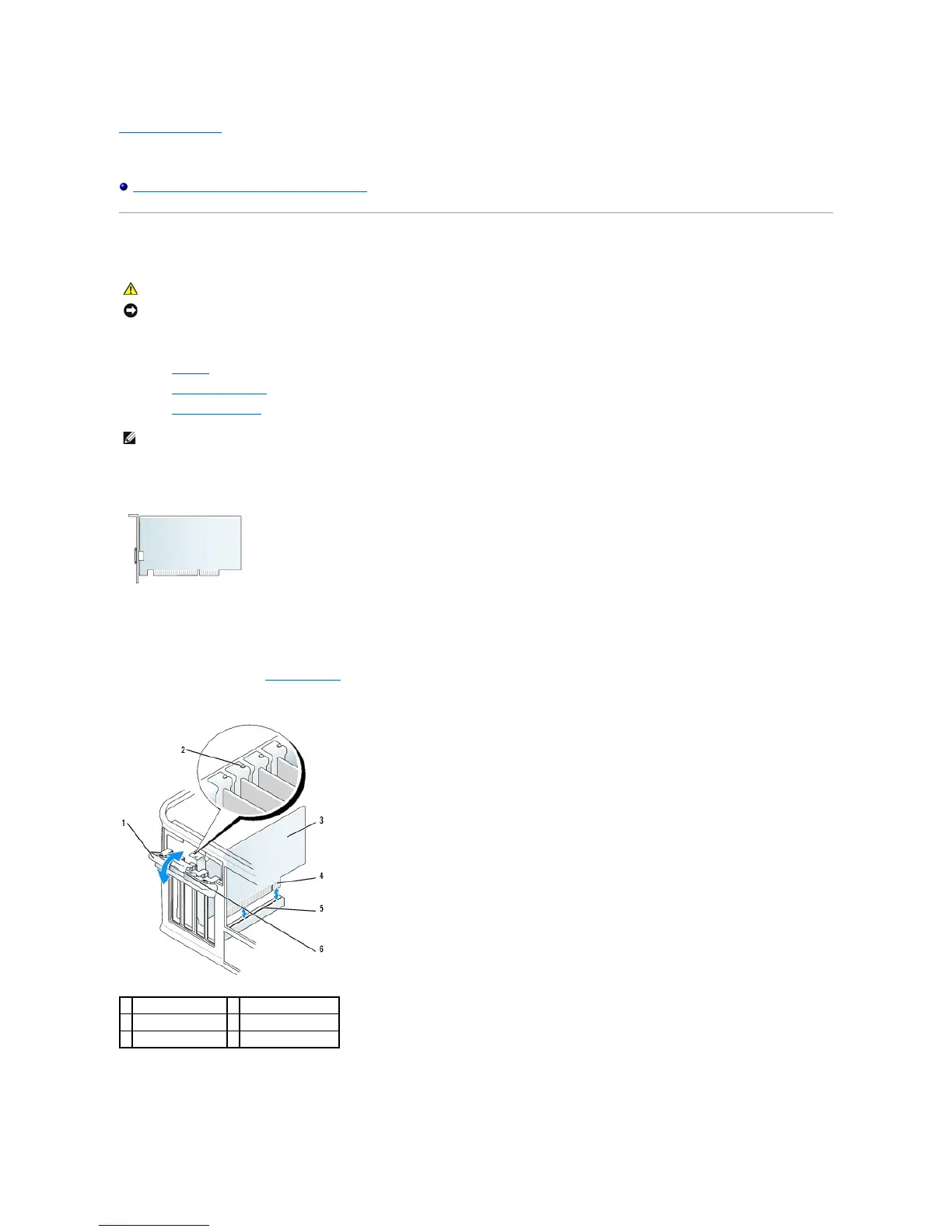
Installing a PCI Card
1. Follow the procedures in "Before You Begin."
2. Gently push the release tab on the card retention latch from the inside to pivot the latch open. The latch will remain in the open position.
3. Open the card retention mechanism that secures the card in place from the top:
a. Place your thumb on the top of the card retention mechanism and grip the bottom of the retention mechanism with your fingers.
NOTICE: To prevent static damage to components inside your computer, discharge static electricity from your body before you touch any of your
computer's electronic components. You can do so by touching an unpainted metal surface on the computer chassis.














 To Next Page