26 About Your Computer
www.dell.com | support.dell.com
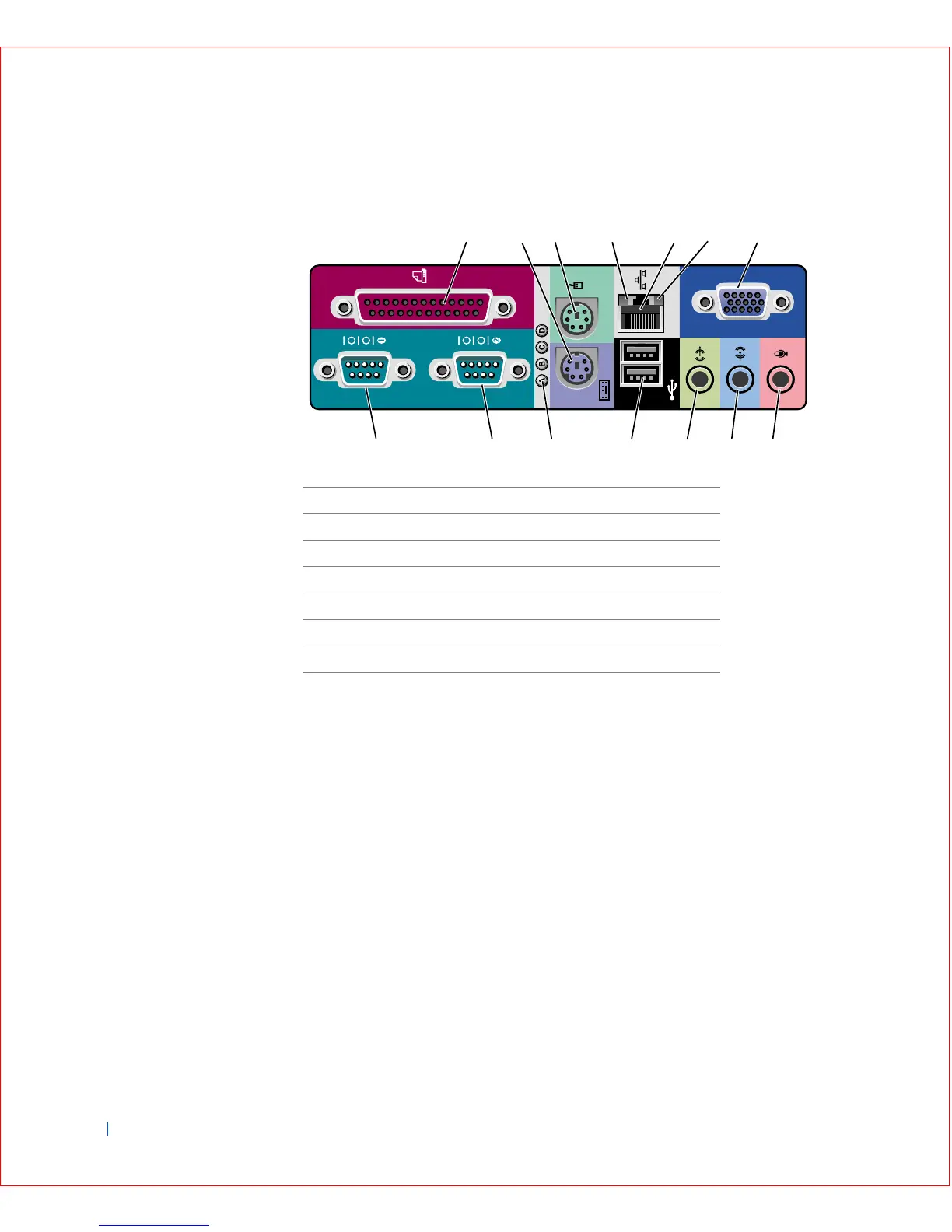
I/O Panel—Small Form-Factor, Desktop, and Mini-Tower
Computers
Connecting Devices
When you connect external devices to your computer's back panel, follow
these guidelines:
• Check the documentation that accompanied the device for specific
installation and configuration instructions.
For example, you must connect most devices to a particular
input/output (I/O) port or connector to operate properly. Also, external
devices like a mouse or printer usually require you to load device
drivers into computer memory before they will work.
• Always attach external devices while your computer is turned off. Then
turn on the computer before turning on any external devices, unless
the documentation for the device specifies otherwise. (If the computer
does not seem to recognize the device, try turning on the device before
turning on the computer.)
1 Parallel connector 8 Microphone connector
2 Keyboard connector 9 Audio line-in connector
3 Mouse connector 10 Audio line-out connector
4 Link integrity light 11 USB connectors (2)
5 Network adapter 12 Diagnostic lights
6 Activity light 13 Serial 2 connector
7 Video connector (1) 14 Serial 1 connector
213456
14 13 12 11 910 8
7









 To Next Page