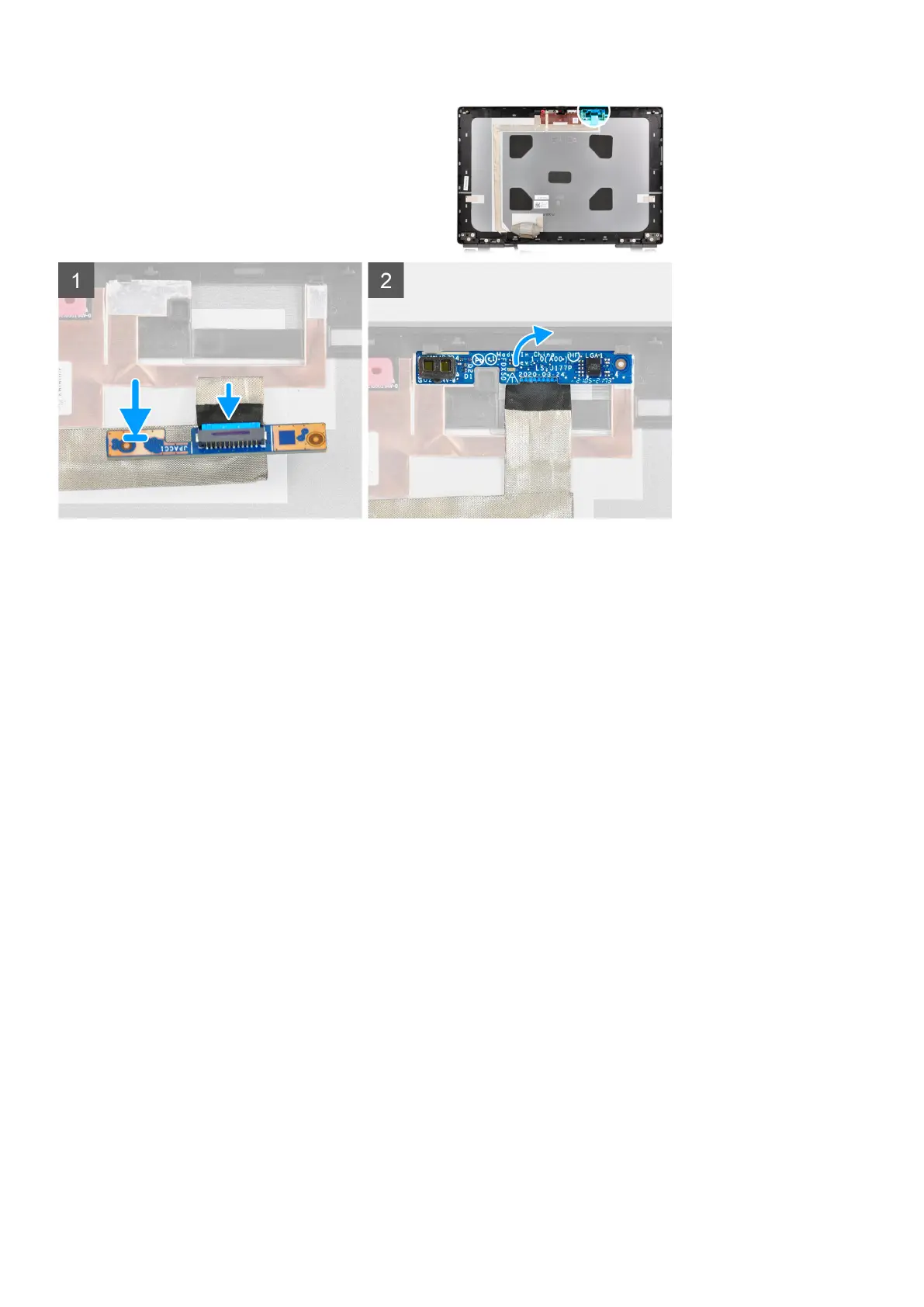
Steps
1. Connect the display cable to the P-sensor board.
2. Flip the P-sensor board and place it gently in its slot on the display back cover.
Next steps
1. Install the display panel.
2. Install the display bezel.
3. Install the display assembly.
4. Install the middlecap.
5. Install the speakers.
6. Install the system board.
7. Install the inner frame.
8. Install the heat-sink assembly.
9. Install the GPU card.
10. Install the GPU power cable.
11. Install the SD card reader.
12. Install the keyboard.
13. Install the keyboard lattice.
14. Install the SIM card.
15. Install the primary memory.
16. Install the WWAN card.
17. Install the WLAN card.
18. Install the secondary memory.
19. Install the primary M.2 SSD.
20. Install the battery.
21. Install the base cover.
22. Install the secondary M.2 SSD.
23. Install the SD card.
24. Follow the procedure in after working inside your computer.
Removing and installing components
113



 To Next Page