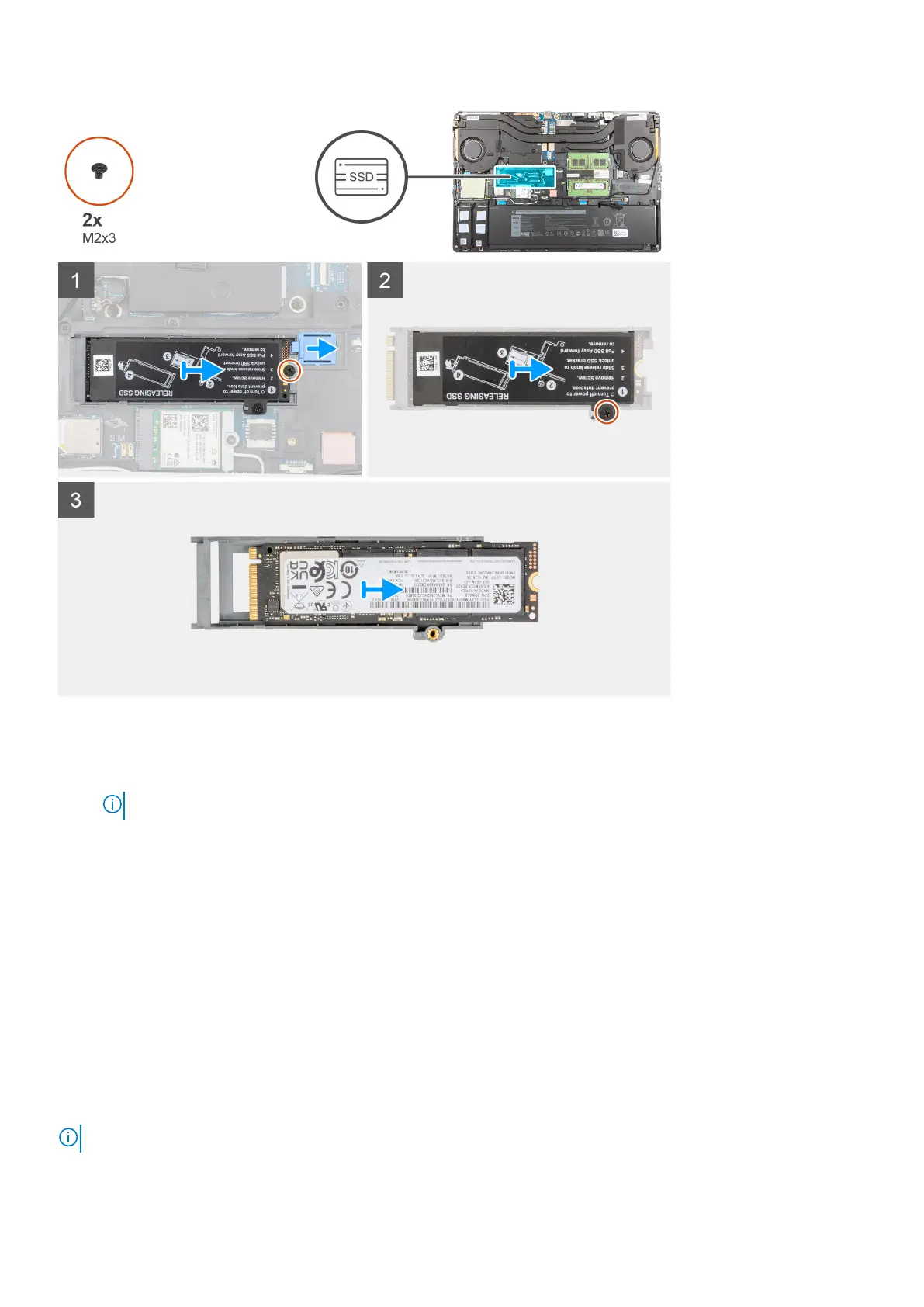
Steps
1. For computers with SSD door configuration:
a. Use a plastic scribe to pry open the SSD door from its recess point.
NOTE: The SDD door is attached to the base cover from one side and cannot be detached.
b. Follow the procedure from Step 3 to Step 8.
2. For computers without SSD door configuration:
a. Follow the procedure from Step 3 to Step 8.
3. Remove the (M2x3) screw that secures the SSD module into its slot on the computer.
4. Slide the SSD release latch to unlock the SSD module.
5. Remove the SSD module from the computer.
6. Remove the (M2x3) screw that secures the SSD thermal plate to the SSD carrier.
7. Carefully tilt at an angle and then slide to remove the SSD thermal plate from the SSD module.
8. Remove the M.2 2280 SSD from the SSD carrier.
Installing the secondary M.2 SSD module
Prerequisites
NOTE: For computers shipped with M.2 2280 PCIe Gen4 SSD installed in slot 4.
18 Removing and installing components



 To Next Page