5. Unroute the power-adapter cable from the cut-out on the system board and lift the cable clamp from the computer chassis.
6. Slide the power-adapter port towards the rear side of the computer to remove the power-adapter port from its
compartment on the computer chassis.
Installing the power-adapter port
Prerequisites
If you are replacing a component, remove the existing component before performing the installation procedure.
About this task
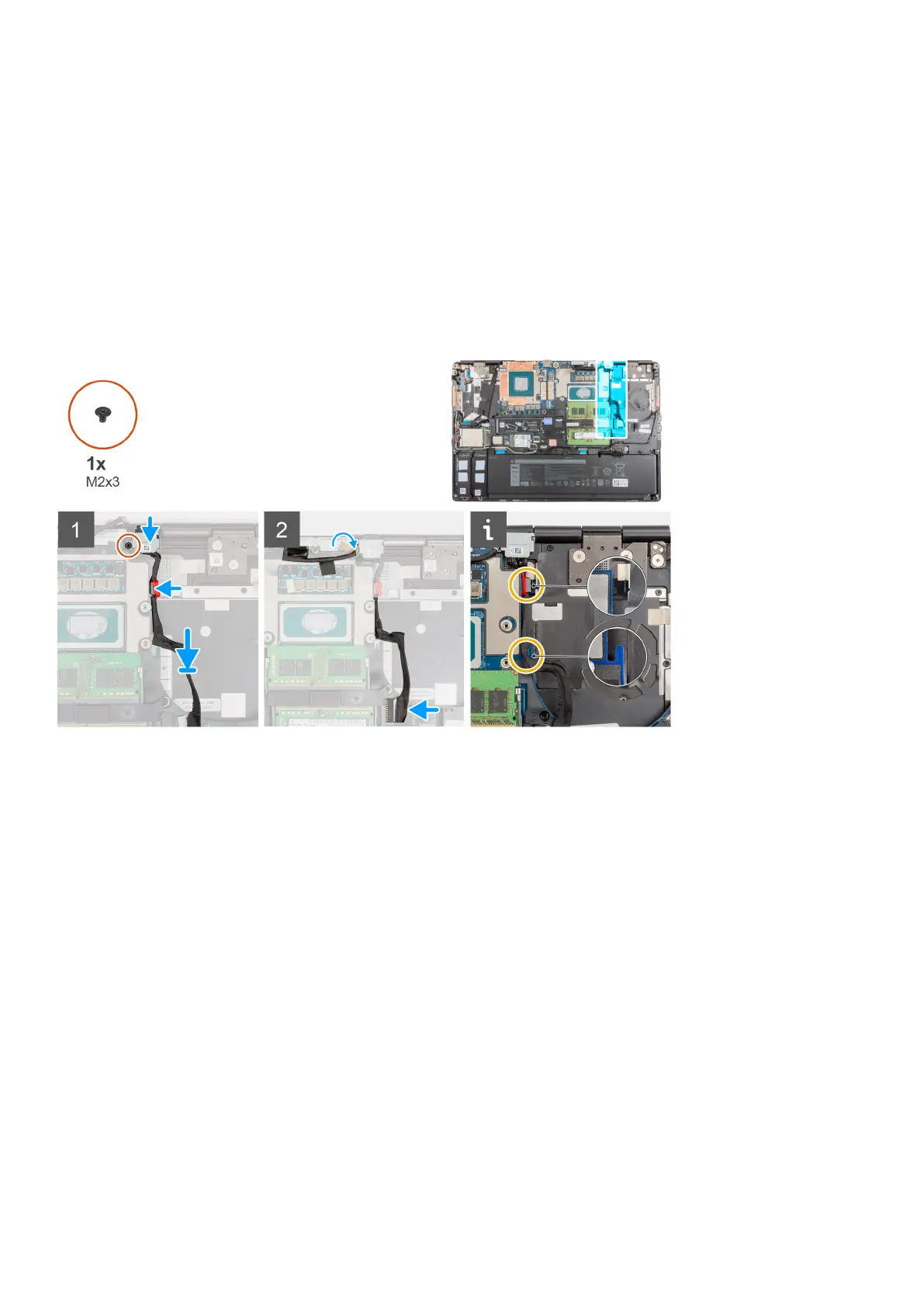
The figure indicates the location of the power-adapter port and provides a visual representation of the installation procedure.
Steps
1. Align and place the power-adapter cable on the computer.
2. Place the power-adapter port into its compartment on the computer chassis.
3. Firmly place the cable clam into its compartment on the computer chassis and route the power-adapter cable through the
cut-out on the system board.
4. Place the power-adapter port bracket on the power-adapter port.
5. Replace the (M2x3) screw to secure the power-adapter port bracket to the computer.
6. Connect the power-adapter cable to the connector on the system board.
7. Adhere and route the display cable in place.
Next steps
1. Install the heat-sink assembly.
2. Install the base cover.
3. Install the SD card.
4. Follow the procedure in after working inside your computer.
78
Removing and installing components



 To Next Page