Steps
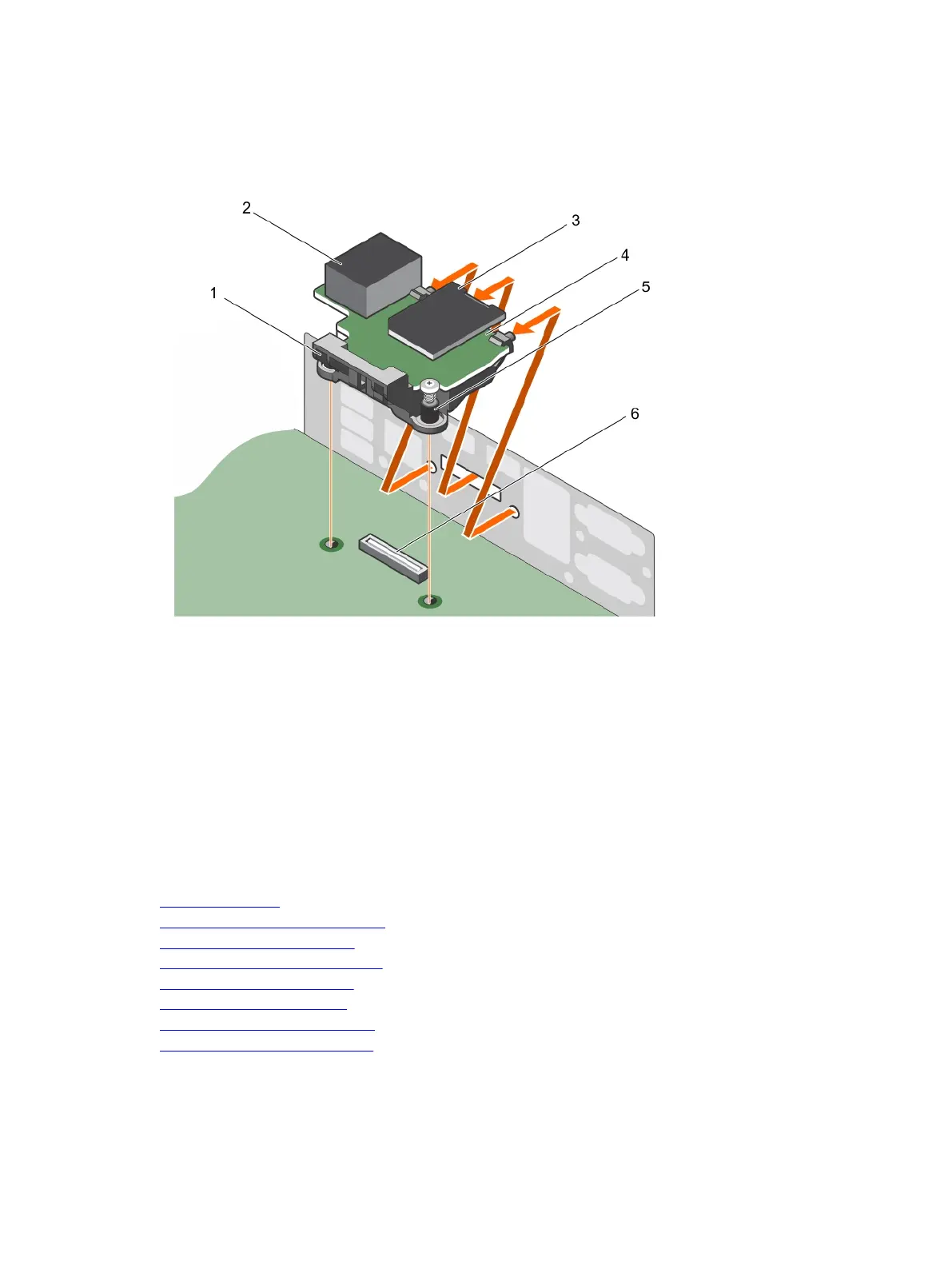
1. Loosen the two captive screws that secures the iDRAC port card holder to the system board.
2. Pull the iDRAC port card to disengage it from the iDRAC port card connector on the system board,
and remove the card from the chassis.
Figure 70. Removing the iDRAC port card
1. iDRAC port card holder 2. iDRAC port
3. SD vFlash media card 4. iDRAC port card
5. captive screw (2) 6. iDRAC port card connector
Next steps
1. Install the iDRAC port card.
2. Install the cooling shroud.
3. Install the internal cooling fan.
4. Follow the procedure listed in the After working inside your system section.
Related links
Safety instructions
Before working inside your system
Removing the cooling shroud
Removing the internal cooling fan
Installing the iDRAC port card
Installing the cooling shroud
Installing the internal cooling fan
After working inside your system
158












 To Next Page